This thread has been locked.

If you have a related question, please click the "Ask a related question" button in the top right corner. The newly created question will be automatically linked to this question.

TMDSCNCD280039C: Download firmware wrong

Part Number: TMDSCNCD280039C
Other Parts Discussed in Thread: C2000WARE

I use the demo board of TMDSCNCD280039C. The CCS version is 12.2.0.00009. The import project of timer_ex1_cputimers  from C:\ti\c2000\C2000Ware_4_03_00_00\driverlib\f28003x\examples\timer. when download the firmware, it give the prompt dialog box as follow:
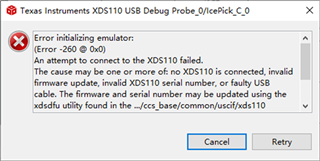
Does the demo board not have the function of firmware download or debug? I have install CCS many times.

  • Qi,

    Host connection error

    The error below is thrown by CCS when the device driver is unable to communicate with the JTAG debugger either via USB or Ethernet.
    Due to the nature of the different debug probes, the error messages vary according to the XDS family. This can have several sources:

    • First and foremost: Hardware. Many issues can be caused by the problems described in the previous section Hardware checklist above.
    • The Windows device drivers are not properly installed or failed to initialize. Check the Windows Device Manager, the XDS100 troubleshooting, the XDS110 troubleshooting or the XDS200 troubleshooting.
    • The Linux udev rules are not properly configured. Either check Linux lsusb and udev rules, run the install_drivers.sh script as shown here or check the XDS200 known issues.
    • The JTAG debugger failed to boot properly (XDS200 and XDS560v2). For XDS560v2, check the manufacturer's debug probe manual or the DTC_CONF page to see if it is in Safe Mode.
    • There is another user already connected to the JTAG debugger (XDS220 or XDS560v2 Ethernet-based Debug Probes). For XDS560v2, check the DTC_CONF page to learn how to find which host is using the probe.
    • The JTAG debugger is not powered (some variants of XDS560 and XDS560v2). Check the external power supply.
    • The USB cable has loose contacts or not connected at all. Replace the USB cable and retest.
    • The USB is connected via an incompatible USB HUB or port. Connect the USB cable directly to the host PC or to a different port.
    • The debug probe firmware is incompatible with the OS. This is mostly applicable to XDS110 and XDS200. To verify this you can check the steps shown in the Firmware update section for XDS110 and XDS200.

    Cable break

    This error means the JTAG debugger is sending data to the device via the TDI pin but is not receiving anything back on the TDO pin.

    This error can either have two variants: near or far from itself, which means the JTAG circuit is broken close to the JTAG debug probe or close to the board.

    Note: in the specific case of XDS100 debug probes, this error may happen also if the wrong variant is selected: for example, a XDS100v2 is configured but a XDS100v1 is present on the target. Technically a cable break is detected by a pin that is grounded when the cable is plugged in. If the pin is on the connector that plugs into the target board, it is often called Cable Break Far or sometimes just Cable Break. If the pin is on the connector that plugs into the debug probe (e.g. the cable pod of an XDS560v2), that is called Cable Break Near.


        Error connecting to the target:
        (Error -183 @ 0x0)
        The controller has detected a cable break far-from itself.
        The user must connect the cable/pod to the target.


    Another possible cause of a "cable break far-from itself" could be that the TVRef signal (pin 5) is pulled up to the IO voltage, or TDIS (pin 4) is pulled-down to ground. TVRef should be connected to the IO voltage through a small current limiting resistor. TDIS should be connected directly to ground. See XDS Target Connection Guide in the section References above for more information on the connection of these and other emulator signals.

  • Thank you very much!