This thread has been locked.

If you have a related question, please click the "Ask a related question" button in the top right corner. The newly created question will be automatically linked to this question.

TMS320F28388S: error #10008-D when linking code from object file to run in RAM

Part Number: TMS320F28388S


Hello,

I already used pragma CODE_SECTION before different C++ functions to load code from Flash and execute in RAM. It's work fine. Now, I'm trying to do the same thing but with an autogenerated C++ file. This autogenerated file don't have the pragma thus I'm trying to pass by the .cmd to indicate to the linker that this C++ file will be load from Flash and execute in RAM. This is this the .cmd:
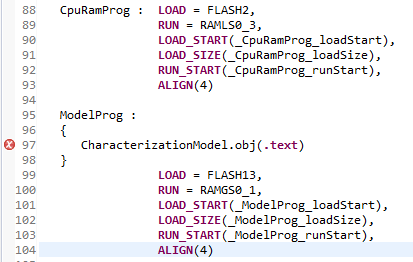
The CpuRamProg section is for the CODE_SECTION pragma and the ModelProg section is the autogenerated C++ file.

The linker returns this error:

"../F2838x/Cmd/f2838x_flash_lnk_cpu1.cmd", line 97: error #10008-D: cannot find file "CharacterizationModel.obj"
error #10010: errors encountered during linking; "fw-Projet.out" not built.

But the .map file contains the information about ModelProg section

ModelProg
* 0 000be000 00001055 RUN ADDR = 0000d000
    000be000 00000f69 CharacterizationModel.obj (.text:_step__26CharacterizationModelClassF18InputPeripheralBus15InputCommandBusP9OutputBus)
    000bef69 0000004f CharacterizationModel.obj (.text:_rt_remf__FfT1)
    000befb8 00000049 CharacterizationModel.obj (.text:_CharacterizationModel_ApplyCharacterization__26CharacterizationModelClassFfPCfPf)
    000bf001 0000002b CharacterizationModel.obj (.text:_rt_roundf__Ff)
    000bf02c 0000001f CharacterizationModel.obj (.text:_initialize__26CharacterizationModelClassFv)
    000bf04b 0000000a CharacterizationModel.obj (.text:___ct__26CharacterizationModelClassFv)

Thus can I run some code in RAM from .obj file? Why Linker output has info about .obj file but an error 10008-D is returned?

I used CCS 11.0.0.00012 with compiler version v21.6.0.LTS

Thanks,

Claude C.

  • To help me determine what occurred, please submit two files.

    One file is a log of the complete project build.  Please rebuild the entire project.  One way to do that is to right-click on the name of the project and select Rebuild Project.  Then save the contents of the Console (not Problems) view to a text file.  Use the icon named Copy Build Log.

    The other file the linker command file f2838x_flash_lnk_cpu1.cmd.

    Please put both of those files in a zip and attach it to your next post.

    Thanks and regards,

    -George

  • Thank you George for your help. Here is the cmd file and the build log.

    cmd_BuildLog.zip

    Claude C.

  • Unfortunately, I am unable to reproduce the problem.  

    I might be able to reproduce the problem another way.  Is there any chance you could zip up all these files?

    "../F2838x/Cmd/f2838x_flash_lnk_cpu1.cmd"
    "../F2838x/Cmd/f2838x_Registers_cpu1.cmd"
    "./Application/Controller/Controller.obj"
    "./Application/Controller/Factory/FactoryController.obj"
    "./Application/Factory/FactoryApplication.obj"
    "./Application/Runner.obj"
    "./Application/main.obj"
    "./Application/SystemStates/ConfigurationState.obj"
    "./Application/SystemStates/RunningState.obj"
    "./Application/SystemStates/Factory/FactorySystemStateMachine.obj"
    "./Exonetik/ErrorCodes.obj"
    "./Exonetik/Utils/Compiler/New.obj"
    "./Exonetik/Utils/Compiler/PureVirtual.obj"
    "./Exonetik/Utils/ConversionTool.obj"
    "./Exonetik/Utils/Lookup.obj"
    "./Exonetik/Utils/MathTool.obj"
    "./Exonetik/Utils/Memory.obj"
    "./Exonetik/Utils/Register.obj"
    "./Exonetik/Utils/StateManager.obj"
    "./F2838x/Configurations/F2838x_ADCConfiguration.obj"
    "./F2838x/Configurations/F2838x_DACConfiguration.obj"
    "./F2838x/Configurations/F2838x_DIOConfiguration.obj"
    "./F2838x/Configurations/F2838x_EtherCatConfiguration.obj"
    "./F2838x/Configurations/F2838x_PIEConfiguration.obj"
    "./F2838x/Configurations/F2838x_PWMConfiguration.obj"
    "./F2838x/Configurations/F2838x_SCIDConfiguration.obj"
    "./F2838x/Configurations/F2838x_SPIConfiguration.obj"
    "./F2838x/Configurations/F2838x_SystemConfiguration.obj"
    "./F2838x/Configurations/F2838x_TimersConfiguration.obj"
    "./F2838x/HAL/F2838x_ADC.obj"
    "./F2838x/HAL/F2838x_AsynchronousPWM.obj"
    "./F2838x/HAL/F2838x_CoilDriverPWMs3LevelsUpdater.obj"
    "./F2838x/HAL/F2838x_DAC.obj"
    "./F2838x/HAL/F2838x_DIO.obj"
    "./F2838x/HAL/F2838x_SCI.obj"
    "./F2838x/HAL/F2838x_SPI.obj"
    "./F2838x/HAL/F2838x_Timer.obj"
    "./F2838x/HAL/System.obj"
    "./F2838x/HAL/Factory/FactoryF2838x.obj"
    "./F2838x/Registers/F2838x_GlobalVariabledefs.obj"
    "./F2838x/Utils/F2838x_CodeStartBranch.obj"
    "./F2838x/Utils/F2838x_Device.obj"
    "./F2838x/Utils/F2838x_Utils.obj"
    "./Models/CharacterizationModel_ert_rtw/CharacterizationModel.obj"
    "./Models/ecat_config_xml_0.obj"
    "./Peripherals/CoilDriver.obj"
    "./Peripherals/EncoderAksIM2.obj"
    "./Peripherals/LEDManager.obj"
    "./Peripherals/MotorDriverEscon50_5.obj"
    "./Peripherals/MotorDriversExcon50_5Enabler.obj"
    "./Peripherals/PID.obj"
    "./Peripherals/Thermistor.obj"
    "./Peripherals/TimerTick.obj"
    "./Peripherals/VoltageDivider.obj"
    "./Peripherals/EtherCat/EtherCat.obj"
    "./Peripherals/EtherCat/EtherCatRegisters.obj"
    "./Peripherals/EtherCat/EtherCatVariables.obj"
    "./Peripherals/EtherCat/Factory/FactoryEtherCat.obj"
    "./Peripherals/Factory/FactoryPeripherals.obj"
    "./virtual_ios/CCS_code/Factory/FactoryVirtualIO.obj"
    "./virtual_ios/CCS_code/VirtualIO.obj"
    "../F2838x/Cmd/f2838x_Ethercat.cmd"
    "../F2838x/Lib/rts2800_fpu32.lib"
    "../F2838x/Lib/rts2800_fpu32_fast_supplement_coff.lib"

    All of those paths are relative to the directory that corresponds to the CCS build configuration, which appears to be C:/git/CCSv11/fw-project404/Application_Output .

    Please attach the zip to your next post.

    Thanks and regards,

    -George

  • Thanks again George for your help. Here is the asked files.

    Project404.zip

    Claude C.

  • Thank you for submitting so many files.  I am able to reproduce the behavior.

    Here is one possible solution.  In f2838x_flash_lnk_cpu1.cmd, add --library like this ...

       ModelProg :
       {
          --library=CharacterizationModel.obj(.text)
       }
    

    In addition, add this option to the linker options: --search_path=./Models/CharacterizationModel_ert_rtw.  To add that option in CCS, right-click on the name of the project, select Show Build Settings.  In the directory like path on the left, browse to Build | C2000 Linker | File Search Path.  Add the entry to the search_path part.  

    To understand the details about how --search_path and --library work together, please search the C28x assembly tools manual for the sub-chapter titled Alter the Library Search Algorithm.  Even though these options are typically applied to libraries, they work the same way to find an object file that is not in the current directory.

    I was unable to reproduce the problem before, because it does not occur in simpler builds.  Because I cannot explain that, I filed EXT_EP-11092.  You are welcome to follow it with that link.

    Thanks and regards,

    -George

  • Thank you George, I had already tried to add --library and add --search_path individually but it didn't work. Now, I tried both together and it's work.

    Claude C.