This thread has been locked.

If you have a related question, please click the "Ask a related question" button in the top right corner. The newly created question will be automatically linked to this question.

TMS320F280039C: LFU: How to set the properties for multiple updates?

Part Number: TMS320F280039C

Tool/software:

Hi Team,


Bcakground & Prerequisites: The first version of code is the most basic code;
The second version of code adds two variables A and B on the basis of the first version, and adds them to the cmd file according to the update attribute set in the file. TI.update section; initialize during __TI_auto_init_warm() (refer to the key steps in section 3.5.7 in Live Firmware Update Reference Design with C2000 Real-Time MCUs (Rev. D) for all steps)
In the third version of the code, two variables C and D should be added on the basis of the second version of the code (the variables A and B maintain the original update property), and the update attribute should be set according to the file, which has been defined in the cmd file. TI.update;

My questions are:

Q1: Are the A and B variables in version 2 preserve or update for version 3 code? If the compilation is completed according to item 1.1, whether the two variables A and B can still maintain the original address and value after the compilation of version 3 is completed;
Q2: Version 3 and Version 2 are available in the cmd file. TI.update section, whether it will affect the RAM address allocation of variables C and D;
Q3: 1.2.3 Version 3 code also needs to initialize C.D during __TI_auto_init_warm(), variables A and B are not new variables in version 3 and do not need to be initialized,
There is a key question here: how do you initialize a new variable?
1> "Initialize during __TI_auto_init_warm()"—What exactly does this mean?
Q3.1 Write a new variable in this function to initialize the assignment code ??
__TI_auto_init_warm() has been defined in the FAPI_F28003x_EABI_v1.58.00.LIB file, and the content of this function cannot be rewritten in code, but can only be called.
Q3.2 If the initial value is defined at the same time as the update attribute of the new variable, the compilation error is reported:
Error code #10472-D SECTION spliting not support for LFU output section "TI,update"
So what is the specific operation of the sentence "initialize during __TI_auto_init_warm()"?

Best Regards,

Zane

  • Zane,

    I've assigned this thread to an compiler expert. They should be able to provide to reply to your question soon.

    Thank you,

    Ricky

  • Are the A and B variables in version 2 preserve or update for version 3 code?

    From the perspective of version 3, all the variables in version 2 can be either preserve (the default) or update.  This includes A and B.  

    I'm not sure what this ...

    Version 3 and Version 2 are available in the cmd file.

    ... means.  Therefore, I cannot reply to Q2.

    "Initialize during __TI_auto_init_warm()"—What exactly does this mean?

    Please search the C28x compiler manual for the sub-chapter titled Reinitializing Variables During a Warm Start.  Model your solution on how examples in the LFU application note call __TI_auto_init_warm.

    Error code #10472-D SECTION spliting not support for LFU output section "TI,update"

    For a general introduction to the linker feature for splitting an output section, search the article Linker Command File Primer for the part titled Split an Output Section Across Multiple Memory Ranges.  The section .TI.update cannot be split.

    Thanks and regards,

    -George

  • Hi,George, 

    We are studying the save and update characteristics of LFU
    Define the newly added variable as the update attribute. The other variables are the preserve attribute. Define the TI. update section in the cmd file, provide the old image, and compile it to generate a warning. How can I solve this problem?
    The problem is as follows:

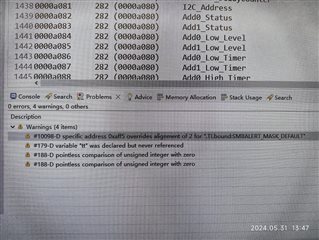
    #10098-D specific address 0xaff5 overlaps with 2 alignment of ". TI. bound: SBALERT-MASK-DEFAULT"

    The map file shows that SBALERT-MASK-DEFAULT has been assigned to the exact address 0xaff5, why is a warning still generated?
    In the cmd file The definition of the TI.update section is as follows:

    The information related to SMBALERT-MASK-DEFAULT in the map file is as follows:

    Thanks and regards,

    Joyce Wang

  • Define the newly added variable as the update attribute. The other variables are the preserve attribute. Define the TI. update section in the cmd file, provide the old image, and compile it to generate a warning. How can I solve this problem?

    For the CCS project where this occurs, please put it into a zip file using the directions in the article Sharing projects.  Be sure the executable file for the old image is in the zip.  Attach that zip to your next post.

    Thanks and regards,

    -George

  • In the above configuration, I defined 8 update attribute variables, of which 3 were assigned initial values, and the other 5 were not assigned initial values or called operations. After compilation, only the three variables with initial values are assigned to RAM. Why?

    Thanks and regards,

    Joyce Wang

  • Hi,George, 

    Here is another question:

    1. Background: There is a project that was updated according to the following configuration to obtain a new project, so these two projects are called the basic project and the new project. In the project, there are some global variables that are only defined but not called.

    In the basic project, these global variables that are only defined but not called are assigned to RAM.

    The RAM of the new project does not have the above variables, but the address where these variables are stored has not been assigned any other variables.

    For example:

    In the basic project, variables: global_var1 and global_var2 are defined but not called.

    The addresses allocated in RAM are 0xa100, 0xa101.

    There are no variables global_var1, global_var2 in the RAM of the new project,

    But addresses 0xa100 and 0xa101 do not store any variables.


    1.2 Question: How to configure CCS in the basic project so that only global variables defined but not called are not allocated to RAM?

    1.3 Question: After completing item 1.2 and following the steps to update LFU, can the variables in the new project be continuously allocated in RAM?

    Thanks and regards,

    Joyce Wang

  • Joyce,

    Here's some feedback for your various questions:

    Q1: Are the A and B variables in version 2 preserve or update for version 3 code? If the compilation is completed according to item 1.1, whether the two variables A and B can still maintain the original address and value after the compilation of version 3 is completed;

    It's up to you to decide based on your application whether variables A,B should be update or preserve in any particular firmware versions.
    However, "update" variables from earlier firmware versions should probably be changed to "preserve" for later firmware versions.

    __attribute__(update) indicates the address will move, and the variables will be initialized during warm_init switchover.
    __attribute__(preserve) indicates that address will remain same as prior firmware version and the variables will only be initialized during a cold
    restart

    Q2: Version 3 and Version 2 are available in the cmd file. TI.update section, whether it will affect the RAM address allocation of variables C and D;

    __attribute__(update) variables will always be placed in .TI.update section, however their particular address within that section could change from one
    firmware version to another.

    Q3: 1.2.3 Version 3 code also needs to initialize C.D during __TI_auto_init_warm(), variables A and B are not new variables in version 3 and do not need to be initialized,
    There is a key question here: how do you initialize a new variable?
    1> "Initialize during __TI_auto_init_warm()"—What exactly does this mean?

    In order to initialize a "new" variable in a new firmware version during warm_init switchover, you must mark the variable with __attribute__(update)
    and add .TI.update section to your linker cmd file. The variable is then placed in .TI.update and will get initialized during warm_init switchover.

    In order to keep an existing variable from prior firmware version at the same address (and NOT initialize it during warm_init switchover), you must mark it with __attribute__(preserve)

    Q3.1 Write a new variable in this function to initialize the assignment code ??
    __TI_auto_init_warm() has been defined in the FAPI_F28003x_EABI_v1.58.00.LIB file, and the content of this function cannot be rewritten in code, but can only be called.

    I do not understand above question.

    Q3.2 If the initial value is defined at the same time as the update attribute of the new variable, the compilation error is reported:
    Error code #10472-D SECTION spliting not support for LFU output section "TI,update"
    So what is the specific operation of the sentence "initialize during __TI_auto_init_warm()"?

    Above error indicates you cannot use the splitting placement ">>" for output section .TI.update. Please see spru513 pdf section 8.5.5.7

    Regarding the linker warning about "overrides alignment of 2", please see below bug which we will fix in next patch release:
      https://sir.ext.ti.com/jira/browse/EXT_EP-11487 


    Regarding issue with:
    "8 update attribute variables, of which 3 were assigned initial values,
    and the other 5 were not assigned initial values or called operations.
    After compilation, only the three variables with initial values assigned
    to RAM"
    Could you please submit a project so I can reproduce the issue?
    Otherwise I will need more details about each of the 8 variables.

    Regarding your issue with "global variable defined but not called", the compiler may eliminate unused variables. In order to keep them you should mark with retain pragma. See spru514 pdf section 6.9.22

    Thanks
    Greg

  • Hi Greg,


    Regarding this issue: How does the compiler handle global variable defined but not called. We can infer from your answer that by marking retain pragma, the above variables are assigned to RAM,

    I also want to know: how to configure CCS to ensure that these variables are not allocated to RAM?

    Because in my project, there are some global variables that are only defined but not called. After the compilation of the project is completed (without LFU configuration), the above variables will be allocated to RAM.

    But when I upgrade the project using LFU configuration (such as adding update attribute variables, providing old images, etc.) and then compile it, only defined but not called global variables will not be assigned to RAM. This phenomenon will greatly affect the subsequent LFU design.


    The specific phenomenon is:

    Before the project is updated (referred to as the base project), flag_clear_vloop_clamp, sr_turn_on_flag is defined but not been called.The addresses assigned to these two variables in RAM are 0xa021 and 0xa023;

    After the project update, the variables “flag_clear_vloop_clamp and sr_turn_on_flag were not allocated to RAM,But addresses 0xa021 and 0xa023 also do not store any variables.

    I don't want this phenomenon to occur: in a contiguous area of RAM, there are one or two addresses that do not store any variables.

    So what I want to do is: in the basic project, these variables defined but not called should not be allocated to RAM。


    Thanks and regards,

    Joyce Wang

  • Hi Greg,

    Regarding this issue:

    The answer you provided - "Using retain pragma to mark variables" can effectively solve the problem.

    My goal is to allocate a global variable defined update attribute to RAM without assigning an initial value.

    Thanks and regards,

    Joyce Wang

  • Enabling --lfu should not change the retain behavior. I do not understand how unused variables are retained in the non-lfu builds.

    Please send a test case so I can reproduce the issue to investigate.

    For the CCS project where this occurs, please put it into a zip file using the directions in the article Sharing projects.  Be sure the executable file for the old image is in the zip.  Attach that zip to your next post.

  • Joyce,

    C28 compiler v22.6.2.LTS is now available and has all the latest lfu bug fixes.
       https://www.ti.com/tool/download/C2000-CGT/22.6.2.LTS

    Resolved defects are listed in below:
      https://software-dl.ti.com/codegen/esd/cgt_public_sw/C2000/22.6.2.LTS/README.html

    I highly recommend any customers doing lfu development to upgrade.

    Kind Regards,
    Greg