Part Number: TMS320F28379D
Tool/software:
Hello all,
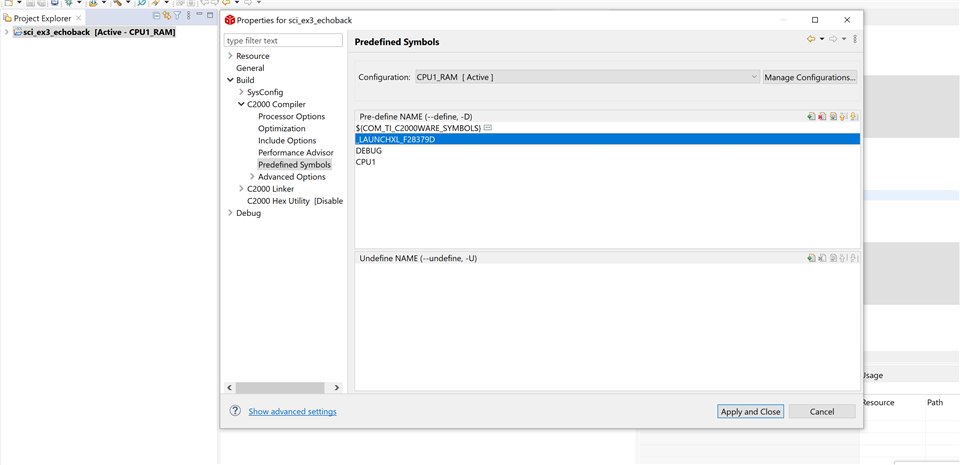
I am new to the TMS320F28379D microcontroller but have an issue when using the Echoback program from the resource explorer. I have consulted other forum posts with issues related to this program but I don't seem to be having the same issue, and I am unsure of where to proceed from here. To get the program to run I had to change the below GPIO register values to be 43U and 42U respectively to match the initial statement
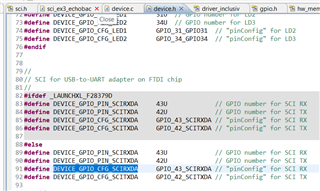
One this change was made, the code did run but all data sent to the terminal was garbage. The initial greeting message is garbage, any input characters are shown as garbage, and the echoed characters are also garbage. The fact that the input characters are garbage makes me think that there is something wrong with the SCIA register configuration, but that is just an educated guess. I have posted the code for the program below as well as an example of the described issue
//#############################################################################
//
// FILE: sci_ex3_echoback.c
//
// TITLE: SCI echoback example.
//
//! \addtogroup driver_example_list
//! <h1>SCI Echoback</h1>
//!
//! This test receives and echo-backs data through the SCI-A port.
//!
//! A terminal such as 'putty' can be used to view the data from
//! the SCI and to send information to the SCI. Characters received
//! by the SCI port are sent back to the host.
//!
//! \b Running \b the \b Application
//! Open a COM port with the following settings using a terminal:
//! - Find correct COM port
//! - Bits per second = 9600
//! - Data Bits = 8
//! - Parity = None
//! - Stop Bits = 1
//! - Hardware Control = None
//!
//! The program will print out a greeting and then ask you to
//! enter a character which it will echo back to the terminal.
//!
//! \b Watch \b Variables \n
//! - loopCounter - the number of characters sent
//!
//! \b External \b Connections \n
//! Connect the SCI-A port to a PC via a USB cable.
//! Refer to the hardware user guide for the UART/USB connector information.
//
//#############################################################################
//
//
// $Copyright:
// Copyright (C) 2013-2024 Texas Instruments Incorporated - http://www.ti.com/
//
// Redistribution and use in source and binary forms, with or without
// modification, are permitted provided that the following conditions
// are met:
//
// Redistributions of source code must retain the above copyright
// notice, this list of conditions and the following disclaimer.
//
// Redistributions in binary form must reproduce the above copyright
// notice, this list of conditions and the following disclaimer in the
// documentation and/or other materials provided with the
// distribution.
//
// Neither the name of Texas Instruments Incorporated nor the names of
// its contributors may be used to endorse or promote products derived
// from this software without specific prior written permission.
//
// THIS SOFTWARE IS PROVIDED BY THE COPYRIGHT HOLDERS AND CONTRIBUTORS
// "AS IS" AND ANY EXPRESS OR IMPLIED WARRANTIES, INCLUDING, BUT NOT
// LIMITED TO, THE IMPLIED WARRANTIES OF MERCHANTABILITY AND FITNESS FOR
// A PARTICULAR PURPOSE ARE DISCLAIMED. IN NO EVENT SHALL THE COPYRIGHT
// OWNER OR CONTRIBUTORS BE LIABLE FOR ANY DIRECT, INDIRECT, INCIDENTAL,
// SPECIAL, EXEMPLARY, OR CONSEQUENTIAL DAMAGES (INCLUDING, BUT NOT
// LIMITED TO, PROCUREMENT OF SUBSTITUTE GOODS OR SERVICES; LOSS OF USE,
// DATA, OR PROFITS; OR BUSINESS INTERRUPTION) HOWEVER CAUSED AND ON ANY
// THEORY OF LIABILITY, WHETHER IN CONTRACT, STRICT LIABILITY, OR TORT
// (INCLUDING NEGLIGENCE OR OTHERWISE) ARISING IN ANY WAY OUT OF THE USE
// OF THIS SOFTWARE, EVEN IF ADVISED OF THE POSSIBILITY OF SUCH DAMAGE.
// $
//#############################################################################
//
// Included Files
//
#include "driverlib.h"
#include "device.h"
//
// Defines
//
// Define AUTOBAUD to use the autobaud lock feature
//#define AUTOBAUD
//
// Globals
//
uint16_t loopCounter = 0;
//
// Main
//
void main(void)
{
uint16_t receivedChar;
unsigned char *msg;
uint16_t rxStatus = 0U;
//
// Configure PLL, disable WD, enable peripheral clocks.
//
Device_init();
//
// Disable pin locks and enable internal pullups.
//
Device_initGPIO();
//
// Configuration for the SCI Rx pin.
//
GPIO_setMasterCore(DEVICE_GPIO_PIN_SCIRXDA, GPIO_CORE_CPU1);
GPIO_setPinConfig(DEVICE_GPIO_CFG_SCIRXDA);
GPIO_setDirectionMode(DEVICE_GPIO_PIN_SCIRXDA, GPIO_DIR_MODE_IN);
GPIO_setPadConfig(DEVICE_GPIO_PIN_SCIRXDA, GPIO_PIN_TYPE_STD);
GPIO_setQualificationMode(DEVICE_GPIO_PIN_SCIRXDA, GPIO_QUAL_ASYNC);
//
// Configuration for the SCI Tx pin.
//
GPIO_setMasterCore(DEVICE_GPIO_PIN_SCITXDA, GPIO_CORE_CPU1);
GPIO_setPinConfig(DEVICE_GPIO_CFG_SCITXDA);
GPIO_setDirectionMode(DEVICE_GPIO_PIN_SCITXDA, GPIO_DIR_MODE_OUT);
GPIO_setPadConfig(DEVICE_GPIO_PIN_SCITXDA, GPIO_PIN_TYPE_STD);
GPIO_setQualificationMode(DEVICE_GPIO_PIN_SCITXDA, GPIO_QUAL_ASYNC);
//
// Initialize interrupt controller and vector table.
//
Interrupt_initModule();
Interrupt_initVectorTable();
//
// Initialize SCIA and its FIFO.
//
SCI_performSoftwareReset(SCIA_BASE);
//
// Configure SCIA for echoback.
//
SCI_setConfig(SCIA_BASE, DEVICE_LSPCLK_FREQ, 9600, (SCI_CONFIG_WLEN_8 |
SCI_CONFIG_STOP_ONE |
SCI_CONFIG_PAR_NONE));
SCI_resetChannels(SCIA_BASE);
SCI_resetRxFIFO(SCIA_BASE);
SCI_resetTxFIFO(SCIA_BASE);
SCI_clearInterruptStatus(SCIA_BASE, SCI_INT_TXFF | SCI_INT_RXFF);
SCI_enableFIFO(SCIA_BASE);
SCI_enableModule(SCIA_BASE);
SCI_performSoftwareReset(SCIA_BASE);
#ifdef AUTOBAUD
//
// Perform an autobaud lock.
// SCI expects an 'a' or 'A' to lock the baud rate.
//
SCI_lockAutobaud(SCIA_BASE);
#endif
//
// Send starting message.
//
msg = "\r\n\n\nHello World!\0";
SCI_writeCharArray(SCIA_BASE, (uint16_t*)msg, 17);
msg = "\r\nYou will enter a character, and the DSP will echo it back!\n\0";
SCI_writeCharArray(SCIA_BASE, (uint16_t*)msg, 62);
for(;;)
{
msg = "\r\nEnter a character: \0";
SCI_writeCharArray(SCIA_BASE, (uint16_t*)msg, 22);
//
// Read a character from the FIFO.
//
receivedChar = SCI_readCharBlockingFIFO(SCIA_BASE);
rxStatus = SCI_getRxStatus(SCIA_BASE);
if((rxStatus & SCI_RXSTATUS_ERROR) != 0)
{
//
//If Execution stops here there is some error
//Analyze SCI_getRxStatus() API return value
//
ESTOP0;
}
//
// Echo back the character.
//
msg = " You sent: \0";
SCI_writeCharArray(SCIA_BASE, (uint16_t*)msg, 13);
SCI_writeCharBlockingFIFO(SCIA_BASE, receivedChar);
//
// Increment the loop count variable.
//
loopCounter++;
}
}
//
// End of File
//
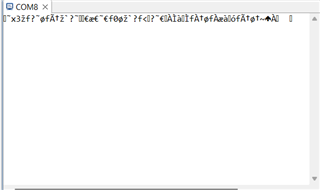
The above image shows the input and output from when the space key is pressed in the program. When I press a key, the LED on the board lights up which I would guess indicates some data being received, so I am not sure what to do from here.
Any advice would be greatly appreciated.