This thread has been locked.

If you have a related question, please click the "Ask a related question" button in the top right corner. The newly created question will be automatically linked to this question.

TMS320F280034: Firmware update(FWU) Flash Boot Fail

Part Number: TMS320F280034

After normal booting to SCI_A by changing the boot mode, the boot loader was put in normally through Serial_Flash_Program. After that, if you send Application S/W normally and CPU RUN using Menu 6, Application S/W does not work.

Please check.

  • Hi Seok,

    Can you confirm what is your application code start address? Are you able to debug further on this?

    Can you give me more details when you mean that the application SW does not work?

    Thanks

    Aswin

  • The DCSM setting of the current project is set as shown in the picture below.

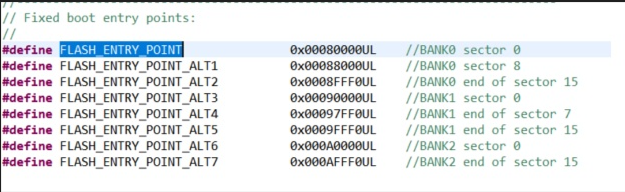
    In the example of creating Flash Kernel, the entry point is set to 0x00080000 in the SCI Boot Application function. I set it to Flash Entry Point alt10x00088000 in the DCSM setting and am using it. Is it correct to change the entry point of the Kernel program according to the DCSM setting?

  • Hello,

    I have a few questions:

    • Have you verified that the application image has been correctly programmed to flash?
    • What address are you inputting to the CPU RUN command?
      • You should be providing your codestart address, for you in this case it would be 0x00088000.
    • What address is program execution going to instead of your application?
      • Is the device resetting or is it stuck somewhere? If it's resetting, what is the reset cause? You can find this by checking the contents of the RESC register

    Best,

    Alex