This thread has been locked.

If you have a related question, please click the "Ask a related question" button in the top right corner. The newly created question will be automatically linked to this question.

TMS320F28379S: device is reset during connect

Part Number: TMS320F28379S

Dear TI Team,


i want to connect to a TMS320F28379S which stops after ~1 week on a machine. With the XDS100 it is reseting the device, regadless of the setting in the debug configuration (Reset the target on a coonect is disabled).


BR,

Wolfgang

  • Hello,

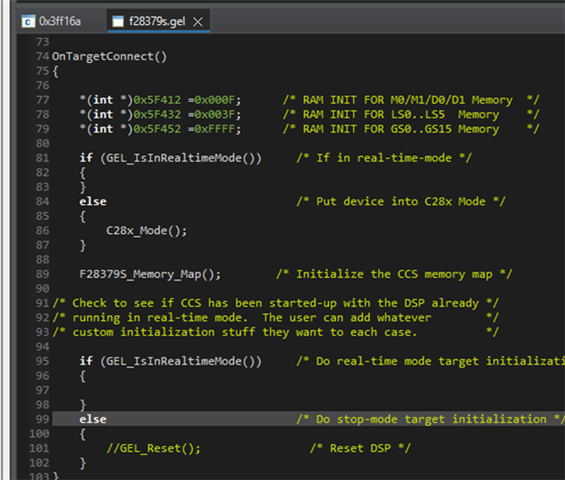
    The issue most likely lies within the GEL file, specifically the OnTargetConnect() function. On every target connect, CCS will re-initialize the RAM and reset the CPU. These lines can be commented out. This file can be found in CCS at ccs\ccs_base\emulation\gel\f28379s.gel.

    OnTargetConnect()
    {
    
        // *(int *)0x5F412 =0x000F;      /* RAM INIT FOR M0/M1/D0/D1 Memory  */
        // *(int *)0x5F432 =0x003F;      /* RAM INIT FOR LS0..LS5  Memory    */
        // *(int *)0x5F452 =0xFFFF;      /* RAM INIT FOR GS0..GS15 Memory    */
    
        if (GEL_IsInRealtimeMode())     /* If in real-time-mode */
        {
        }
        else                            /* Put device into C28x Mode */
        {
            C28x_Mode();   
        }
    
        F28379S_Memory_Map();        /* Initialize the CCS memory map */
    
    /* Check to see if CCS has been started-up with the DSP already */
    /* running in real-time mode.  The user can add whatever        */
    /* custom initialization stuff they want to each case.          */
    
        if (GEL_IsInRealtimeMode())     /* Do real-time mode target initialization */
        {
    
        }
        else                            /* Do stop-mode target initialization */
        {
            // GEL_Reset();                /* Reset DSP */
        }
    }

    Best,
    Matt

  • Dear Matt, many thanks for your response! Funny, I tried to edit the GEL file you mentioned and commented out the GEL_Reset() by myself. But, unfortunately it did not change anything, still reseting the device. I suppose that the XDS100v3 does it by itself, but don't know.

    Any other hints?

    BR,

    Wolfgang

  • Hi,

    I'm assuming all the steps on this thread were followed:  TMS320F2800156-Q1: Attach to a running target 

    What version of CCS are you using?

    Let me try on my own setup next week with my own F2837 device and XDS100v3 as well.

    Best,
    Matt

  • Hi Matt,

    we use CCS V12.1.0.

    here I just see the first post, "This thread has been locked."

    BR,

    Wolfgang

  • Hello,

    I am able to connect non-intrusively with an XDS100v2 on an F28377D unit.

    These are the steps I followed: 

    1. For OnTargetConnect() in the gel file (ti\ccs1281\ccs\ccs_base\emulation\gel\f28379s.gel):
      1. Are you commenting out the GEL_Reset() call?
      2. Are you commenting out the RAM initialization lines?
    2. Go to View > Target Configurations. Right click the intended target configuration file (either under Projects or manually imported in User Defined) and select Properties
      1. Confirm "Halt the target on a connect" is unselected under Connection Options in the Program/Memory Load Options menu. Apply and close to save.
      2. Then right click the same target configuration file and select "Launch Selected Configuration".

    Best,
    Matt 

  • Dear Matt,

    the "Launch Selected Configuration" AND modifying the GEL file help, now I can connect without reset.

    Many thanks!

    Wolfgang

    The modified GEL file: