F29H85X-SOM-EVM: Flashing and Debugging issue

Part Number: F29H85X-SOM-EVM
Other Parts Discussed in Thread: HSEC180ADAPEVM, TMDSHSECDOCK, , XDS110ISO-EVM

Hello,
We are using the F29H85X-SOM-EVM for developing our project with all the required additonal components such as TMDSHSECDOCK, HSEC180ADAPEVM and XDS110ISO-EVM.
I am using CPU1 and CPU3.

When I start the debugging my steps are such as below:
1- Start Project-less Debug
2-CPU1 "Connect Target"
3-Run-Load Program-Load CPU1.out 
4- Run CPU1 - it halts and waits for the CPU3 via ICP
5- CPU3 Connect target
6- Run-Load symbol- LoadCPU3.out
7- Run CPU3 and Run CPU1.

Now, although this sequence is working fine sometimes but, when I try to re-start this sequence there might errors pops up such as attached screenshot.

image.png

After this screnshot occurs, nothing happens the IDE just stuck there.

Then, i need to close the IDE, remove and reconnect the DOCK and XDS110ISO-EVM power conenctions. Even, sometimes I needed to restart the whole windows to succesfully debug again.

I am not sure what is the problem here is but this affects the studying a lot obviously because we can not focus on our SW related issues because we can not be connected the device!!!.

I have used CCS 12.6 a lot for F28 family device and nothing happened like this.

Please help us about this.

  • Another failure screenshot.


    When this happens, it is quite hard to fix. I needed to re-start all windows OS.

    Also, I have tried to decrease the JTAG TCLK frequency which decreases the first screenshot occurrence but did not make it zero fail.  


  • Also, this is the connection properties

  • Hi Gokhan,

    Thank you for posting your question.

    I am using CPU1 and CPU3.

    Did you make any modifications to the empty multi-core project?

    Since you are only doing a CPU1/CPU3 project I suggest starting with the following example. The empty multi-core project setups CPU1, CPU2, and CPU3 (with CPU1 and CPU2 in non-lockstep). Where as the following example only setups up CPU1/CPU3:

    C:\ti\f29h85x-sdk_1_03_00_00\examples\driverlib\multi_core\led\led_ex1_blinky_cpu1_cpu3_multi

    When I start the debugging my steps are such as below:

    The steps are correct. I assume that BANKMODE was programmed to 2 before the steps were executed correct? Else you would have seen an error during programming.

    I have used CCS 12.6 a lot for F28 family device and nothing happened like this.

    Can you please let me know which CCS version you are using? From the error screenshot I would presume 20.4. I suggest using the latest version if not already (20.4.1): https://www.ti.com/tool/CCSTUDIO 

    Best Regards,

    Marlyn

  • Hi Marlyn,

    Thanks for the reply.

    I got the led_ex1_blinky_cpu1_cpu3_multi preject also. However, same error occurs there too. 

    Yes, Bankmode is 2.

    I am using 20.4.1.

    I believe there is something wrong with how I disconnect and stop the debugging. Because many of error occurs when I try to re-connect after I change something with the application code.

    I believe just clicking "stop" button in debugging confuses the CPUs and while re-connection these kind of errors occur. Actually I am not sure this also because I could not find any helpful documentation or answer from E2E threads.

  • Hi Gokhan,

    Thank you for the additional information.

    Because many of error occurs when I try to re-connect after I change something with the application code.

    May I ask what it is that you are changing in the application?

    I believe just clicking "stop" button in debugging confuses the CPUs and while re-connection these kind of errors occur.

    Can you please list out the steps that you are performing after you loaded the code and both CPU1/CPU3 are running?

    I tried the example on my side and have not been able to replicate the issue on my setup.

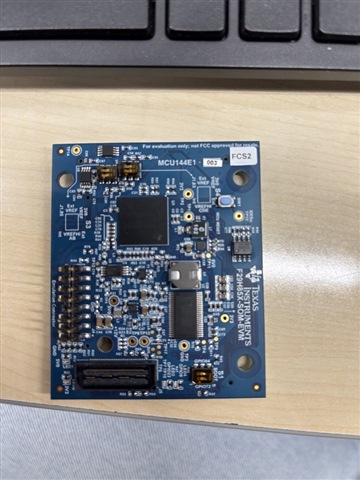
    Could you also please let me know the version of hardware you have? The F29H85x-SOM-EVM should have a marking on it to signify whether it is E1 or A revision along with a number designator (-001, -002, or -003).

    Best Regards,

    Marlyn

  • Hi Marlyn,

    May I ask what it is that you are changing in the application?

    Not a specific change, sometimes it is PWM period sometimes a single variable definiton. 

    Can you please list out the steps that you are performing after you loaded the code and both CPU1/CPU3 are running?

    At first I just press "stop" button in the debug screen for stopping the debug operation.
    Then after changes in the code, I "build all" the project.
    Then re-do the debugging sequence again.
    Usually, during load Programming of CPU1, there are various error pops up as shown above.
    Is there any correct sequence like starting the debugging


    Could you also please let me know the version of hardware you have? The F29H85x-SOM-EVM should have a marking on it to signify whether it is E1 or A revision along with a number designator (-001, -002, or -003).

    I am sharing the picture of the board. I assume it is MCU144E1-003
     

  • Hi Gokhan,

    Not a specific change, sometimes it is PWM period sometimes a single variable definiton. 

    Do you observe the issue if you just use the SDK example as-is (not add in any additional code)? I would like to isolate the problem thus good to just test with known software. I am unable to replicate the problem on my side with SDK examples. 

    Is there any correct sequence like starting the debugging

    No, what you are describing is okay. There are no specific steps with regards to stopping a debug session and restarting program load that should need to be followed.

    I am sharing the picture of the board. I assume it is MCU144E1-003

    Thank you for providing the image. This is an early version of the EVM. I will check to see if I can get access to this version to also test on my side and see if I can replicate the issue.

    Best Regards,

    Marlyn

  • Hi Marlyn,


    Do you observe the issue if you just use the SDK example as-is (not add in any additional code)?

    Yes.

    Thank you for providing the image. This is an early version of the EVM. I will check to see if I can get access to this version to also test on my side and see if I can replicate the issue.

    Thank you, I am waiting then.

    Best regards,

    Gökhan 

  • Hi Gokhan,

    Thank you for your patience. I was able to locate an early version of the EVM and I can replicate the problem you are seeing. I've asked for new hardware to be sent to you. With the updated hardware you should not face this issue anymore. 

    Best Regards,

    Marlyn

  • Hi Marlyn,

    Thanks for the support. I am in contact with Dan Peterson about sending us new HW.

    I assume there is no HW version issue with TMDSHSECDOCK, HSEC180ADAPEVM and XDS110ISO-EVM which we use for working with the SOM EVM, right?

    Best regards,

    Gökhan 

  • Hi Gokhan,

    Correct, you can continue to use the rest of the hardware. Only an updated revision of F29H85X-SOM-EVM is needed.

    Best Regards,

    Marlyn