CCSTUDIO-THEIA: CCSTUDIO-THEIA settings bug: Compiler and SysConfig discovery is broken

Part Number: CCSTUDIO-THEIA
Other Parts Discussed in Thread: SYSCONFIG, C2000WARE

The  Compiler and SysConfig discovery in CCS Settings is broken.

It's working as expected for C2000Ware.

This is tested on Windows 11. It's unknown if a similar issue exist on Linux and Mac.

Some background:

When installing several versions of CCS and C2000Ware from the release packages, the install folder gets to look like this:

image.png

With my setup, the expectation is that it's still possible to execute the four versions of CCS, and thereby be able to have the same features as when they were released - including use the LTS compiler and SysConfig that they came bundled with.

The problem.

The reality is that only the latest version of the Compiler and SysConfig is available for all of the installed CCS versions. 

Going to  File -> Preferences -> Code Compose Studio Settings.. in any of the installed CCS versions will unfortunately show exactly the same, as illustrated below.

Compilers:
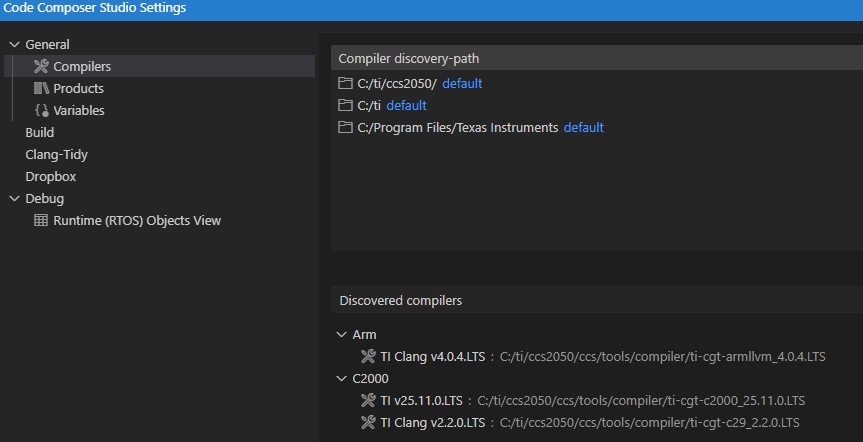
image.png

As can be seen, the Compiler discovery-path defaults to the latest installed version, and secondary to the c:\ti folder - but it discovers nothing more that the latest version. Adding for example c:/ti/ccs2041 (or a version with slashes the other direction) does nothing to discover the earlier compilers. And editing the c:/ti/ccs2041 path or changing the search order is not possible.


Products:
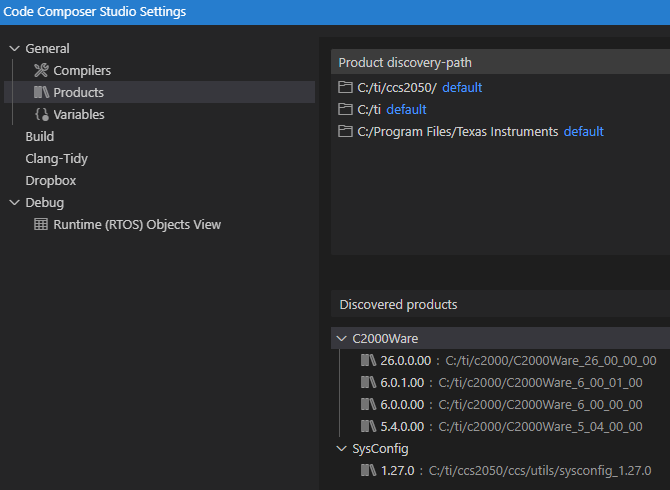
image.png

It's slightly better on this pane.

The C2000Ware versions are correctly discovered, and thereby available to use by the projects.

However, the SysConfig is suffering from the same issues as the Compiler, that only only the latest version is available.

Expected:

If possible, please provide a quick workaround that allows selecting the old versions, and later provide a long-term fix.


Thanks.


  • Hello,

    The reality is that only the latest version of the Compiler and SysConfig is available for all of the installed CCS versions. 

    It should detect all versions in the C:\ti directory in addition to what comes with CCS by default. 

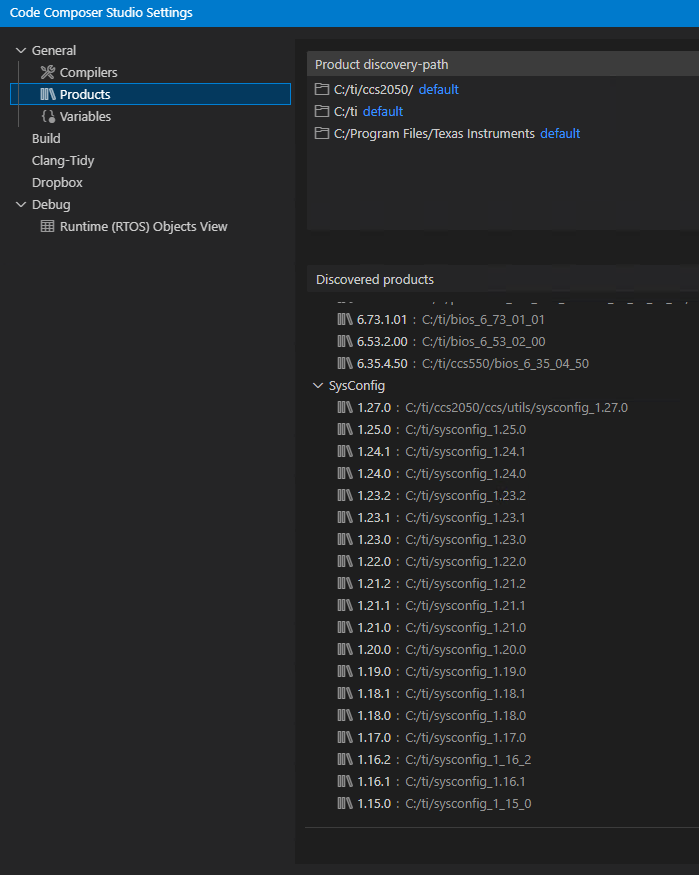
    My CCS 20.5.0 can detect many SysConfig versions:

    Adding for example c:/ti/ccs2041

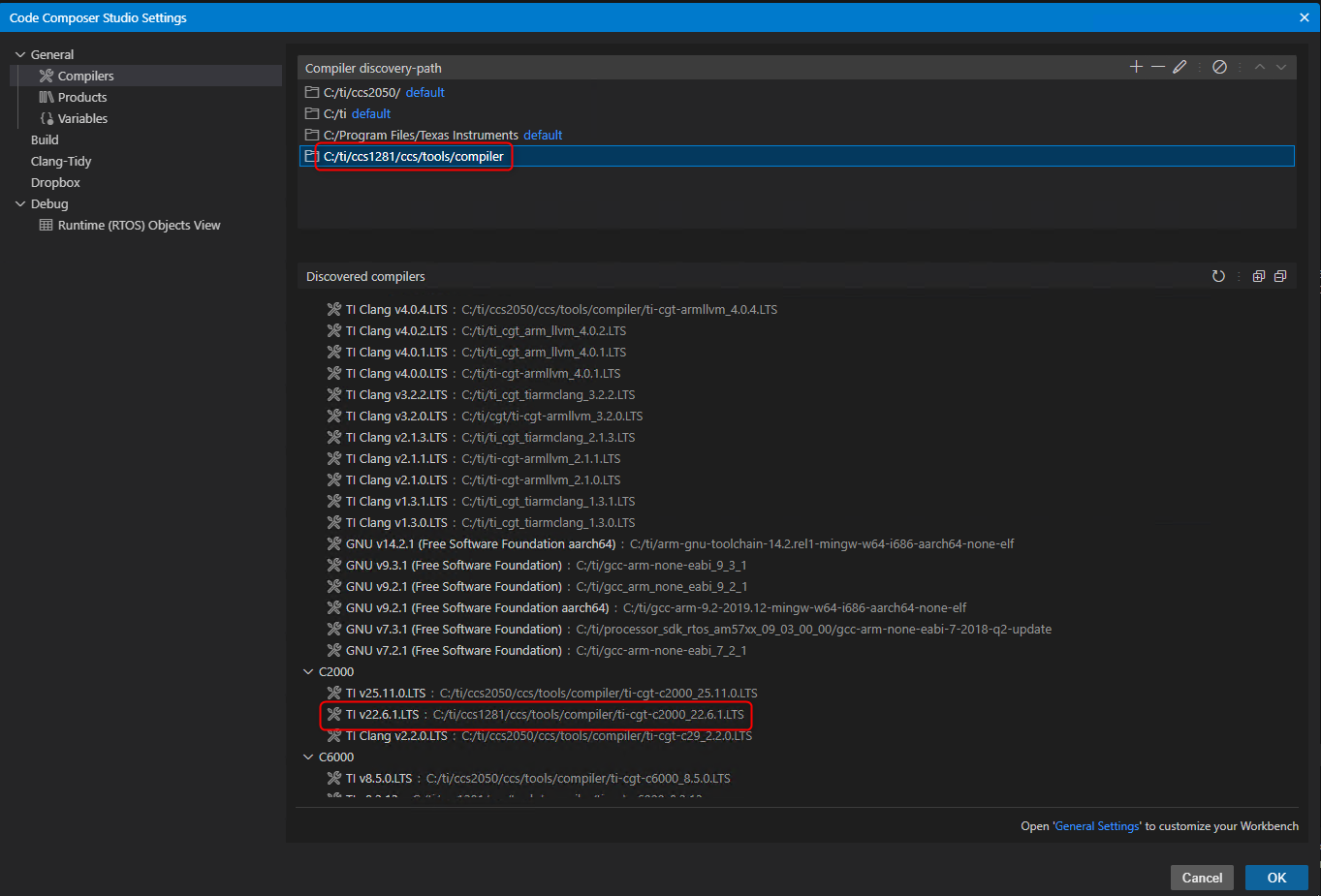
    Note that other than the current CCS installation directory, the discovery feature will only look in the current directory and one subdirectory level. If you want to find say the C2000 compiler from an other CCS version, try setting the search path as such in the example below:

    Thanks

    ki


  • Thank you for the answer, Ki.


    I agree that it should detect all installed versions, but alas it does not.

    I notice in your case with sysconfig, that it does not find sysconfig in the folders where the CCS installer actually places them, ie.paths starting with  c:\ti\ccs2020, c:\ti\ccs2040, and c:\ti\ccs2041, etc.

    Most of the sysconfig's that you list are placed directly in the c:\ti\ folder, and do not follow the CCS install pattern.

    The only sysconfig you have that follow that pattern is the one in c:\ti\ccs2050, which I attribute to the default C:/ti/ccs2025/ discovery path, but in fact it is still strange, as I tried adding c:\ti\ccs2020, then C:\ti\ccs2020\ccs and only after adding the C:\ti\ccs2020\ccs\utils was it able to discover sysconfig_1.24.0

    This ought to work out of the box. And the install pattern is so simple that there is no reason it does not.

    ¨
    Likewise with the compiler, I had to add a path of C:\ti\ccs2020\ccs\tools\compiler\ti-cgt-c2000_22.6.2.LTS for it to discover the 22.6.2.LTS compiler. Adding just C:\ti\ccs2020\ccs\tools\compiler as in your example was not enough.

    Again, this ought to work out of the box, with just c:\\ti\ folder in the discovery-path.

  • I agree that it should detect all installed versions, but alas it does not.

    The current running CCS instance is not aware of any other CCS installations.

    I notice in your case with sysconfig, that it does not find sysconfig in the folders where the CCS installer actually places them, ie.paths starting with  c:\ti\ccs2020, c:\ti\ccs2040, and c:\ti\ccs2041, etc.

    Most of the sysconfig's that you list are placed directly in the c:\ti\ folder, and do not follow the CCS install pattern.

    All the ones in C:\ti root are the ones I downloaded and installed from Resource Explorer or I downloaded from ti.com and ran the install manually.

    The only sysconfig you have that follow that pattern is the one in c:\ti\ccs2050, which I attribute to the default C:/ti/ccs2025/ discovery path, but in fact it is still strange, as I tried adding c:\ti\ccs2020, then C:\ti\ccs2020\ccs and only after adding the C:\ti\ccs2020\ccs\utils was it able to discover sysconfig_1.24.0

    The CCS discovery feature will search in the root location of any specified discovery paths and also one subfolder deep. This is to minimize performance impact that can happen when searching folders recursively. However, there are some locations CCS will also search in automatically inside its install directory and one is ccs/utils and the other is ccs/tools/compiler. Again this only applies to the CCS install directory for the current running CCS instance.

  • Thank you for the reply. I've been away a while, sorry.

    I now understand that the current version is not aware of other installed versions, but IMHO this is an error.

    You only have a few (but apparently more than I thought) standard paths patterns to search for compilers etc. IMHO CCS should have a default path entry that was similar to C:\ti\ccs???\ccs\tools\compiler and C:\ti\ccs????\ccs\utils for products.

    This way after an upgrade you are sure the same compiler etc. are used as is specified in the project. And the developer is in charge of upgrading the compiler etc. when required.

  •  IMHO CCS should have a default path entry that was similar to C:\ti\ccs???\ccs\tools\compiler and C:\ti\ccs????\ccs\utils for products.

    This would work for environments where CCS is installed in the default locations. I suppose it is worth a look to at least support those cases.

  • A ticket has been filed for this request. Tracking link: https://sir.ext.ti.com/jira/browse/EXT_EP-13408

    Thanks

    ki