This thread has been locked.

If you have a related question, please click the "Ask a related question" button in the top right corner. The newly created question will be automatically linked to this question.

eCAN Transmit problems

Hello.

I am currently using a 28335eZdsp with CCSv3.3. I am trying to implement eCAN, and it worked for the example files (A_to_B_Xmit and back_to_back) and when I only enabled one mailbox to receive and transmit.

However, I am now trying to enable multiple mailboxes, and when I go to test the code, it will not transmit. My code gets stuck in the following loop:


while(ECanaRegs.CANTA.all != 0x0000000F){};


And will not continue.

I have checked my switches (only SW1-3 is on, the other are off, and all of SW2 are on). I have checked my initialization functions and my eCAN set up and loops, they follow the same format as the examples. I have ran a search on these forums and found similar problems from other users, but none were resolved. I have also sent an email to TI, but they have not responded.

What could be causing this to happen?


  • Ryan,

    there must be something wrong in your initialization. There is no problem in transmitting 4 different messages from 4 different mailboxes. I have used and use this technique quite often, however I usually use interrupt services to wait for the completition of the transmissions.

    I have attached a working example, which comes close to your setup, including the polling loop for CANTA. The example was made for the F2812, but you can easily adapt this example for the F28335. The example requires a physical connection to a 2nd node, a 2nd CAN channel (A and B) or a CAN - Analyzer - otherwise the missing ACK will not set the TA bits.  If you don't have a 2nd node and you would like to use the self test mode (Bit STM in MCC = 1), then there is no physical transmission at all. Instead, the transmitted messages are received by MBX0 of the same node.  In such a case it is better to configure MBX31 to 28 as transmitters.

    Check my code against yours and try to find differences.

    Hope this helps.


  • Frank,


    Thank you for the reply. I have gone through and compared my code to yours. The only difference I could find in the initialization function is my CANBTC.bit.BRPREG is 4 instead of 99, but I think this is due to a difference in the clock frequency. Also, your code used the extended identifier, mine did not. Just to test it out, I changed mine to ext., but I still encounter the same problem.

    I did implement your loop to trigger on the interrupt - easily done as we had cpu_timer_0_isr enabled at a slow frequency, and your code was very straightforward from there, so thank you for that.

    I am using another node - an identical DSP with similar code, but configured to receive instead of transmit. In the end, all DSP's on the CAN bus will have both Tx and Rx functions. Could it be possible that there is a hardware issue or an issue on the other node that is preventing the ACK from setting the TA bits? I will try self-test mode tomorrow and see if this is possibly the problem.

    Thanks for your help,

    Ryan

  • Ryan,

    yes the difference in BTC is related to different data rates / clock frequencies. The 2833x devices have a fixed divider by 2 for the CAN clock, which is not present at the 281x. The data rate from my example is 100 kbps because of  the length of the cable in my laboratory.

    The initial start of a CAN net is a little bit tricky. When a transmitter sends out a message and there is no active 2nd node at the physical line, the transmitting node will not get the ACK and go itself into bus off state (after 128 unsuccessful repetitions of the message). An active 2nd node means, that you must have either a 2nd controller, initialized at the same data rate as the transmitter node, or a CAN - Analyzer also at the same data rate and in active ACK mode.  I usually start first a receiver node and second the transmitter node. It also helps to have a CAN analyzer connected to monitor, what's going on.

    Regards

    Frank


  • Hello Frank,

    I was using the code u mentioned in previous comment.

    My hardware layout is,  PC - PCAN USB Adaptor - CAN BUS - F28335 Pheripheral board.

    At PC, we have PCAN View as analyze ( attaching the image of it ).

    For Pheripheral Board, we have CANA_H and CANA_L directly available at J4 and J5 as shown in Schematic below

    5100.PeripheralExplorer[R5]-SCH.pdf

    When I run the code, the register Value of MBOX5_MDL  is being changed but i cant see any data in receive block of PCAN View GUI.

    i changed the baudrate to 100kBits/s at both ends.

    Please let me know wht is the problem, n how can i correct it.

    thanks,

    raja

  • Hi!

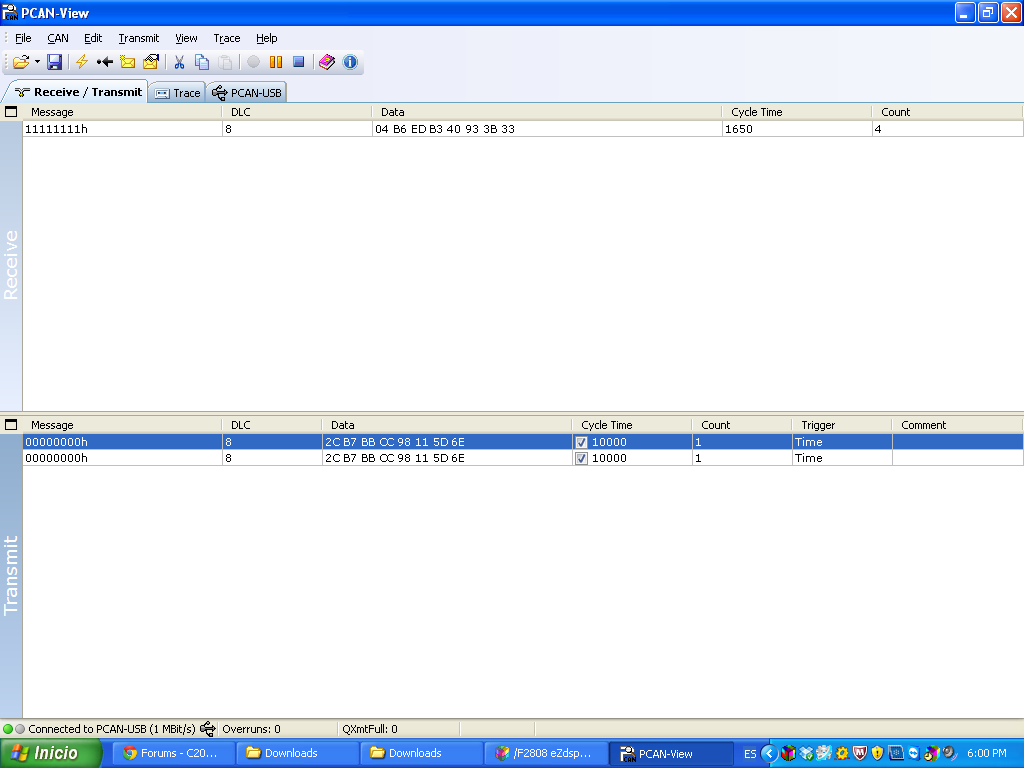
    I was looking your post. I'm working with the same software PCAN-VIEW, my goal it is transmit and receive message but i don't know how can observe on code composer where is the message that i'm sending through PCAN-View.

    Look at this image that show us the data that i'm receiving and transmiting.

    So, Could you tell me please how can i observe if the messages that i'm sending on pcan view i'm receiving on the board.

    Thank you so much 

    Karol

  • Looking into your screenshots, it looks like you initialized the PCAN to transmit two messages with ID=0, both messages with the same cycle time and the same payload. Does this make sense?

    Anyway, if your PCAN transmits messages with Identifier 0, then you have probably initialized one of the 28x-mailboxes as receive mailbox with ID=0, right? Do you use polling or interrupts to wait for the message? In both cases and after the message has been accepted by your mailbox filter, you can suspend the execution (by a breakpoint) and inspect the CAN-registers for that mailbox in the expressions window (ECanaMboxes.MBOXn.MDL).


  • Hi frank

    Thank you for your response.

    Yes i have a mistake on PCAN to transmit, so i fix the identifier on the code and the software PCAN view. I used watchdog for wait a message. when i saw on the watch window it doesn't appear the mailboxes registers so i'm confused, with which option can i see the message that i'm receiving?

    Look at the registers of watch window:

    So, There isn't ECanaMboxes.MBOXn.MDL. When you said inspect the CAN-registers for that mailbox in the expressions window (ECanaMboxes.MBOXn.MDL). The expressions windows do you refer a watch window?


    Thank you 


    Karol

  • Hi Frank 

    Now i can solve my problem of send messages throught CAN analyser and see on watch-window. But i would like to ask you if it is possible to store the data of mailboxes in some variables for then organize in a table  throught code composer.

    Thank you for your response

    Karol