This thread has been locked.

If you have a related question, please click the "Ask a related question" button in the top right corner. The newly created question will be automatically linked to this question.

assist on new project run

Other Parts Discussed in Thread: TMS320F2808

Hello,

I've set up a new F2808 project, using SYS-BIOS 6.70.01, and am trying to run it on a F2808 target.  I'm able to build the project, and it appears to be flashing in.  But it never breaks at main as instructed, and when I hit break it in 0x0259ed address space, which it says the memory map prevents for reading.

I'd be appreciate of any instructions or suggestions of next steps, in trying to get further with this effort, i.e. running the simple project I had generated (example CCS project, with just main.c).

Robert

  • attached is the .cfg file being used (as part of a separate configuration that is used by my main project)

    6562.app.cfg

  • Hi Robert,

    Is this a TI provided example or custom code? If you run TI provided example code for SYS-BIOS, does it run OK?
  • Hi,

    This was just a basic main.c TI provided example for SYS-BIOS (so answer to second question is no).  It builds loads, but never breaks at main.c, and when I do break, looks off in the weeds.  I can zip up and provide the project, if that would help any.

    Regards,

    Robert

  • It was an example project, with a separate RTSC platform, that was giving this trouble.

    If I use just a vanilla project example, no platform, the project builds and runs ... with just a main.c with only a return line, nothing else. How can I start to add in  SYS-BIOS things, and specifically a .cfg file to begin with?

    Robert

  • I think it's typically easiest to start with one of the SYS/BIOS examples and add your code from there. Open up the "Resource Explorer Classic" in CCS and import one of the SYS/BIOS examples for your device.

    Whitney
  • Thanks for the reply. That's what I did this time. Initially it just had the main.c and F2808 .cmd file. Now I'm trying to add in some of the SYS-BIOS stuff, via a .cfg file. I activated the SYS-BIOS and XDCTOOLS in the project general configuration items, since it appears they're needed for processing the commands in the .cfg file.

    Seems to have run into issues right off the bat, though.

    Building file: "../f2808.cfg"
    Invoking: XDCtools
    "C:/ti/xdctools_3_50_05_12_core/xs" --xdcpath= xdc.tools.configuro -o configPkg -t ti.targets.C28_large -r debug -c "C:/ti/ti-cgt-c2000_18.1.2.LTS" "../f2808.cfg"
    making package.mak (because of package.bld) ...
    subdir_rules.mk:12: recipe for target 'build-470080623-inproc' failed
    js: "./config.bld", line 10: Error: Can't find the target named 'ti.targets.C28_large' along the path 'C:/ti/xdctools_3_50_05_12_core/packages;..;': please check the spelling of the target's name and that it exists along this path.
    xdctools_3_50_05_12_core\gmake.exe: *** No rule to make target `.configuro'. Stop.
    js: "C:/ti/xdctools_3_50_05_12_core/packages/xdc/tools/Cmdr.xs", line 52: Error: xdc.tools.configuro: configuration failed due to earlier errors (status = 2); 'linker.cmd' deleted.
    gmake[1]: *** [build-470080623-inproc] Error 1
    gmake: *** [build-470080623] Error 2
    subdir_rules.mk:9: recipe for target 'build-470080623' failed
    gmake: Target 'all' not remade because of errors.

    **** Build Finished ****


    Robert
  • I can't reproduce this. I'm forwarding this thread to the SYS/BIOS team.

    Does the example build before you start modifying it? Maybe there's something in your cfg file that's causing the issue. Do you mind sharing it?

    Whitney
  • f2808.cfg

    I didn't know where to start with a .cfg file, so I just grabbed one from my C6000 project, and left in a few lines ... of no particular relevance to this project, just to see if the project would incorporate the .cfg file, while still building

    Robert

  • Robert,

    I think we should focus on getting a BIOS provided example running on your hardware first. You started out with the basic main.c example with what appears to be a valid app.cfg file. You offered to share your project. I'd like to start there. Please share the project.

    I notice that the BIOS.cpuFreq is being set to 60MHz. This indicates to me that you are using a custom F2808 board rather than a standard EVM provided by TI. Can you describe your hardware platform a little?

    Alan

  • Hi Alan,

    I initially tried to create a separate SYS-BIOS project, along with a separate RTSC platform ... that is where the app.cfg came from.  But when that ran into trouble, I went to the simple "main.c only" example, which only had the F2808 .cmd file.  That built, loaded and ran (into the single return statement in main.c).  But I really need to go to a SYS-BIOS project, which requires a .cfg file.  So I simply tried to add a previous, gutted C6000 .cfg file into the simple main.c, with the last error reported.

    However, based on your comment that the original app.cfg I was working with was valid, I instead tried to add that into the simple "main.c" project, with the following error again

    Invoking: XDCtools
    "C:/ti/xdctools_3_50_05_12_core/xs" --xdcpath= xdc.tools.configuro -o configPkg -t ti.targets.C28_large -r debug -c "C:/ti/ti-cgt-c2000_18.1.2.LTS" "../app.cfg"
    making package.mak (because of package.bld) ...
    making package.mak (because of package.bld) ...
    subdir_rules.mk:12: recipe for target 'build-1565009311-inproc' failed
    js: "./config.bld", line 10: Error: Can't find the target named 'ti.targets.C28_large' along the path 'C:/ti/xdctools_3_50_05_12_core/packages;..;': please check the spelling of the target's name and that it exists along this path.
    js: "./config.bld", line 10: Error: Can't find the target named 'ti.targets.C28_large' along the path 'C:/ti/xdctools_3_50_05_12_core/packages;..;': please check the spelling of the target's name and that it exists along this path.
    gmake.exe: *** No rule to make target `.configuro'. Stop.
    js: "C:/ti/xdctools_3_50_05_12_core/packages/xdc/tools/Cmdr.xs", line 52: Error: xdc.tools.configuro: configuration failed due to earlier errors (status = 2); 'linker.cmd' deleted.
    gmake[1]: *** [build-1565009311-inproc] Error 1
    gmake: *** [build-1565009311] Error 2
    subdir_rules.mk:9: recipe for target 'build-1565009311' failed
    gmake: Target 'all' not remade because of errors.

    **** Build Finished ****

    My target is a F2808, with OSC of 58.98 Mhz.

    Attached is the project, which, as mentioned, is the simple main.c, with .cmd, project, with the app.cfg added back in from my original attempt at incorporating a RTSC platform.

    Is there an existing F2808 SYS-BIOS project example, that has a valid .cfg file incorporated?

    Regards,

    Robert

    https://e2e.ti.com/cfs-file/__key/communityserver-discussions-components-files/171/20180625.7z

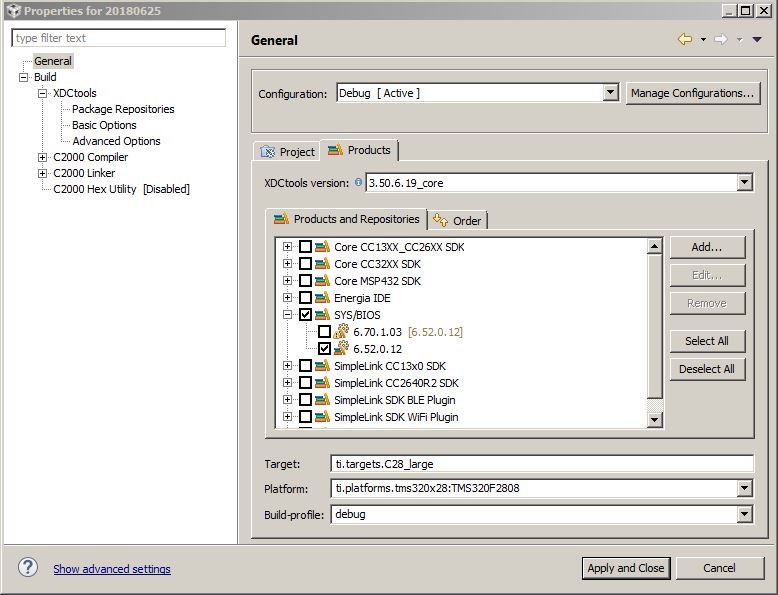
  • In order to get your project to build I had to modify the build settings:

     1) Explicitly set the XDCtools version

     2) Explicitly set the SYS/BIOS version

     3) Select an appropriate Platform

    Additionally, I replaced your linker command file with the content below so that the link would succeed.

    MEMORY
    {
    PAGE 0 :   /* Program Memory */
    
        L03SARAM    : origin = 0x008000, length = 0x002000     /* on-chip RAM block L0-L3 */
        OTP         : origin = 0x3D7800, length = 0x000400     /* on-chip OTP */
        FLASH       : origin = 0x3D8000, length = 0x01FF80     /* on-chip FLASH */
        CSM_RSVD    : origin = 0x3F7F80, length = 0x000076     /* Program with all 0x0000 when CSM is in use. */
        BEGIN       : origin = 0x3F7FF6, length = 0x000002     /* Used for "boot to Flash" bootloader mode. */
        CSM_PWL     : origin = 0x3F7FF8, length = 0x000008     /* CSM password locations in FLASH */
    
        FPUTABLES   : origin = 0x3FD860, length = 0x0006A0     /* FPU Tables in Boot ROM */
        IQTABLES    : origin = 0x3FDF00, length = 0x000B50     /* IQ Math Tables in Boot ROM */
        IQTABLES2   : origin = 0x3FEA50, length = 0x00008C     /* IQ Math Tables in Boot ROM */
        IQTABLES3   : origin = 0x3FEADC, length = 0x0000AA	   /* IQ Math Tables in Boot ROM */
    
        ROM         : origin = 0x3FF3B0, length = 0x000C10     /* Boot ROM */
        RESET       : origin = 0x3FFFC0, length = 0x000002     /* part of boot ROM  */
        VECTORS     : origin = 0x3FFFC2, length = 0x00003E     /* part of boot ROM  */
    
    PAGE 1 :   /* Data Memory */
    
        M01SARAM    : origin = 0x000000, length = 0x000800     /* on-chip RAM block M0, M1 */
        PIEVECT     : origin = 0xD00,    length = 0x100
        L46SARAM    : origin = 0x00A000, length = 0x006000     /* on-chip RAM block L4-L6 */
        L78SARAM    : origin = 0x010000, length = 0x004000     /* on-chip RAM block L7, L8 */
    }
    
    /*
     *  Allocate sections to memory blocks.
     *  Note:
     *      codestart   user defined section in DSP28_CodeStartBranch.asm
     *                  used to redirect code execution when booting to flash
     *
     *      ramfuncs    user defined section to store functions that will be
     *                  copied from Flash into RAM
     */
    
    SECTIONS
    {
        /* Allocate program areas: */
        .cinit              : > FLASH       PAGE = 0
        .pinit              : > FLASH       PAGE = 0
        .text               : > FLASH       PAGE = 0
        codestart           : > BEGIN       PAGE = 0
        ramfuncs            : LOAD = FLASH      PAGE = 0,
                              RUN  = L03SARAM   PAGE = 0,
                              LOAD_START(_RamfuncsLoadStart),
                              LOAD_SIZE(_RamfuncsLoadSize),
                              LOAD_END(_RamfuncsLoadEnd),
                              RUN_START(_RamfuncsRunStart)
    
        csmpasswds          : > CSM_PWL     PAGE = 0
        csm_rsvd            : > CSM_RSVD    PAGE = 0
    
        /* Allocate uninitalized data sections: */
        .stack              : > M01SARAM | L46SARAM                 PAGE = 1
        .ebss               : > M01SARAM | L46SARAM                 PAGE = 1
        .esysmem            : > L78SARAM | L46SARAM | M01SARAM      PAGE = 1
        .cio                : > L78SARAM | L46SARAM | M01SARAM      PAGE = 1
    
        /* Initalized sections go in Flash */
        /* For SDFlash to program these, they must be allocated to page 0 */
        .econst             : > FLASH       PAGE = 0
        .switch             : > FLASH       PAGE = 0
        .args               : > FLASH       PAGE = 0
    
    #ifdef __TI_COMPILER_VERSION__
    #if __TI_COMPILER_VERSION__ >= 15009000
        .TI.ramfunc         : {} LOAD = FLASH    PAGE = 0,
                                 RUN  = L03SARAM PAGE = 0,
                                 table(BINIT)
    #endif
    #endif
    
        /* Allocate IQ math areas: */
        IQmath              : > FLASH       PAGE = 0            /* Math Code */
        IQmathTables        : > IQTABLES    PAGE = 0, TYPE = NOLOAD
    
        /* Allocate FPU math areas: */
        FPUmathTables       : > FPUTABLES   PAGE = 0, TYPE = NOLOAD
    
        /*
         *  Uncomment the section below if calling the IQNexp() or IQexp()
         *  functions from the IQMath.lib library in order to utilize the
         *  relevant IQ Math table in Boot ROM (This saves space and Boot ROM
         *  is 1 wait-state). If this section is not uncommented, IQmathTables2
         *  will be loaded into other memory (SARAM, Flash, etc.) and will take
         *  up space, but 0 wait-state is possible.
         */
        /*
        IQmathTables2       : > IQTABLES2   PAGE = 0, TYPE = NOLOAD
        {
            IQmath.lib<IQNexpTable.obj> (IQmathTablesRam)
        }
        */
    
        /*
         *  Uncomment the section below if calling the IQNasin() or IQasin()
         *  functions from the IQMath.lib library in order to utilize the
         *  relevant IQ Math table in Boot ROM (This saves space and Boot ROM
         *  is 1 wait-state). If this section is not uncommented, IQmathTables2
         *  will be loaded into other memory (SARAM, Flash, etc.) and will take
         *  up space, but 0 wait-state is possible.
         */
        /*
        IQmathTables3       : > IQTABLES3   PAGE = 0, TYPE = NOLOAD
        {
            IQmath.lib<IQNasinTable.obj> (IQmathTablesRam)
        }
        */
    }

  • Thanks Alan.  I now get this error

    "C:\\ti\\ccsv8\\utils\\bin\\gmake" -k -j 4 all -O 


    Building file: "../app.cfg"
    Invoking: XDCtools
    "C:/ti/xdctools_3_50_05_12_core/xs" --xdcpath= xdc.tools.configuro -o configPkg -t ti.targets.C28_large -p ti.platforms.tms320x28:TMS320F2808 -r debug -c "C:/ti/ti-cgt-c2000_18.1.2.LTS" "../app.cfg"
    subdir_rules.mk:12: recipe for target 'build-1565009311-inproc' failed
    js: "C:/ti/xdctools_3_50_05_12_core/packages/xdc/tools/Cmdr.xs", line 52: Error: xdc.tools.configuro: Error: Can't find the platform package 'ti.platforms.tms320x28'. TI platforms are no longer shipped as part of XDCtools (C:\ti\xdctools_3_50_05_12_core). Please ensure you are either using a pre-3.30 version of XDCtools or you have added a product that includes your platform support along the path ';C:\ti\xdctools_3_50_05_12_core/packages'. Check that this path names a directory containing the necessary platform support and that the platform name is properly spelled.
    gmake[1]: *** [build-1565009311-inproc] Error 1
    gmake: *** [build-1565009311] Error 2
    subdir_rules.mk:9: recipe for target 'build-1565009311' failed
    gmake: Target 'all' not remade because of errors.

    **** Build Finished ****

    https://e2e.ti.com/cfs-file/__key/communityserver-discussions-components-files/171/2402.20180625.7z

    Did you keep my app.cfg?

    I've attached the latest project, with (what I think to be) the changes you said were required.

    Robert

  • CCS will not let me import this project for some reason.

    Yes, I used your app.cfg.

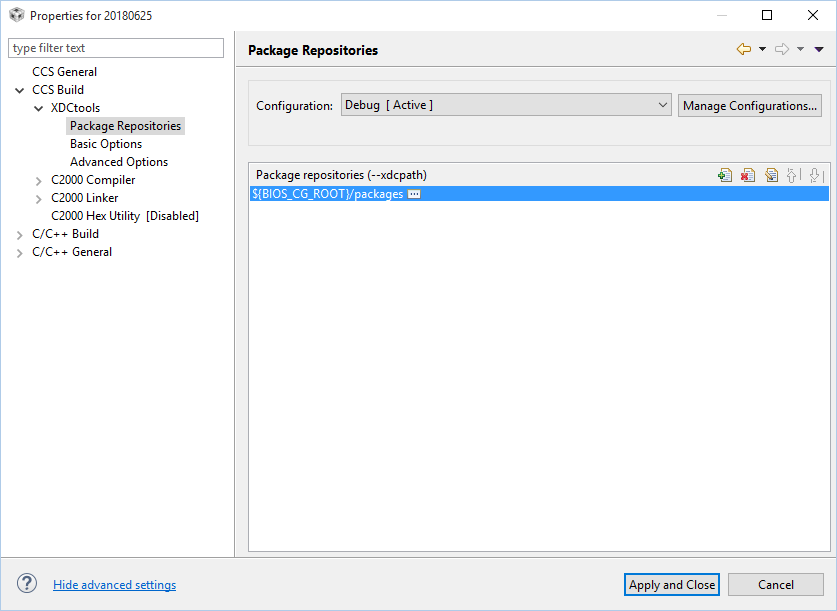
    The command line is missing a value for the --xdcpath assignment. This should be the path to your installed BIOS product. Did you select the BIOS product in the General Build settings under Products and Repositories?

    The --xdcpath assignment in my build options is:

    --xdcpath="C:/ti/bios_6_52_00_12/packages;"

    Yours is null:

    --xdcpath=
  • I'm able to build, with the addition of this:

    but the load fails with this:

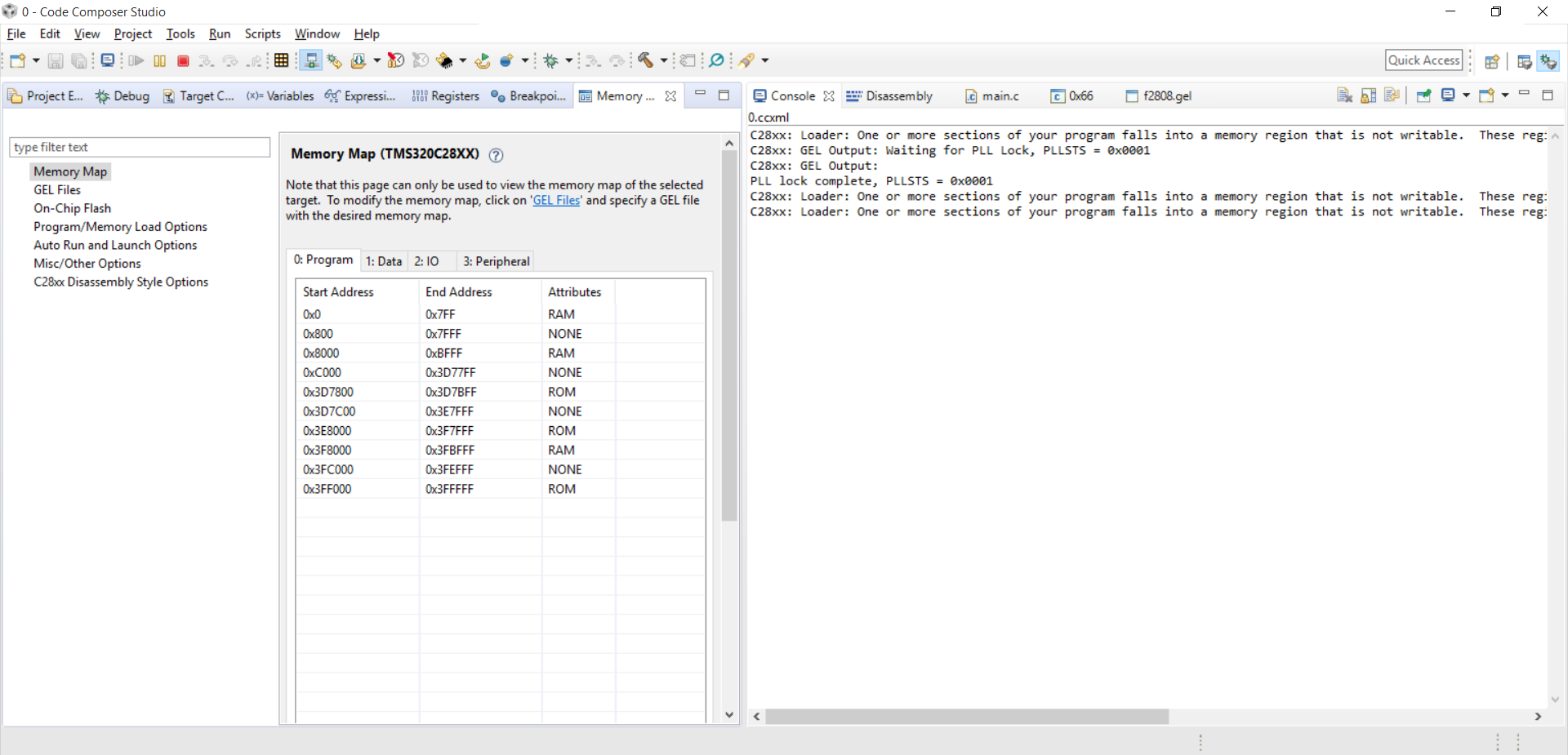
    C28xx: Loader: One or more sections of your program falls into a memory region that is not writable. These regions will not actually be written to the target. Check your linker configuration and/or memory map.

    and never breaks at main

    latest project attached

    https://e2e.ti.com/cfs-file/__key/communityserver-discussions-components-files/171/2664.20180625.7z

  • If you believe your linker command file is correct, then you probably just need to update the GEL file being used by CCS to add the memory regions that your hardware has on it.

    The error message indicates that CCS does not believe that writable memory exists at some of the locations the .out file wants to load into and therefore doesn't try.

    Since the .out file wasn't completely loaded into memory, it is likely that this is the reason the CPU never gets to main().

    In the GEL file associated with your target configuration, look for a function that has a bunch of GEL_MapAdd() statements in it.
    Make sure all the memory regions in your hardware have corresponding Gel_MapAdd() statements.

    After editing the GEL file, you'll have to perform a "Reload" of the GEL file to update CCS regarding your memory map.

    Alan

  • I've been running the f2808.gel that comes with CCS, as attached.  

    f2808.gel

    And performing the F2808_Memory_Map() function, but still have the load issue.  Does this memory map look right?

  • Your 2808.cmd file is placing .cinit, .pinit, .text, etc into FLASH.

    The FLASH memory region is defined as:

    FLASH : origin = 0x3D8000, length = 0x01FF80 /* on-chip FLASH */

    The memory map you show above shows "NONE" for the address range 0x3D7C00 to 0x3E7FFF.

    This looks to me like you need to add a GEL_MadAdd() command to your GEL file to inform CCS that you have writable memory in your FLASH address range. As it is, CCS thinks there's "NONE" in the region where all of your application code is being placed.

    Alan
  • Thanks.  Still trying to make my way through the .gel, .cmd settings.  Latest is that it's complaining about not being to access the CSL passwords:

    C28xx: GEL: Error while executing OnReset(0): Memory map prevented writing 0x00000AE0@Data
    at *(0xAE0)=0xFFFF [f2808.gel:245]
    at Unlock_CSM() [f2808.gel:39]
    at OnReset(0)

    per .gel file:

    /********************************************************************/
    menuitem "Code Security Module"
    hotmenu Unlock_CSM()
    {
    /* Perform dummy reads of the password locations */
    XAR0 = *0x3F7FF8;
    XAR0 = *0x3F7FF9;
    XAR0 = *0x3F7FFA;
    XAR0 = *0x3F7FFB;
    XAR0 = *0x3F7FFC;
    XAR0 = *0x3F7FFD;
    XAR0 = *0x3F7FFE;
    XAR0 = *0x3F7FFF;

    /* Write passwords to the KEY registers. 0xFFFF's are dummy passwords.
    User should replace them with the correct password for their DSP */
    *0xAE0 = 0xFFFF;
    *0xAE1 = 0xFFFF;
    *0xAE2 = 0xFFFF;
    *0xAE3 = 0xFFFF;
    *0xAE4 = 0xFFFF;
    *0xAE5 = 0xFFFF;
    *0xAE6 = 0xFFFF;
    *0xAE7 = 0xFFFF;
    }

    but yet the .cmd file has them in flash

    FLASH : origin = 0x3D8000, length = 0x01FF80 /* on-chip FLASH */
    CSM_RSVD : origin = 0x3F7F80, length = 0x000076 /* Program with all 0x0000 when CSM is in use. */
    BEGIN : origin = 0x3F7FF6, length = 0x000002 /* Used for "boot to Flash" bootloader mode. */
    CSM_PWL : origin = 0x3F7FF8, length = 0x000008 /* CSM password locations in FLASH */

    all attached here

    https://e2e.ti.com/cfs-file/__key/communityserver-discussions-components-files/171/0763.20180625.7z

  • I don't fully understand what you're trying to do. But I don't see any Gel_MapAdd() lines that define the memory you're writing to in Unlock_CSM() function (0xae0-0xae7). This is probably why CCS is complaining.
  • Alan DeMars said:
    I don't fully understand what you're trying to do. 

    Sort of makes two of us :)

    I'm wondering why the gel file, provided by TI for F2808, is trying to write the passwords in a location that is not defined by the .cmd (also provided).  The .cmd defines the password location as 

    CSM_PWL 003f7ff8 00000008 00000000 00000008 RWIX

    Is the .gel file attempt to do that, beginning at 0xAE0, incorrect?

    Robert

  • Robert,

    Myself being primarily knowledgeable about TI-RTOS, you've moved considerably outside of my comfort zone.
    I'll try to find someone with the right qualifications to help you.

    Alan
  • Is there anyone that can help with this today?
  • Ok, got it.  As attached.  Only the simple main.c file, but I would think this could be extremely helpful to someone trying to setup a base SYS-BIOS project for the F280x family.

    Regards,

    Robert

    https://e2e.ti.com/cfs-file/__key/communityserver-discussions-components-files/171/2335.20180625.7z

  • Hi Robert,

    Thanks for sharing your solution. So your new GEL file got rid of those errors?

    If you're still wondering what that Unlock_CSM() function was doing, that 0xAE0-0xAE7 memory is the location of the KEY registers. If your device was secured, you would replace the 0xFFFFs with the password to allow CCS to unlock your device. You can read up on the unlock flow in the CSM chapter of the System Control and Interrupts Reference Guide.  We also have a CSM FAQ.

    Whitney

  • Hi,

    Yes. .cio also needed to be added to the .cmd file. Plus the stack sizes needed to be trimmed in the .cfg file.

    Thanks for the info. I did find some of it while investigating.

    Robert