This thread has been locked.

If you have a related question, please click the "Ask a related question" button in the top right corner. The newly created question will be automatically linked to this question.

RTOS/TMS320F28069M: Moving project to use TI-RTOS or SYS-BIOS while using InstaSPIN components

Part Number: TMS320F28069M
Other Parts Discussed in Thread: MOTORWARE, SYSBIOS

Tool/software: TI-RTOS

Hey,

I had asked a few days ago about using SYS-BIOS with the InstaSpin/SpinTac components, and I was pointed to some resources. I have gotten the OS up and running and I am adding in what is essentially LAB12B which is sensored speed control, but I'm using the CTRL PID controller instead of the SpinTac VelCTL Controller. I'm having some trouble with this logic:
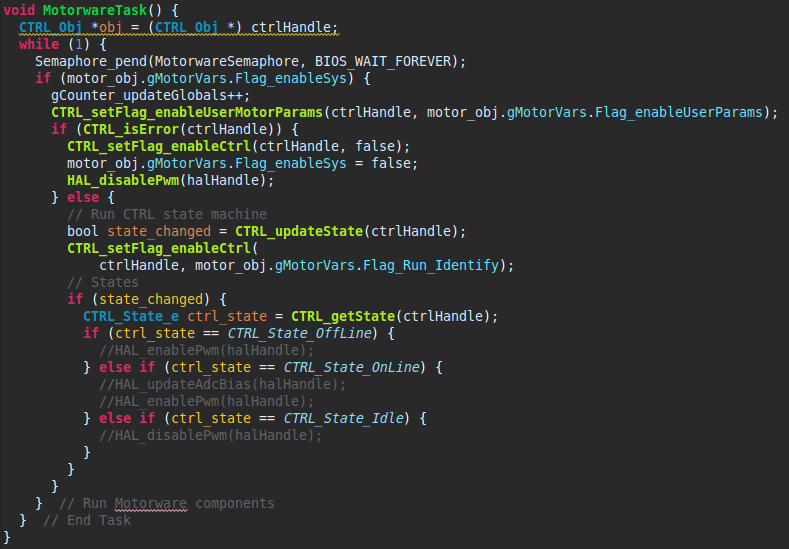
I currently have PWM enabling/disabling commented out, but when the CTRL_updateState runs with CTRL_enableCtrl flag set to true, it sets up all the components, returns then crashes the OS. Is there any reason why this could be happening?

  • Can you give me more details about what you mean by "crashes the OS"? What error message are you seeing? If you look at the ROV do you see any errors? Any signs of stack overflow?

    Whitney
  • So there are no logged messages from the OS, Stack peak of my two tasks(one being motorware task, other being an led blink pending on semaphore), are under 200 bytes, stack for both tasks is 512 bytes so no stack overflow is apparent. When I say "crash" I mean that the clocks stop running as well as the tasks and no OS components other than HWI run after I flip the CTRL_setFlag_enableCtrl.
  • Did you properly instantiate the CTRL and EST objects? What does your initialize code look like? Maybe your HWI is calling the CTRL or EST objects in the mainISR() and landing in uninitialized/unknown memory?

    Sean
  • It appears that running the CTRL_run and CTRL_runOnLineUser(which is within CTRL_run) causes OS to crash, I'm looking to see if I can see which function specifically causes the crash. Looking into what I should do from here.
  • Can you verify that the objects are in memory? The CTRL_initCtrl() will allocate memory for both of these objects. I want to make sure neither return NULL. Do you also ensure nothing is writing over the CTRL or EST objects during run time?

    Sean
  • The CTRL_Handle is persistent and I monitor it in the watch expression tab of the debugger, and it doesn't get overwritten(in that all the values are persistent or change in a logical way).
  • Since both CTRL_run() and CTRL_runOnLineUser() have source available to you, can you step through and tell me more precisely which API causes the OS to crash? I have a feeling it may be happening at EST_run()

    Sean
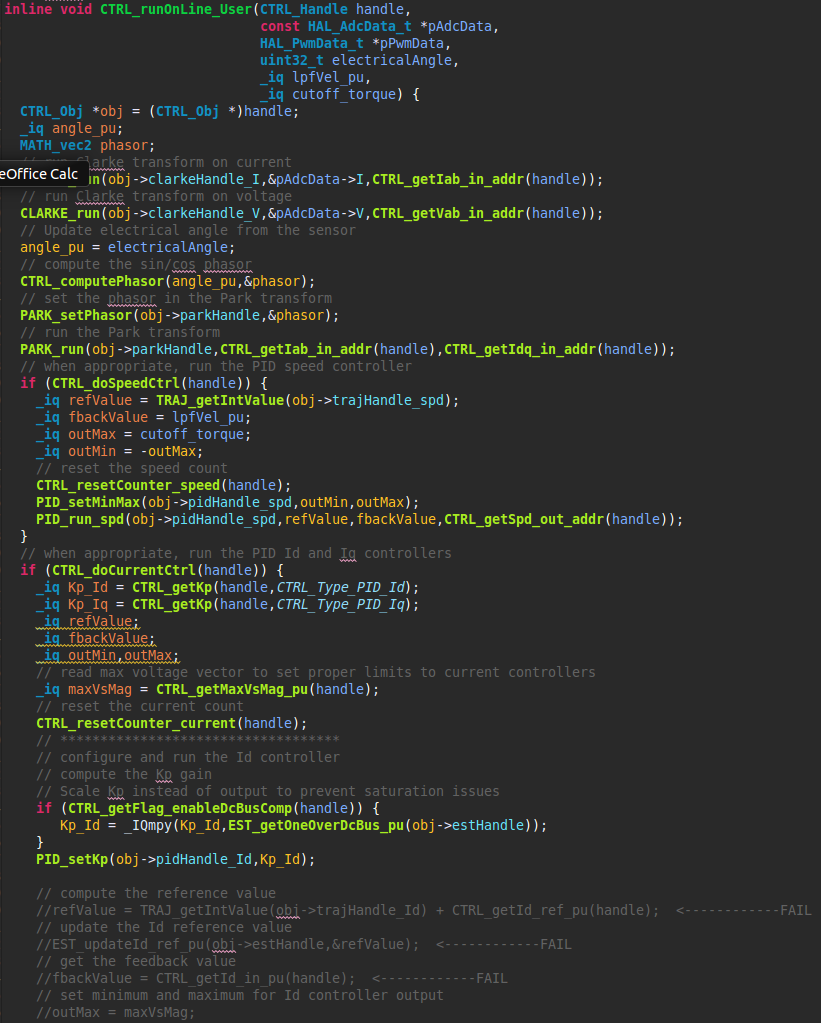
  • So, I went through and uncommented blocks of code to find where it was crashing and found 16 functions in the CTRL_runOnline_user() that caused crashes, not sure what they share in common that's causing crashes seems to be kind of random to me, other than accessing the CTRL_Obj:

    Park and Clarke transformations seem to run fine, as well as the speed control PID.

    Seems like most functions inside the current control section fail when run I have them commented out and marked if they crashed the tasks when they were run.

    1 function also caused some weird clock skew in the OS(line 2156) caused the led task to blink noticeably faster and slower than 1Hz which is what its set to do with SYSBIOS clock function.

  • You haven't allocated any memory range from 0x13800 to 0x14000 in the linked command file, correct? The F28069F_ram_lnk.cmd reserves that location for the EST and CTRL objects, just want to make sure that you're using that linker command file

    Sean
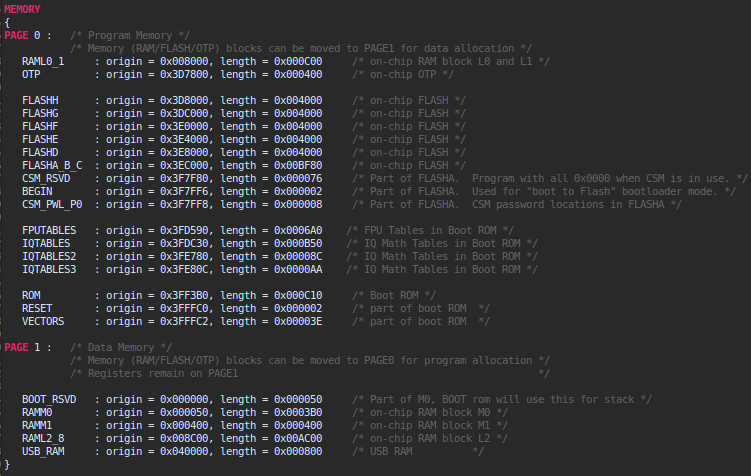
  • This is my linker file, you'll notice that most of my RAM is in one block, and it doesn't run into those memory locations.

  • It seems it is a root issue with the CTRL_Obj. I understand the handle doesn't change, but what about the next 200 bytes? You said they change as expected, but I'm not sure what's happening if everything is working as intended inside the object.

    I've created a spreadsheet that lists the members of the object and the resolved addresses when the base is known. For the F28069M, the base is 0x13800. Can you try manipulating the object directly after the instantiation and initialization, using known get/set functions to test that it's been properly placed in RAM?

    Once CTRL_initCtrl() and CTRL_setParams() has been called, please try some get/sets like enableDcBusComp() or similar and check the memory map in CCS to make sure it's working as intended. I would like to know that that is working before you start further with the RTOS stuff

    /cfs-file/__key/communityserver-discussions-components-files/171/2543.CTRL_5F00_Obj-address-table.xlsx

  • Having some trouble with the memory browser debugging but when I do a get->set->get I can see the value change as expected but I don't know if the memory browser is reflecting what is actually happening. The memory looks the same between the RTOS, and non-RTOS versions. This program has completely working on a bare-metal version so I'm unsure what could be happening. Are there components of the structure or code that are sensitive to being run in the context of an RTOS?
  • Unfortunately it's hard for me to answer that question as we've never used InstaSPIN with an RTOS on our end. Generally, if the ADC SOC ISR (mainISR) can run without issue, it should be ok, but there are also set-up functions for the CTRL (and subsequently the EST) modules that happen in the background loop. They are not necessarily time sensitive, but our program structure typically expects them to run periodically against the mainISR.

    Are you able to get the RTOS working if you use only the mainISR and a single thread? I would try to see if you can get the RTOS working in a use case that is closest to the non-RTOS version (i.e two threads, highest priority being the mainISR and lowest being the background task).

    Sean
  • The way I have it set up is:

    main():

    Initialize HAL,

    check for errors in user params,

    set user params,

    set hal params(not timer 1 or any PIE functions),

    init control structure,

    fill control structure with all params,

    setup faults,

    enable adc interrupt, 

    setup encoder, 

    setup a separate traj handle that I'm using,

    setup ST components,

    enable DRV,

    enable bus comp,

    compute scaling factors,

    start bios

    Motorware task(runs as fast as allowed yields once per loop):

    The same loop as Lab12b, except for that it checks which control mode it's in according to my code and sets max accel + speed, iq_ref, or position(dummy value) as needed.

    main_isr(called controlLoop):

    The same as the ISR from lab 12b minus led toggling logic.

    When it is run like this the motorware task(OS  components) crash, and only the HWI(main_isr) is run.

  • Hey Sean,

    Checking in on this issue as I haven't heard back in a while. I am wondering if maybe it's an issue with timer0 as the bios uses that as it's main tick source and there's an interrupt setup function in the HAL library, Does motorware call this somewhere? Have you found anything else that could be a conflict. Need to get this working for a product I'm working on.

  • CPU timer 0 is not reserved for Motorware/InstaSPIN, so that shouldn't be an issue. I'm still wondering if there is an issue accessing the CTRL or EST objects as the errors occur when referencing the CTRL handle. When stuck in the HWI, does the PWM continue to generate a signal to the FET driver?

    Sean
  • Sorry for the delay on replying, have been very busy lately. I am fairly sure that the problem is the CTRL_run function just takes too long inside the interrupt context. The PWM is disabled in the initialization of main() and then re-enabled in the motorware task if I disable the ctrl_run function, it will allow the OS enough time to run code between interrupts, like running the other tasks, which re-enables the PWM. I timed the interrupt by setting an LED high at the beginning and back low at the end and the waveform shows a 75-80% duty cycle at 20kHz. Is there any way I can trim ctrl_run for a specific application or run it in a less time critical context?

  • Also, I just found that if I enable compiler optimization level 2, it is able to run the tasks as shown and has a duty cycle of closer to 50%

    This is what the Task profiler looks like:

  • Update:

    The motor seems to feel like its stuck in an RS Recal state, I think this is because it doesn't run the motorware task. Also, the ISR is showing some weird instability, I have removed all extra things from the interrupt other than what is needed. The needed things being encoder read, adc read, ctrl_run, and ctrl_setup.

    This is what the timing of the ISR looks like:

    It looks the same with CTRL_Run commented out, just a lower CPU utilization.

  • So It turns out that the EST_run function is causing the ISR to run too long. When I set the motor identified flag to true, and the run rs_recalc to false, it skips over the ctrl_runonline which runs the EST_run function, but the motor is still acting as though it is doing the rs calculation(has a small amount of current holding the rotor). It seems when the estimator version is running the estimator state goes from idle->rs->idle and doesn't complete the estimation. I can force it to go from idle->online, but it still seems to be setting the ID reference to something above 0. Any idea what's going on here?