This thread has been locked.

If you have a related question, please click the "Ask a related question" button in the top right corner. The newly created question will be automatically linked to this question.

Compiler/TMS320F28069F: Load Program Error

Part Number: TMS320F28069F
Other Parts Discussed in Thread: TMS320F28069, C2000WARE,

Tool/software: TI C/C++ Compiler

showing the error in console

C28xx: Failed CPU Reset: (Error -1137 @ 0x6) Device is held in reset. Take the device out of reset, and retry the operation. (Emulation package 8.0.27.9)
C28xx: Trouble Reading Register PC: (Error -1137 @ 0x0) Device is held in reset. Take the device out of reset, and retry the operation. (Emulation package 8.0.27.9)
C28xx: Trouble Reading Register ST1: (Error -1137 @ 0x6) Device is held in reset. Take the device out of reset, and retry the operation. (Emulation package 8.0.27.9)
C28xx: GEL: Error while executing OnReset(1): Target failed to read register ST1
  at (ST1&~(0x0100)) [f28069.gel:312]
  at C28x_Mode() [f28069.gel:32]
  at OnReset(1)
C28xx: Flash Programmer: Warning: The configured device (TMS320F28069), does not match the detected device (). Flash Programming operations could be affected. Please consider modifying your target configuration file.
C28xx: Failed CPU Reset: (Error -1137 @ 0x0) Device is held in reset. Take the device out of reset, and retry the operation. (Emulation package 8.0.27.9)
C28xx: Trouble Reading Register PC: (Error -1137 @ 0x0) Device is held in reset. Take the device out of reset, and retry the operation. (Emulation package 8.0.27.9)
C28xx: Trouble Reading Register ST1: (Error -1137 @ 0x6) Device is held in reset. Take the device out of reset, and retry the operation. (Emulation package 8.0.27.9)
C28xx: GEL: Error while executing OnReset(1): Target failed to read register ST1
  at (ST1&~(0x0100)) [f28069.gel:312]
  at C28x_Mode() [f28069.gel:32]
  at OnReset(1)
C28xx: Trouble Writing Memory Block at 0x0 on Page 0 of Length 0x2: (Error -1137 @ 0x6) Device is held in reset. Take the device out of reset, and retry the operation. (Emulation package 8.0.27.9)
C28xx: File Loader: Verification failed: Target failed to write 0x00000@Program
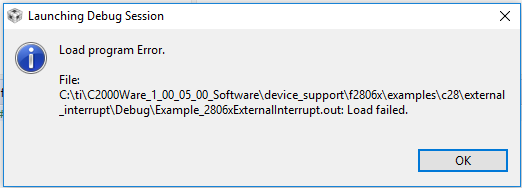
C28xx: GEL: File: C:\ti\C2000Ware_1_00_05_00_Software\device_support\f2806x\examples\c28\gpio_setup\Debug\Example_2806xGpioSetup.out: Load failed.
  • Aash,
    I know we have another thread going on connecting the JTAG from the 28027LP to your target. Want to make sure that is resolved/different before responding here.

    Will look for your reply and act accordingly.

    Best,
    Matthew
  • hello Sir,

    my problem still not resolved. plz help me out??


    thankyou
  • Part Number: TMS320F28069F

    I am using TMS320F28069

    When I erasing flash through xds100v2 (launchpad f28027f)

    its shows error ,device held in reset

    [18:26:41] Begin Erase Flash operation.
    [18:26:41] ERROR >> C28xx: Failed CPU Reset: (Error -1137 @ 0x6) Device is held in reset. Take the device out of reset, and retry the operation. (Emulation package 6.0.83.1)
    [18:26:42] ERROR >> C28xx: Trouble Reading Register PC: (Error -1137 @ 0x0) Device is held in reset. Take the device out of reset, and retry the operation. (Emulation package 6.0.83.1)
    [18:26:42] ERROR >> C28xx: Trouble Reading Register ST1: (Error -1137 @ 0x6) Device is held in reset. Take the device out of reset, and retry the operation. (Emulation package 6.0.83.1)
    [18:26:42] ERROR >> C28xx: GEL: Error while executing OnReset(1): Target failed to read register ST1
     at (ST1&~(0x0100)) [f28069.gel:301]
     at C28x_Mode() [f28069.gel:32]
     at OnReset(1)
    [18:26:42] ERROR >> C28xx: Trouble Writing Memory Block at 0x7012 on Page 1 of Length 0x1: (Error -1137 @ 0x7013) Device is held in reset. Take the device out of reset, and retry the operation. (Emulation package 6.0.83.1)
    [18:26:42] ERROR >> C28xx: Error occurred during flash operation: Target failed to write 0x00007012@Data
    I am attaching my schematics,plz verify it 2477.file5B437296-MCU.pdf
  • Aash,

    Please check out this app note http://www.ti.com/lit/spracf0 there is a specific section that talks about using some manual methods to connect and download code when there are system stability issues that will help.

    There are alot of steps/config dependencies when you use the "Debug" Icon to launch the session.

    Best,

    Matthew