This thread has been locked.

If you have a related question, please click the "Ask a related question" button in the top right corner. The newly created question will be automatically linked to this question.

Compiler/TMS320F28334: TMS320F28334

Part Number: TMS320F28334
Other Parts Discussed in Thread: C2000WARE, TMDSCNCD28335, SN75C3232, MAX3221

Tool/software: TI C/C++ Compiler

Hi Sal,

Greetings for the day,

I tried the below methods suggested by you

1.I have tried making the change you suggested ,but still it was not flashing the code into the controller,i think that the flash sectors are not being erased.after few minutes it was coming out the command terminal.
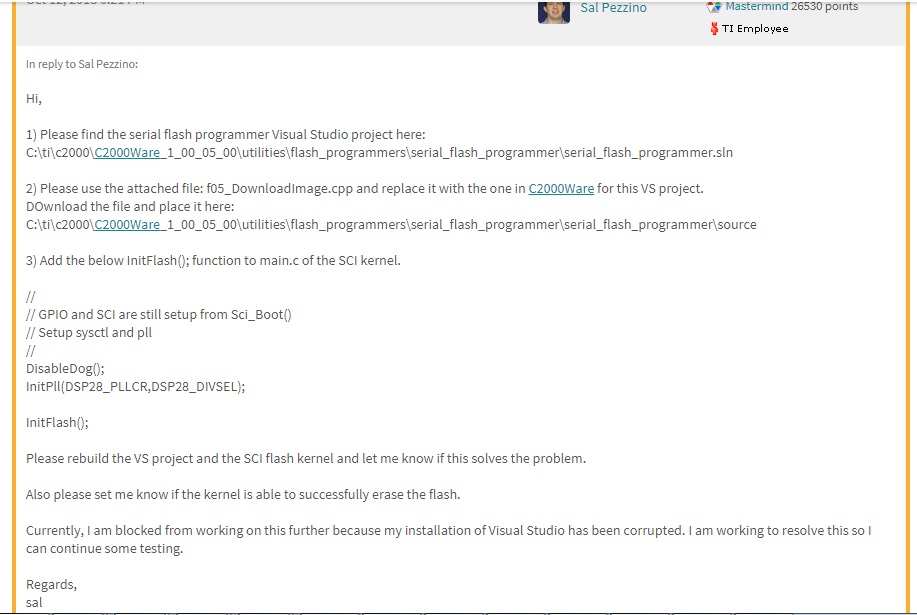
for reference am sharing the screen shots, please find the attachments

2.And i I have tried the second method  you suggested ,like i have created one f28334_flash_kernel project  in CCS and open properties and making the change you suggested "-InitBoot" ,but .after this iam not getting what to do

3.And can you please tell me how to run the kernel from the CCS  and send it the flash application using the Visual Studio project to begin debugging my issue,because we are having .txt application file(binary format) and custom GUI.

4.And in below blog you told that add some delay ,we are not developed the application file,we have .txt file (binary format ) which was provided by client.can you please tell step by step  the procedure how to add the delay in serial flash programmer after loading the kernel and other procedure which was mentioned by you in above

Iam waiting for your kind reply

Thanks & Regards

Gangadhararao

  • Try using the attached serial flash programmer .exe and kernel.txt.

    I was able to get this working.

    sal

    Gangadhararao.zip

  • Hi Sal,

    Thank you very much for sharing the files,i have replaced the serial flash programmer and kernel file which was shared by you , after application auto-baud successful,it was getting stuck and not coming out,and i have waited for more than 1 hour,i have checked my output ,the code was not programmed

    And i have tried with 3 different kernals files shared by you,all are happening in same way only after application auto baud successful, it was not coming out

    Am sharing screen shot ,Can you please see where am doing wrong in the arguments passing in command terminal

    C:\ti\c2000\C2000Ware_1_00_06_00\utilities\flash_programmers\serial_flash_programmer>serial_flash_programmer.exe -d f2803x -k kernel_flash2.txt -a PQCR_DACTesting_1.5V.txt -p COM5 -b 9600 -v

    Iam waiting for your kind reply

    Thanks & Regards

    Gangadhararao G

  • Which GPIO pins are you using to load the kernel? In other words, which GPIO SCI pins are you using for the bootloader?

    sal
  • Hi Sal,

    Thank you so much for your quick response,we are using below GPIO pins for serial flash programming. our controller was "TMS320F28334PGFA"

    SCI-A

    GPIO 28-SCIRX

    GPIO 29-SCITX

    iam waiting for your kind reply

    Thanks & Regards

    Gangadhararao G

  • Hi Sal,

    Please give reply

    Thanks &Regards

    Gangadhararao G

  • Hi Sal,

    We are waiting for your reply,requesting you to please give reply soon

    Thanks & Regards

    Gangadhararao G

  • G,

    You will need to start debugging on your own now. I have gotten this working on the F2833x control CARD.

    Please use the provided Visual Studio project and kernel CCS project to debug your issue. There may be some timing issue between the autobaud lock and sending the flash application. Perhaps you can add a greater delay in the serial flash programmer after the autobaud lock and before sending the application.

    Good luck.

    sal

  • Hi Sal,

    we are using below GPIO pins for serial flash programming. our controller was "TMS320F28334PGFA" is it correct or not

    SCI-A

    GPIO 28-SCIRX

    GPIO 29-SCITX

    iam waiting for your kind reply

    Thanks & Regards

    Gangadhararao G
  • Yes, those are the same pins used by the kernel.

    sal
  •  Hi Sal,

    Iam not familiar with visual studio and CCS ,can you please tell me some what clearly to debug

    Actually we are using the command prompt console to flash the application, so iam unable to figure out where to add delay.

    Please find the screen shot attached

    Thanks

    Gangadhararao G

  • Hi Sal,

    Please guide me how to use Visual Studio project and kernel CCS project to debug my issue,


    Iam from india, now indian time was 9 PM,so morning 9:00 AM to still now, we were waiting for your reply,i think you will come to office at 6:30 PM as per indian time ,so still entire night we are waiting for your reply in office,please help us to resolve this issue

    Iam waiting for your kind reply

    Thanks & Regards
    Gangadhararo G
  • Hi Sal,

    Please give reply

    Thanks & Regards
    Gangadhararao G
  • Hi Sal,,

    We are waiting for your reply,please give reply

    Thanks & Regards
    Gangadhararao G
  • Hi Sal,

    Atleast please tell how to do it from visual studio.


    Thanks
    Gangadhararao G
  •  Hi Sal,

    1.You told me to replace f05_DownloadImage.cpp  file with existing file, i think you missed to attach the file. please can you share

    2.And you mentioned ike add initFlash();function to main.c of the SCI kernel,but i did n't find SCI kernel file in c2000ware  ,i could see f28335_flash_kernel. are you referring to same folder or we missing out that details? did you mean below is the folder path and file i need to change

    C:\ti\c2000\C2000Ware_1_00_06_00\device_support\f2833x\examples\f28335_flash_kernel\main.c

    Thanks & Regards

    Gangadhararao G

  • Hi Sal,


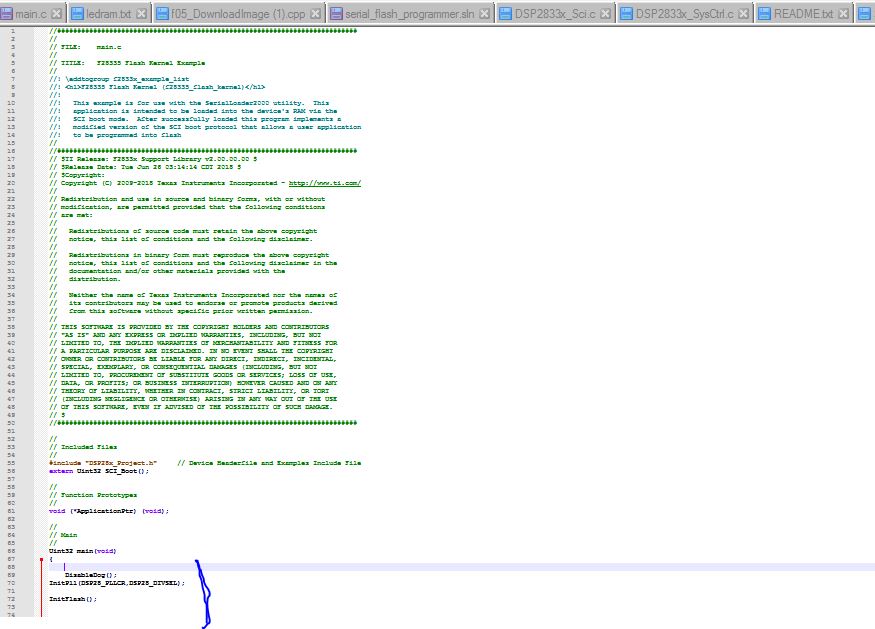
    1.You told me to replace f05_DownloadImage.cpp file with existing f05_DownloadImage.cpp file,i think you missed to attach the file. please can you share f05_DownloadImage.cpp file

    2.And you mentioned ike add initFlash(); function to main.c of the SCI kernel,but i did n't find SCI kernel file in c2000Ware ,i could see only f28335_flash_kernel. are you referring to same folder or we missing out that details? did you mean below is the folder path and file i need to change,please share the main.c of the SCI kernel file

    C:\ti\c2000\C2000Ware_1_00_06_00\device_support\f2833x\examples\f28335_flash_kernel\main.c

    3.Please share the visual studio projects


    Iam waiting for your kind reply


    Thanks & Regards
    Gangadhararao G
  • Hi Sal,,.


    Please Give reply

    Thanks & Regards
    Gangadhararao G
  • HI TI Community,


    Past 2 days we are asking for reply and sending mails ,but no response, due to this our project got stucked for delivery to customer, but Ti community they were not taking as serious, past 6 months we are asking to debug but failed to debug my issue,previously we have used NXP and ST controllers and still we were using ,there is very good support and well response from community and they resolves our issue,but TI were not ,

    Please escalate this issue to higher authority team,because we are in production and due to this our project in critical condition

    Please provide source file for debugging our issue

    Thanks & Regards
    Gangadhararao G
  •  Hi Sal,

    Hi Sal,

    Greetings for the day and Thanks for your support,

    1.You told me to replace f05_DownloadImage.cpp  file with existing file, i think you missed to attach the file. please can you share

    2.And you mentioned like add initFlash();function to main.c of the SCI kernel,but i did n't find SCI kernel file in c2000ware  ,i could see f28335_flash_kernel. are you referring to same folder or we missing out that details? did you mean below is the folder path and file i need to change

     C:\ti\c2000\C2000Ware_1_00_06_00\device_support\f2833x\examples\f28335_flash_kernel\main.c

    Thanks & Regards

    Gangadhararao G

  • Hi Sal,

    You forget to attach f05_DownloadImage.cpp file  please send the f05_DownloadImage.cpp file

    Thanks & Regards

    Gangadhararao G

  • Please find the file attached.

    As I mentioned before, this is working fine for me. You will need to debug your issue for yourself. I can assist in this with suggestions like I have before. Depending on the frequency of your device and board set-up you may need to adjust the delays in the serial flash programmer and the kernel to allow for the kernel to complete erasing the flash before sending the flash application.

    Hope this helps.

    sal

    7573.f05_DownloadImage.cpp

  • Hi Sal,

    Iam using 30 MHZ external crystal and on chip PLL is configured for 150 MHZ system clock

    Thanks & Regards

    Gangadhararao G
  • Hi Sal,

    1.Now kernel is loading and auto baud successful also happening,good to seen some response ,After that application has to load into controller,but it was not happening,i waited for more than 2 hours, still it was not coming out from the terminal,it was stuck there.below is the command line,am i doing anything wrong in this command line

    C:\ti\c2000\C2000Ware_1_00_06_00\utilities\flash_programmers\serial_flash_programmer>serial_flash_programmer.exe -d f2803x -k kernel.txt -a PCR.txt -p COM5 -b 9600 -v

    2.I have replaced the kernel file and f05_DownloadImage.cpp shared by you,and tried in visual studio also same thing happening

    For reference am sharing screen shot please find the attached screen shot.

    Iam waiting for your kind reply


    Thanks & Regards

    Gangadhararao G

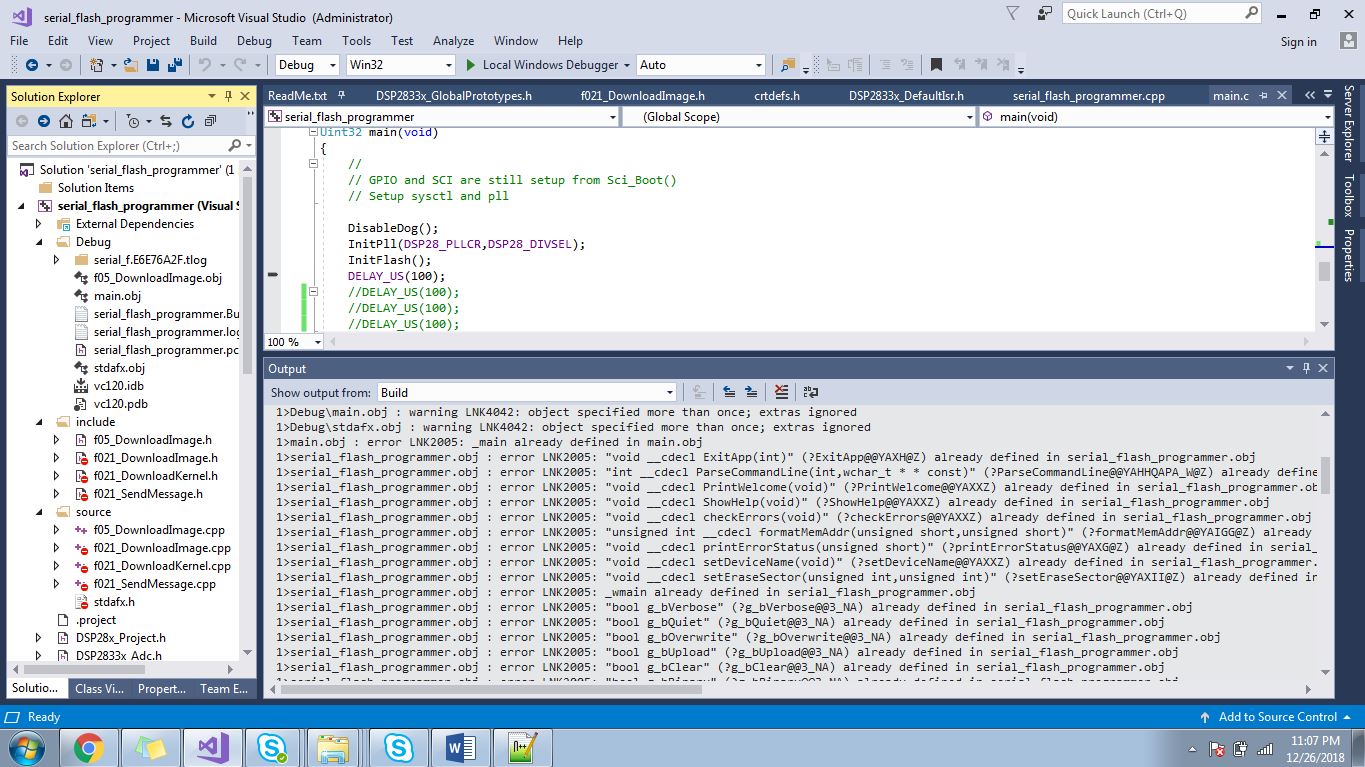
  • Hi Sal,

    As per your suggestion i have run serial flash programmer using visual studio project,it was asked supporting files and then i have added supporting files  after that the following errors were coming

    Please find the attachment

    Thanks & Regards

    Gangadhararao G

  •  Hi Sal,

    Thank you for sharing "7573.f05_DownloadImage.cpp" file and "kernel.txt" file,and "serial flash programmer" by using this "kernel file" &  "serial flash programmer" now we can able to load the kernel into the controller and auto baud successful also happening.

    And we have loaded the visual studio project from c2000Ware and trying to run the "7573.f05_DownloadImage.cpp" file" into the controller,it was not coming out from the below loop

    {

    ReadFile(file, &rcvData, 1, &dwRead, NULL);

    }

    I am sharing the screen shots and file also for reference,please find the attachment unable to load the 

    Also irrespective of the application program , we are unable to flash any other example application program like led.txt shared by you. Even the led.txt program is facing the same issue with the Readfile function. If you can kindly help us with the flashing of sample led.txt file, we can flash our application program. 

    0160.7573.f05_DownloadImage.cpp

    Thanks & Regards

    Gangadhararao G

  • The PC is waiting for data.

    It looks like the PC has performed a successful autobaud lock. Then it sends the 22 words of header file information. And it waiting for the checksum to return but it doesn't return.

    Can you try adding a larger delay at line 186. Change to Sleep(6000); and try that.

    I believe this is a timing issue.

    sal
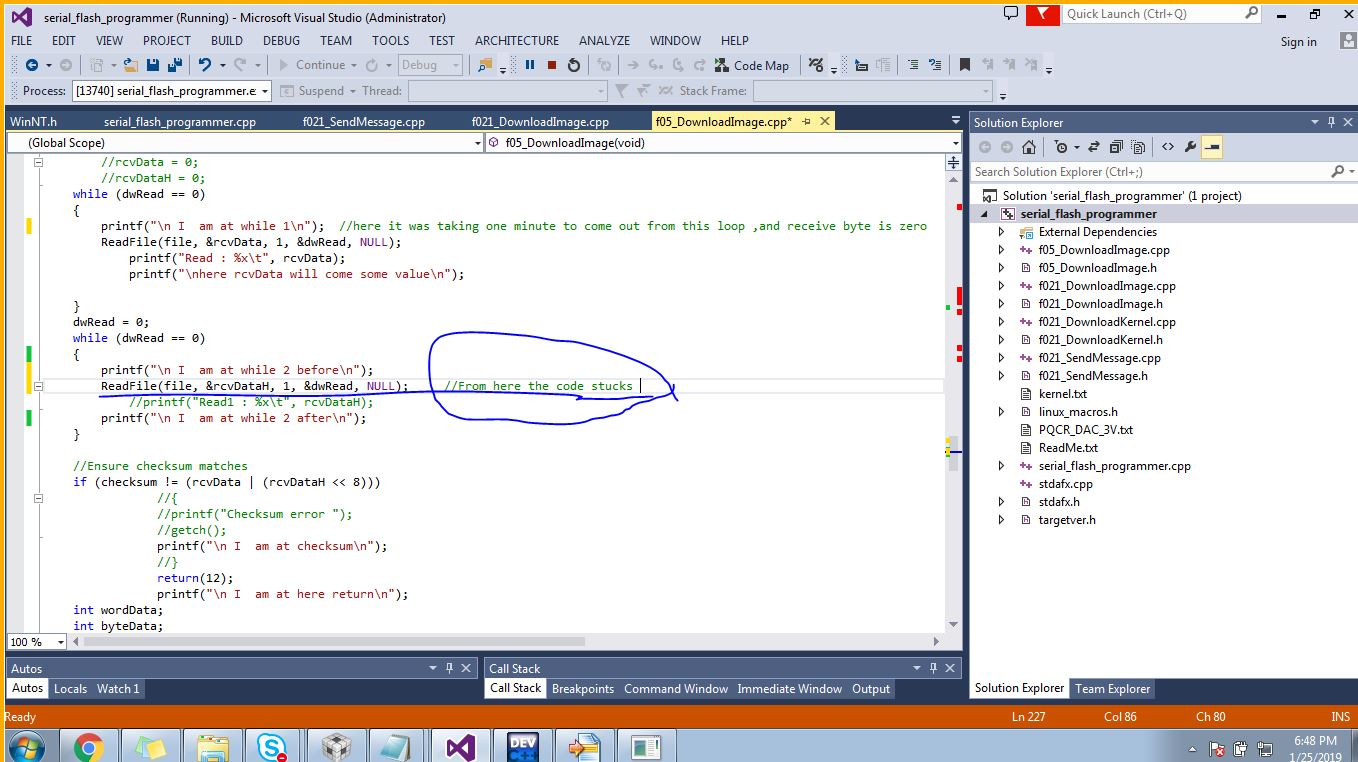
  • Yes the PC is waiting for the data but I reckon this is not the issue with the timing . I have clearly mentioned that program flow is not happening after the second "Readfile" function [line 213] and even after changing to Sleep(6000) I'm facing the same problem. The issue is with the Readfile function and the "unsigned int" variables "rcvData" and "rcvDatah" are not receiving the correct values that they should be receiving if Readfile function gets executed properly.
    Also as you said, the checksum has the 22 words of header information which I have checked and this has to match with the
    "(rcvData | (rcvDataH << 8))" as in the line 217 so that the program will not "return(12)" , and since the second "Readfile" function [line 213] is not getting executed the variable "rcvDatah" is not receiving anything. I would also like to mention here that I have tried printing "rcvData" from the first "Readfile" function [line 208] and every time it is printing only '0'.
    So kindly let me know what this Readfile function has to do if at all if the checksum has to match with those two variables.

    Thanks & Regards
    Gangadhararao G
  • Hi Sal,

    As you suggested we are added larger delay than Sleep(6000), but it did not working. How we get to know the Kernel is loaded into controller? How we send command to kernel(for checking kernel loaded or not)?

    We are not able to load Application file, After successful  autobaud lock, then it send 22 words of header and we are getting checksum error. And some time "ReadFile(file, &rcvData, 1, &dwRead, NULL);"  rcvData getting zero value which means no response getting from controller.

    please find attached screenshot

    Any suggestion from from your side,am waiting for your reply

    Thanks & Regards

    Gangadhararao G

  • You will need to debug this.

    You can try to connect to the device and add the kernel symbols to it. Connect to the device with a modified GEL file so that it does not reset the device on target connect. And then you can see where the CPU is trying to execute and see what the CPU is doing when you are not getting a response.

    You need to debug to see why you are not getting a response.

    sal
  • Hi Sal,

    1.As you said that "add the kernel symbols",i did n't found any kernel symbols in visual studio project but i found only  "Tools--->options--->symbols"

    below is the screen shot am sharing

    2.As you suggested that connect to the device with a "modified GEL file",is this the below file i need to add,am sharing the path screen shot please find the attachment


    Thanks & Regards

    Gangadhararao G
  • Hi Sal,

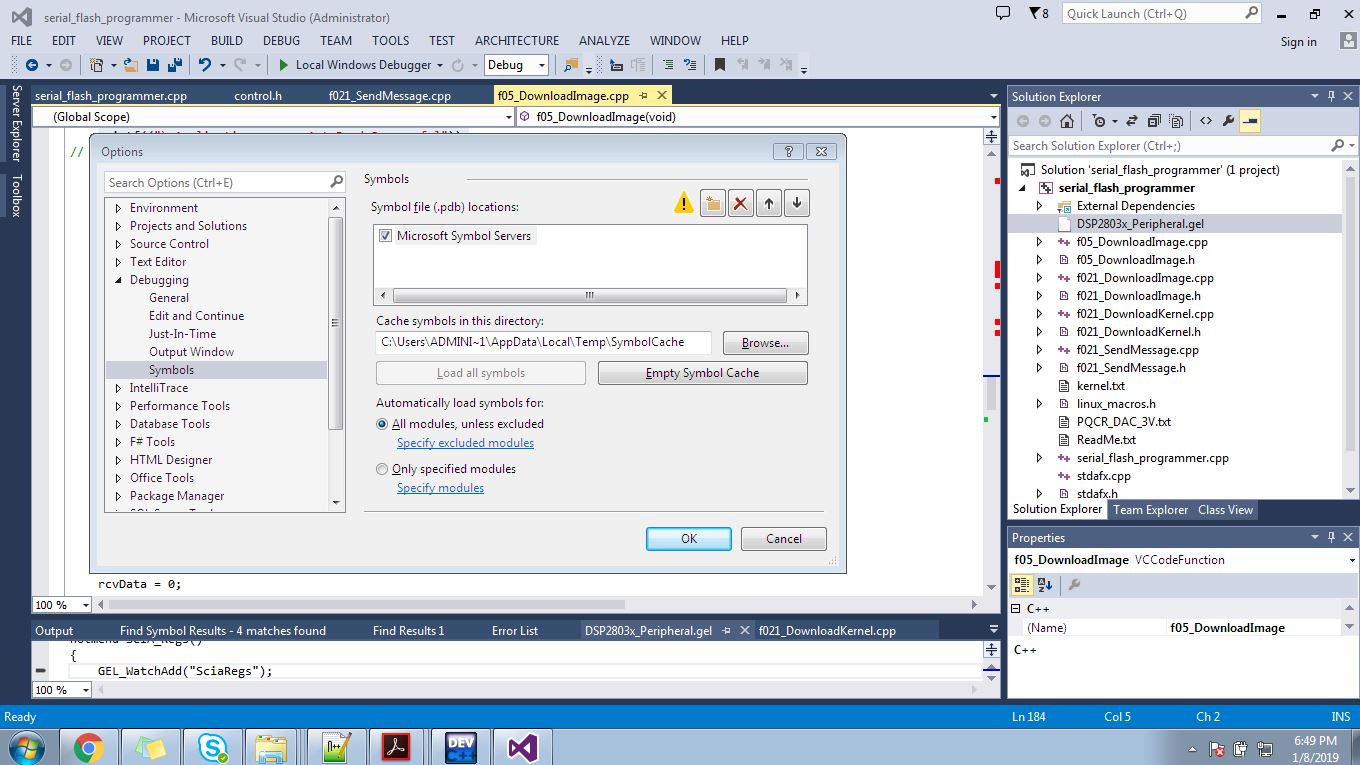
    1.As you said before "add the kernel symbols",i did n't found any kernel symbols in visual studio project but i found only  "Tools--->options--->symbols"

    below is the screen shot am sharing

    2.As you suggested that connect to the device with a "modified GEL file",is this the below file i need to add,am sharing the path screen shot please find the attachment

    Is this the correct path and file am using,please confirm

    Iam waiting for your reply

    Thanks & Regards

    Gangadhararao G

  • You need to connect to the device in CCS and add symbols in CCS, not Visual Studio.

    You need to modify whatever GEL file you are using. You can find this in the "Tools" CCS drop down windows after you launch the target configuration file. Comment out the code to reset the device on target connect or load so that the reset does not occur when you connect. Then you can add the kernel symbols and see where the CPU is executing.

    sal
  • Hi Sal,

    As you suggested we modified GEL file and commented reset code.While we are trying to load kernel symbols we got error given below. Please let us know whether we doing correctly or not.

    Iam waiting for your kind reply

    Thanks & regards,

    Gangadhararao G

  • Make sure you "Add Symbols." Do not load symbols. The idea is that you have already loaded the kernel into RAM, but now want to connect to the device to see what the CPU is doing. Do you are going to connect to the CPU and Add Symbols so that you can see what line of code the CPU is executing and how the program is executing so you can begin to debug.

    sal
  • HI Sal,

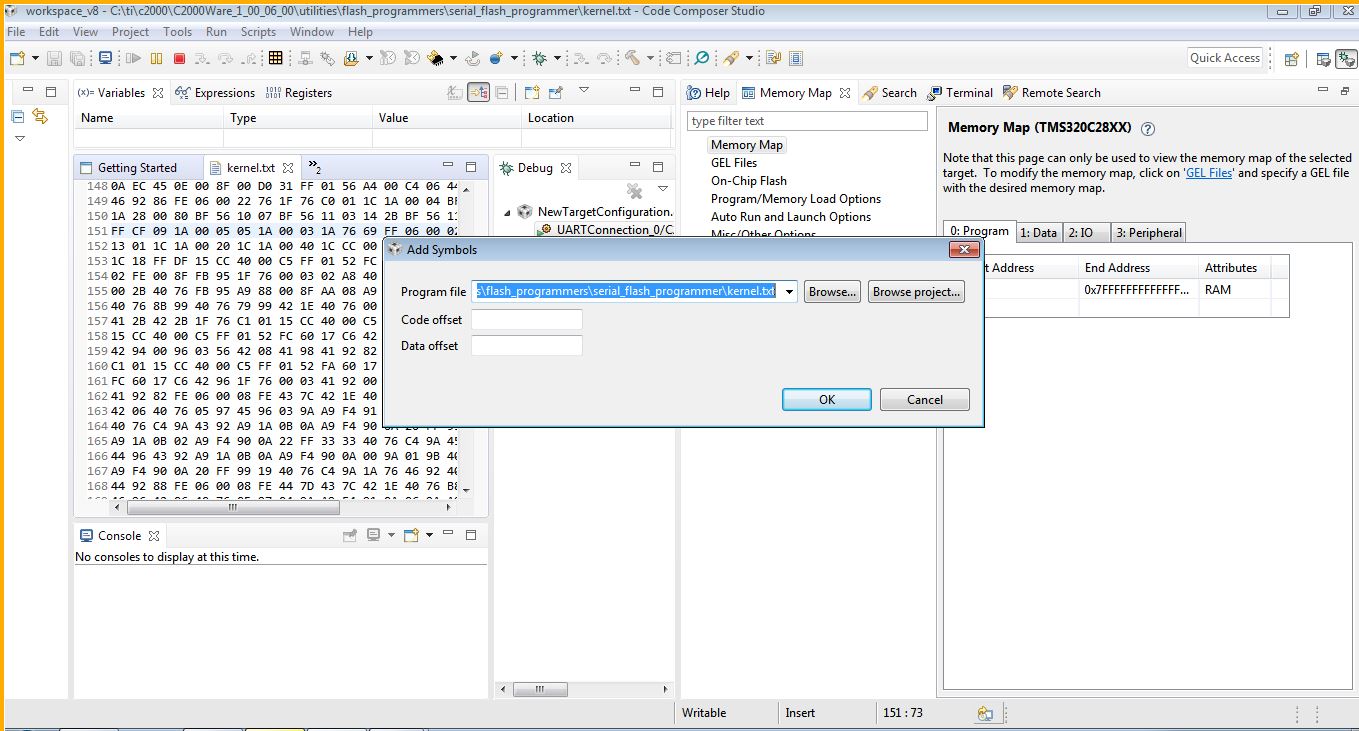
    As you suggested "Add Symbol", we follow same procedure and we selected "kernal.txt" file.

    but we got below error

    please let us know what file we need to add,for reference am sharing the screen shots, please find the attachments

    Thanks & Regards

    Gangadhararao G
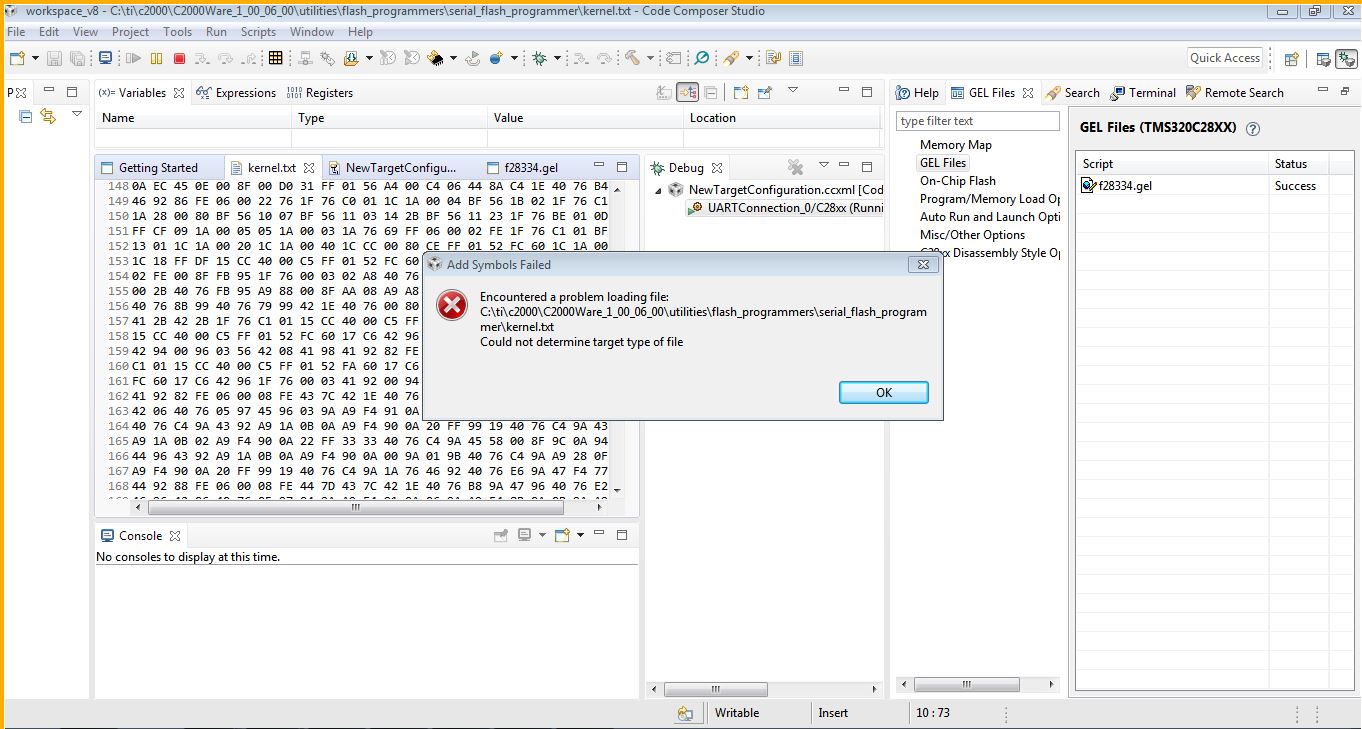
  • kernel.txt is the hex file containing the data. You need to select a .out file. The .out is the symbols.

    sal
  • Hi Sal,

    Thank you for reply,

    You mean to say like
    1. we need to convert this kernel.txt file into kernel.out file ??? (or)
    2. Application file (myfile.txt) to (myfile.out)

    Which file we need to use and convert into .out file


    Iam waiting for your kind reply

    Thanks & Regards
    Gangadhararao G
  • Hi Sal,

    Thank you for reply,

    You mean to say like 
    1. we need to convert this kernel.txt file into kernel.out file ??? (or) 
    2. Application file (myfile.txt) to (myfile.out)

    Which file we need to use and convert into .out file


    Iam waiting for your kind reply

    Thanks & Regards
    Gangadhararao G

  • Hi Sal,


    It means 1. we need to convert this kernel.txt file into kernel.out file ??? (or)
    2. Application file (myfile.txt) to (myfile.out)

    Please tell Which file we need to use and convert into .out file


    Iam waiting for your kind reply

    Thanks & Regards
    Gangadhararao G
  • Hi Sal,

    It means   1. we need to convert this kernel.txt file into kernel.out file ??? (or)

                     2. Application file (myfile.txt) to (myfile.out)

    Please tell Which file we need to use and convert into .out file

    Iam waiting for your kind reply

    Thanks & Regards

    Gangadhararao G
  •  Hi Sal,

    While debugging our code  Visual Studio stuck at the below point,am sharing screen shot. please suggest what might be the issue.

    Thanks & Regards

    Gangadhararao G

  •  Hi Sal,

    While flashing 7573.f05_DownloadImage.cpp code using Visual Studio stuck at the below point,am sharing screen shot. please suggest what might be the issue.

    Thanks & Regards

    Gangadhararao G

  • I got this working again.

    I was successful using the kernel, serial flash programmer, and blinky example.

    Please execute the below command using the files I provided in the ZIP to confirm. Use the correct COM port for your setup.

    serial_flash_programmer.exe -d f2833x -v -k f28335_flash_kernel.txt -a Example_2833xLEDBlink.txt -p COM13

    Regards,

    sal

    8080.f2833.zip

  • Hi Sal,

    We had tried as per your suggestion,but no luck, Could you please tell Which com port drivers are using in your control card, so that we will try using those drivers.
    In our custom board we are using FTDI chip and ftdi drivers.

    Iam waiting for your kind reply

    Thanks & Regards
    Gangadhararao G
  • Hi,

    I am not sure how this is relevant. I have gotten this working multiple times with what I have sent you. Perhaps the issue is with your board and perhaps the flash erase and programming times are very large.

    The issue either to do with your board or it is to do with the timing and synchronization in the SCI communication. You will need to make sure the data is communicated effectively either by adding delays in the PC code or by adding an additional handshake.

    Good luck.

    sal
  • Please try this again. I have gotten this working.

    sal

    5040.serial_flash_programmer_f2833x.zip

  • Hi Sal,

    I have tried using your above zip file,still no luck. is this the control card you are using (F28335 controlCARD ZJZ Schematic [R2.2]),or if you are using other control card ,please share your control card schematic which you have tested , so that we will compare your control card with our custom board ,if any modifications required we will change

    Thanks & Regards
    Gangadhararao G
  • I am using the F28335ZJZ2A device with the F28335 controlCARD RELEASE 2.2.

    The schematic is in C2000Ware. C:\ti\c2000\C2000Ware_1_00_06_00\boards\controlCARDs\TMDSCNCD28335\F28335controlCARD_HWDevPkg_ZJZ [R2.2]

    sal
  • This user was able to get it working with what I sent: e2e.ti.com/.../2872783

    sal