Part Number: TMS320F28388D
Other Parts Discussed in Thread: SYSBIOS
Hi all,
I want ti add a timer in my BIOS project for CM core, but it throws an exception like below when I configure it in the GUI.
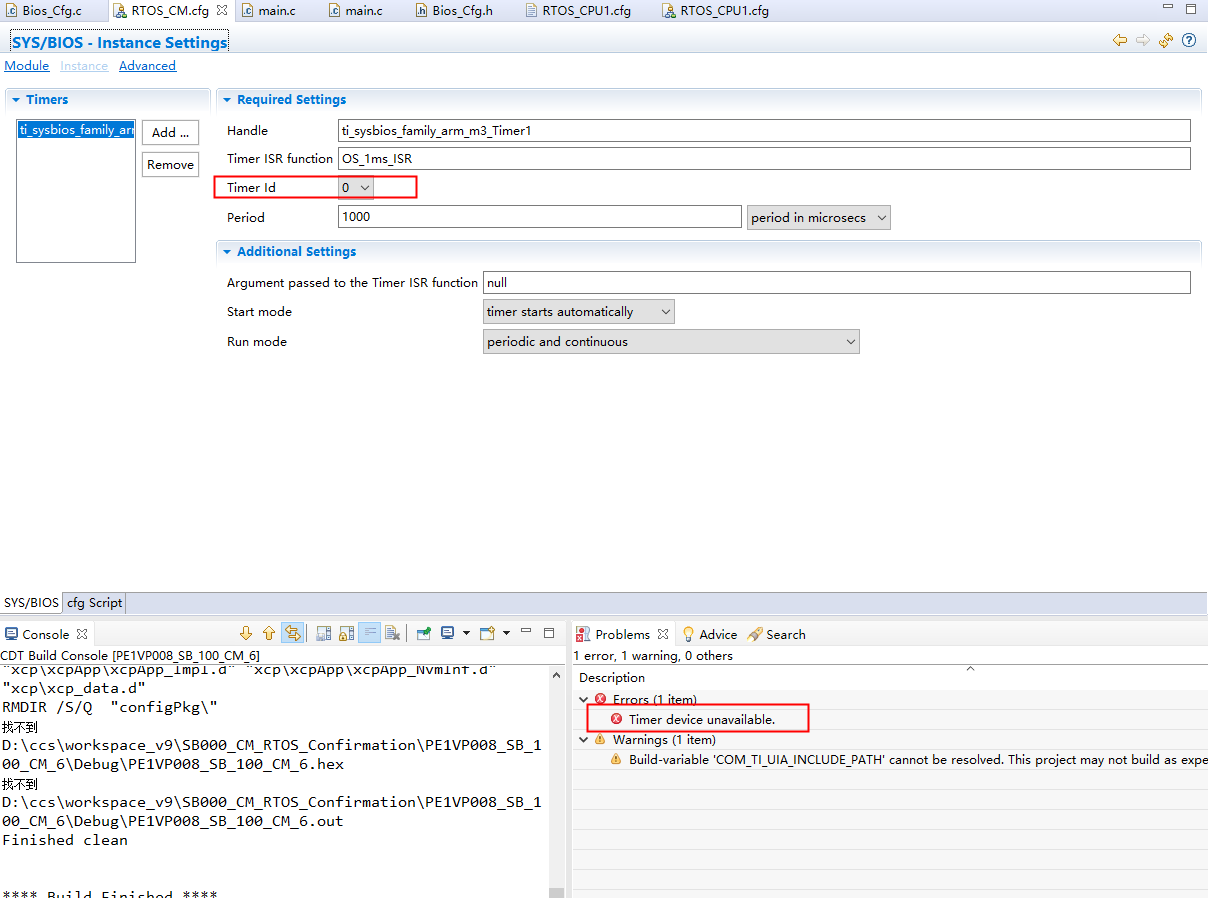
So how to select the Timer ID?
Thanks a lot!
QL
This thread has been locked.
If you have a related question, please click the "Ask a related question" button in the top right corner. The newly created question will be automatically linked to this question.
Part Number: TMS320F28388D
Other Parts Discussed in Thread: SYSBIOS
Hi all,
I want ti add a timer in my BIOS project for CM core, but it throws an exception like below when I configure it in the GUI.
So how to select the Timer ID?
Thanks a lot!
QL
Hi QL,
The CortexM on the 28388D has one SysTick timer (ti_sysbios_family_arm_m3_Timer). By default the kernel uses that timer for the ti.sysbios.knl.Clock module to drive it's timing mechanism (e.g. Task_sleep, Semaphore_pend, etc.). Since there is only one SysTick timer (and it's being used by the kernel), when you try to use another, you get the error.
Options
1. You tell the Clock Module to not use a timer. Instead you call Clock_tick() at the configured rate. Please refer to the "Clock.tickSource = Clock.TickSource_USER;" discussion on the SYS/BIOS API Reference Guide (e.g. http://software-dl.ti.com/dsps/dsps_public_sw/sdo_sb/targetcontent/bios/sysbios/6_33_06_50/exports/bios_6_33_06_50/docs/cdoc/ti/sysbios/knl/Clock.html).
2. Use one of the GP timers (I believe there are 3 timers). For example, you could add the following into the .cfg file
var f2838x_Timer = xdc.useModule('ti.sysbios.family.arm.f2838x.Timer');
var f2838x_Timer0Params = new f2838x_Timer.Params();
f2838x_Timer0Params.instance.name = "f2838x_Timer0";
f2838x_Timer0Params.period = 10000;
Program.global.f2838x_Timer0 = f2838x_Timer.create(null, "&foo", f2838x_Timer0Params);
(and adjust the period and function name as needed).
Todd