This thread has been locked.

If you have a related question, please click the "Ask a related question" button in the top right corner. The newly created question will be automatically linked to this question.

TMS320F28069: Offset value to align ePWMs without using sync chain

Part Number: TMS320F28069
Other Parts Discussed in Thread: C2000WARE

Thanks for your support. I resolved my previous issue, but now I have slightly different issue

I am using 6 ePWMs (ePWM1 to ePWM6), all are currently working with 60kHz frequency and synchronized. I want to use ePWM5 at 20kHz all reamaing at 60kHz. Disabled the sync chain for ePWM5. But to retain the sync effect I want to introduce a offset value for ePWM5. Is there any method to calculate the offset value? When I subtracted 246 (based on 60kHz) from WA value, all PWMs are aligned properly. But I don't have any justification for this number. May be this is the delay between each ePWM.

Regards

Sajin Arakkan

  • Sajin,

    forgive me as I am not an expert with Embedded coder.

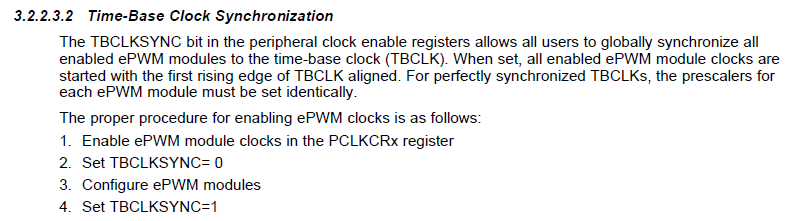
    To enable a C code customer I would recommend them to sync all PWMs at the beginning of their execution using the TBCLKSYNC. Since you just want to maintain a 0 degree clock phase between your master PWM, and ePWM5. Both PWMs share a clock, so they will not drift with time. 

    Looking at Embedded coder I don't think it supports this feature. Nevertheless, you can use TBPHS to synchronize the PWMs. I assume you already realize that for a continuous PWM cycle-by-cycle sync you will need your slowest PWM be the master. 

    So, to answer your question I would expect a delay of only a few cycles if you are using the sync chain. If Embedded coder just enables PWM5 sometime after the other PWMs, I cannot gaurentee that this value would remain consistent. It could be dependent on SW execution time, which could change with compiler versions. it really depends on how Embedded Coder translates to C code.

    Do you know how Embedded coder is syncing them, is it just with a random delay?

    Regards,
    Cody

  • Hi Cody,

    Thanks for giving this hint. Please tell me how to use TBCLKSYNC in c code. I will find out later how to use it in embedded coder.

    Regards

    Sajin

  • Hi Cody,

    I work on same project as Sajin. Background is that this project is a bi-directional DCDC converter. ePWMs 1-4 control the power FETs and ePWM5 is brake resistor control.

    I am trying to solve the problem by using C on a 28069 Piccolo launchpadXL. This is to see if this issue can be solved at the low level. If we can get this working then we can apply with Simulink.

    Just to re-iterate our requirements (due to hardware being frozen)

    ePWMs 1-4 (synced and all running at 60KHz)

    ePWM 5 (synced with above 4 and running at 20KHz)

    ePWM 6 (ADC soc trigger synced with 60KHz ePWMs 1-4).

    I think in your previous post you are saying that 60k PWM can't be synced with 20K. Only 20K to 60K would be possible. If that is the case then we don't have a solution with teh existing hardware. Do you agree?

    Also you mention PHSEN for synchronising. I don't understand this as this is for phase shift not sync?

    thanks for your help

    regards,

    Graham

  • Sajin,

    to align the signals at the beginning of your code you simply use TBCLKSYNC.

    Graham,

    Graham Hunt said:
    I think in your previous post you are saying that 60k PWM can't be synced with 20K. Only 20K to 60K would be possible. If that is the case then we don't have a solution with teh existing hardware. Do you agree?

    Your understanding is close, but not quite correct. To be more clear the 20kHz signal cannot receive a sync signal at a rate of 60kHz, this will reset the 20kHz's time-base counter before it reached its maximum value every period. 

    You can find a description of the problem when you use a higher frequency PWM to sync a lower frequency PWM here: https://e2e.ti.com/support/microcontrollers/c2000/f/171/p/623241/2299699#2299699 

    The problem above is only a big issue if you are phase shifting between the 60kHz and the 20kHz signal. If they have some constant phase relationship you can synchronize ePWM1 and ePWM5 once, and because they share a clock they will always remain in sync with whatever offset you sync to.(you can sync to a offset of 0 if you wish)

    Graham Hunt said:
    Also you mention PHSEN for synchronising. I don't understand this as this is for phase shift not sync?

    So what happens inside of a c2000's PWM when a sync signal comes in is: the TBCTR(time base counter) register is loaded with the value in TBPHS(Time Base phase) register. This allows users to maintain a complex phase-shifted relationship between the different PWMs. If you wish your PWMs to be synchronized, well that's just a 0 degree phase offset, so load TBPHS with 0.(its default value) Simulink abstracts some of this information away, it might be good for you to take a look at the Technical reference Manual which fully describes these concepts!

    You guys are asking all the right questions, i'm pretty confident you'll get this to work without issue.

    Regards,
    Cody 

  • Hi Cody,

    Thanks for the quick reply. I agree, we're nearly there and appreciate your expert help.

    I've taken simulink out of the loop and using a 28069 launchpadXL and controlling ePWM 1 and 2. With ePWM1 at 60K and ePWM2 at 20K, when I link them then ePWM2 stays high all the time for tehe reason you suggest. It's being reset at the faster freq of ePWM1.

    When I switch the freqs around (ePWM1 = 20k and ePWM2 = 60k) everything works fine. So we are using TBCLKSYNC o.k.

    So I think this is understood and proven.

    But we still have the issue of how our hardware is configured (as usual our company expects s/w to change as h/w is frozen and in production and requirements have changed).

    Looking at the post you pointed me to previously, I highlighted in yellow below a possible solution in s/w you suggested. Option 1 is not an option due to hardware.

    TI support material.docx

    Am I correct? Will this require use of an interrupt routine that will enable sync for EPWM5 every 3rd cycle of the 60k signal?We don't need to phase shift the ePWM5 wrt ePWM1 in the real application. ePWM5 is used as a brake resistor and hw guys want it synced to ePWM1-4 for EMC. But as mentioned above, when I try it on the launchpadXL board with ePWM1 = 60k and ePWM = 20k, I sync during initialisation but they are not in sync. I'm not phase shifting at all.

    So in summary I think I need to investigate 2. highlighted in yellow.

    regards,

    Graham

  • Graham,

    To demonstrate how this works I would suggest trying it with C-code first.

    Yes, you could do as you have described, and sync the 20kHz signal every third period. I do not think this is necessary though. 


    Go back to this experiment:

    Graham Hunt said:
    With ePWM1 at 60K and ePWM2 at 20K, when I link them then ePWM2 stays high all the time for tehe reason you suggest. It's being reset at the faster freq of ePWM1.

    This time try disabling the TBPHSEN register for ePWM2 this will get rid of your constant high output issue because the periodic sync pulses are no longer affecting ePWM2. Now lets try to add a phase synchronization back between ePWM1 and ePWM2. But instead of using the sync chain like before try using the TBCLKSYNC trick when setting up the PWM as described above. Actually if you're starting from a C2000Ware example I suspect this will already be done for you.

    Now look at your signals, are they in sync?(they should be)

    Regards,
    Cody
     

  • Hi Cody,

    Yes, trying to do this all in C using TI examples.

    I tried applying the SWsync with an interrupt on every 3rd pulse of the 60k signal but I couldn't get this to work. I'd be interested in any examples that are available.

    After discussion with some hw guys, I went back to the TBCLKSYNC after all PWMs init were complete. This works. I can see at start of the pulses they are aligned and they stay aligned.

    My issue was when I was doing 60K and 20K and triggering on ePWM1 (60k) then the 2 waveforms wouldn't sync (as seen on the scope, when ePWM1 was triggered. ePWM2 wandered around). As soon as I moved the trigger to ePWM2 (20k), the 2 signals were in sync. (both signals static on the scope)

    This is what confused me previously when trying 20k and 60k with scope trigger on ePWM1. It worked fine. Then I switched to 60k/20K and kept the scope trigger on ePWM1 when I should of moved it to ePWM2.

    Next issue to solve is how to add TBCLKSYNC setting after init code in Simulink but that's a mathworks issue to help us solve.

    Thanks for your help. Happy for this issue to be closed

    best regards,

    Graham

  • Graham,

    I do not know of any example showing exactly that code. It should be possible to write though.

    Great, i'm glad you got this working! Will you be opening a thread on the Mathworks forum? If so, I would interested to see their response, could you link that here?

    This higher frequency PWM syncing lower frequency PWMs issue occasionally gets caught after hardware definition. It would be good if Mathworks could support this fix. I have heard of some users who synthesize their code using embedded coder and then tweak the C-code after. This may be an option for you.

    Regards,
    Cody 

  • Hi Cody,

    Response below from Mathworks apps engineer which solved our problem. We added the TBCLKSYNC setting to the start section of the ePWM TLC file. This in effect in-lines the code into the initialisation section.

    #############################################################################################################################

    The source code for the block itself isn’t shipped in the support package. However, from what you’ve described you don’t actually need it, as it won’t change the behaviour in simulation.


    The c2802xpwm.tlc file completely controls how that PWM block is turned into code. If you want to add a few lines of C code into the generated initialise function, you just need to put that C code in the correct place in the tlc file (in the “start” function, from around line 106 depending on the version) and it will be written out for you.


    I’d recommend that you back up the original file before you make modifications, and consider placing your modified version in your project (higher on the MATLAB path( so that your version gets used without you having to touch the installed one. This makes it easier to ensure that everyone else has the same setup by checking out the project, and not having to touch installed files.