


Part Number: MSP430FR2675
Other Parts Discussed in Thread: MSP-FET
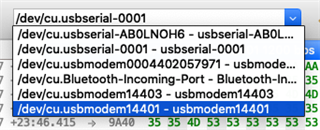
How can I find the device ID string that belongs to my MSP-FET on macOS? I need this value to run the BSL Scripter tool. I think it will look something like this, but I'm not sure which it is, if any.
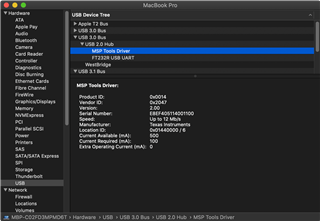
I think this is my MSP-FET in the system report, but it doesn't provide the device string that I need.
I tried to take a guess at a couple likely candidates, but got these errors:
$ ~/ti/BSL-Scripter/bsl-scripter-mac -n FRxx -i [/dev/cu.usbmodem14401,I2C,400000] -b -w ~/Desktop/BSL_keypad_55.txt -v -z [SET_PC,0x8000]
---------------------------------------------------------
BSL Scripter 3.4.0.1
PC software for BSL programming
2021-Jul-13 16:17:38
---------------------------------------------------------
Log mode is turned on!
/Users/pcpro178/ti/BSL-Scripter/bsl-scripter-mac -n FRxx -i [/dev/cu.usbmodem14401,I2C,400000] -b -w /Users/pcpro178/Desktop/BSL_keypad_55.txt -v -z [SET_PC,0x8000]
Verbose is turned off!
Device : FRxx
Init communication parameters : [/dev/cu.usbmodem14401,I2C,400000]
[ERROR_MESSAGE]Please define the COM PORT!
$ ~/ti/BSL-Scripter/bsl-scripter-mac -n FRxx -i [/dev/cu.usbmodem14403,I2C,400000] -b -w ~/Desktop/BSL_keypad_55.txt -v -z [SET_PC,0x8000]
---------------------------------------------------------
BSL Scripter 3.4.0.1
PC software for BSL programming
2021-Jul-13 16:19:28
---------------------------------------------------------
Log mode is turned on!
/Users/pcpro178/ti/BSL-Scripter/bsl-scripter-mac -n FRxx -i [/dev/cu.usbmodem14403,I2C,400000] -b -w /Users/pcpro178/Desktop/BSL_keypad_55.txt -v -z [SET_PC,0x8000]
Verbose is turned off!
Device : FRxx
Init communication parameters : [/dev/cu.usbmodem14403,I2C,400000]
[ERROR_MESSAGE]Please define the COM PORT!
