Part Number: MSP430FR6045
Other Parts Discussed in Thread: MSP430FR6047
MSP430FR6045 custom board is being produced and developed.
When PC, Cativate, Custom Board are connected and USS Tool is connected, the message “HID Bridge Connected -- waiting for device” appears on the bottom bar of the program as shown in Figure 1 below and the next step does not proceed.
Also, the Request Update button is not activated either.
However, it was confirmed that the Waveforms function of the USS Tool and the ADC Capture function work.
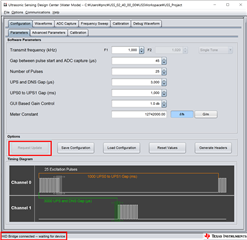
Figure 1
When debugging, if __delay_cycles was used before in the Comm_writeBuffer() function of the comm.c file as shown in Figure 2 below, it was confirmed that the connection at the bottom of the USS Tool was established as shown in Figure 3 below.
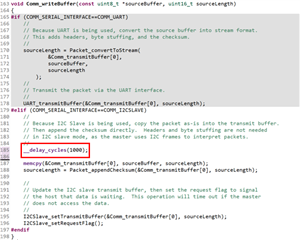
Figure 2

Figure 3
In order to test the MSP430FR6047 EVM board in the same environment as above, the HID Bridge of the EVM board was removed and Cativate was connected.
After connecting to PC, when connecting the USS Tool, it worked normally without modification of the code.
Please tell me why it is so different and how to solve it.