This thread has been locked.

If you have a related question, please click the "Ask a related question" button in the top right corner. The newly created question will be automatically linked to this question.

MSP430F5438A: error: cannot identify the target device

Part Number: MSP430F5438A
Other Parts Discussed in Thread: MSP-EXP430FR5994,

Hi Ti Team,

We are trying to flash MSP430F5438A in our custom boards through the debugger of MSP-EXP430FR5994 Development Kit. we have 6 custom boards, in which we have issues in two boards.

a. In one of the board, we are not able to flash. we are getting the error "cannot identify the target device". 

here is the schematic of our design.

Here are the list of things we tried for debug.

1. The wires from LP board to the custom boards is short ( approx. 4-5 inch). In working boards, we are able to flash MSP with more length of wires ( approx. 6-7 inches). The traces on the board is around 500 mils.

2. The decap for VCORE pin also looks fine. 

3. Power to MSP430 is also proper.

we tried probing the SBW signals ( TDIO, TCK ) between working board and non working board.

Here is the images of working board ( yellow signal: TCK, blue signal: TDIO)

Here is the images of non working board
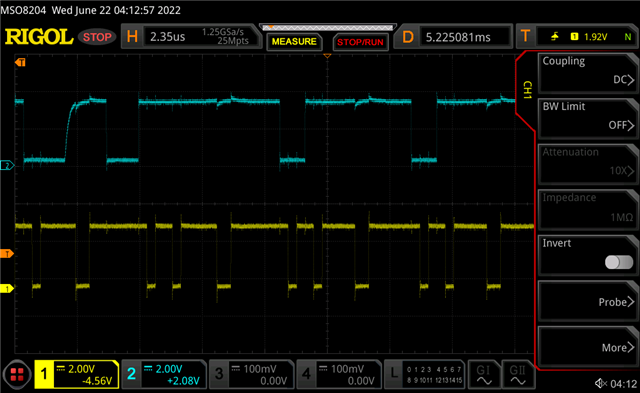
We tried multiple times to flash MSP430 to capture above images. The waveform looks similar between working and non working board.

b. In other board, we are facing issues with UART interface. We have console to print the logs and monitor some GPIO pins. Upon power up we are getting prints on console (means UART TX is working). After boot, when we are trying to read from console, MSP is not responding ( we thought the UART RX is not responding properly). when we probe on Rx signal, we are able to observe the transactions but nothing on TX signal as response. 

what will be the issues for this and how we will debug further?

note: we have replaced the  MSP430F5438A in both boards. Earlier it was working fine, after replacing the MSP430F5438A we are facing this issue.  

--

Regards,

Kiran

  • Hi Kiran,

    One note about your schematic. Why are you connecting a pullup from TEST to VCC? That is not recommend. If you are worried about noise you can connect a pulldown on TEST. See Figure 2 in Hardware Tools User Guide:


    we have replaced the  MSP430F5438A in both boards. Earlier it was working fine, after replacing the MSP430F5438A we are facing this issue.  

    If it was working earlier then that might point a connectivity problem with the device. Can you verify the device's pins have good connections to the board?

    Regards,

    Evan

  • Hi Evan,

    One note about your schematic. Why are you connecting a pullup from TEST to VCC? That is not recommend. If you are worried about noise you can connect a pulldown on TEST. See Figure 2 in Hardware Tools User Guide:

    The pullup is just a optional and it is DNI ( not mounted) in our design. so there is no any pull up on TEST pin.

    Can you verify the device's pins have good connections to the board?

    As we know the device is BGA package, its difficult to identify the connectivity issues.  we wanted to know the what all the things can cause to get that error "cannot identify the target device", so we can look into the ways to debug and narrow down the issue. 

    And in other the board what might be the cause for UART misbehave?

    --

    Regards,

    Kiran

  • Hi Kiran,

    I'm not 100% percent certain on what specific conditions result in "cannot identify the target device". It just means the debugger wasn't able to establish a connection to the device. Since you are only experiencing this problem after replacing the MSP4305438A that indicates that there is some connectivity issue with that device. Is it possible that BGA land pads were damaged during the switch?

    Can you try a simple software example with the UART to determine if that works? Is it only happening on one board?

    Regards,

    Evan

  • Hi Evan,

    Can you try a simple software example with the UART to determine if that works? Is it only happening on one board?

    Yes the UART issue is there only on one board.

    --

    Regards,

    Kiran

  • Did you try a simple software example (like a loop back) on the board with the UART issue? If that works then there may be something wrong with your software. If it doesn't work then there is likely something wrong with the hardware.

    Evan

**Attention** This is a public forum