This thread has been locked.

If you have a related question, please click the "Ask a related question" button in the top right corner. The newly created question will be automatically linked to this question.

MSP430G2231: 'Connect Target' Problem at 11.2.ver CCS

Part Number: MSP430G2231

I've been studying Microcontroller using MSP430G2231 with MSP-EX430G2.

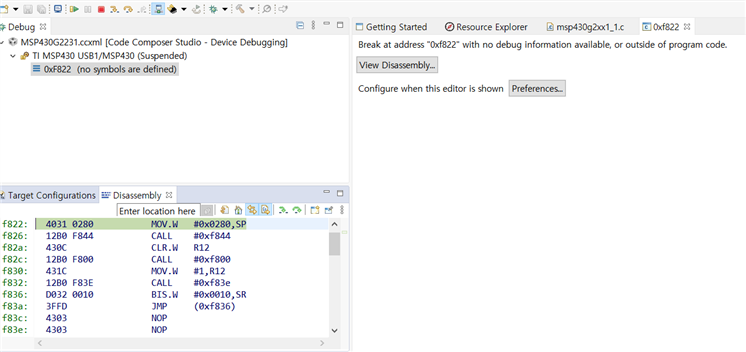
Everytime I try to connect target, it breaks at the certain address.

And the pointed address prints below instructions which means 'ready to sent to flash memory'.

I tried do the same process without any code to check if my code could include mistake. 

But same error occurs again..

Does this problem occur just because the IC I use is too old to apply the latest version of CCS software? (Dose the latest CCS not support old device like MSPG2231?)

Or is there any solution can solve this problem?

Thanks

Regard

Ah Hyun

  • Hi Ah Hyun,

    I believe that CCS should support the MSPG2231.  Can you try to run this with CCSv6 just to be safe?  You can also try some of the code on the link listed below to see if that works.  Let me know if this works.

     https://dev.ti.com/tirex/explore/node?node=AAdVZBnvWomrCsI7IT812Q__IOGqZri__LATEST&search=MSP430G2231

    Sincerely,

    Kyle Holub

  • Still I encountered same error even though I installed and used CCSv6

    It breaked at exact same address "f822".

    I changed Mircrocontroller Chip becuause I thought it could be device problem.

    But the result was same either...

    I really want to know why always it breaks at "4031 0280"...Cry

    Thanks

    Regard,

    Ah Hyun

  • Hi Ah hyun,

    I'm sorry you've been having this bizarre issue.  Good thinking with testing a different microcontroller chip.  Just to clarify, are you getting this error while you are debugging?  Or is this error coming up in the process of connecting to the target?  Also, can I see a picture of your setup with the board?

    Sincerely,

    Kyle Holub

  • Hi Kyle Holub,

    The error comes up in the process of connecting to the target. When debugging, there's warning message occurs like below, but build is always completed somehow.

    And here's the picture of my board setup !

    Regard
    Ah hyun

  • Hi Ah Hyun,

    I am looking into this more, I will get back to you tomorrow.

    Sincerely,

    Kyle Holub

  • Hi Kyle Holub,

    I look forward to hearing from you soon :)

    Thank you

    Regard
    Ah Hyun

  • Hi Ah Hyun,

    While I received the same warning as you when building the project, I was able to flash and debug several programs from that link I sent you on the device you have:  https://dev.ti.com/tirex/explore/node?node=AAdVZBnvWomrCsI7IT812Q__IOGqZri__LATEST&search=MSP430G2231

    Since it seems like it was running the code properly, that warning doesn't seem to concerning.  However, it sounds like you are experiencing something else.

    Just to clarify, what exactly are you trying to accomplish on this device?  If you are just trying to run a program, clicking build, and then flash or debug should allow it to run properly.  Can you walk me through the exact steps you are taking when you get this error?

    Sincerely,

    Kyle Holub

  • Hi Kyle Holub,

    I took education about Microcontroller and tried to handle in practice by myself.

    Before apply my code, I downloaded sample code from Resource Explorer and tried to run as a trial.. then connecting problem occurred.

    So I’ve been trying to connect target board with any code firstly.


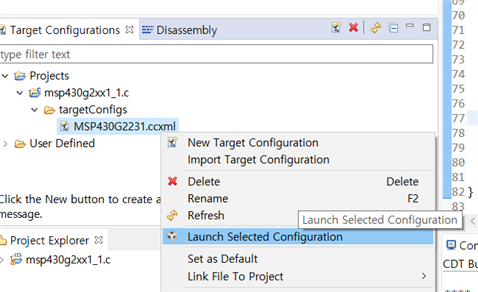
    Here’s the process how I meet the error.

    1. Connect launch board with my laptop.
    2. Open CCS and download sample code of MSP430G2231 from Resource Explorer.
    3. Click ‘Build Project’ and check ‘Project Finished’. (please refer to the image below.)


    4. Click ‘Launch Selected Configuration’. (please refer to the image below.)

    5. Click ‘Connect Target’. (please refer to the image below.)

    6. The error occurs. (please refer to the image below.)

    Thank you

    Sincerely
    Ah hyun

  • Hi Ah Hyun,

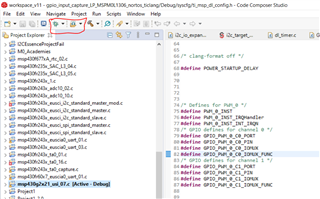
    It looks like steps 1-3 are exactly the steps I would take, however, instead of doing steps 4, 5 and 6, can you do this? After building, try pressing either "debug" or "flash"  You can press the green bug button, which puts you in debug mode, or the button to its right, which flashes the project onto the device.  I've attached a picture of this below.  You can also find these commands in the "Run" tab.

    If you flash the project onto the device, it should start executing the code automatically after it has loaded.  If you debug, you should receive a screen like the picture attached below. If you press the play button which I have circled in red, you can begin to execute your code.

    This should be able to run your code.  Let me know if you have any issues.

    Sincerely,

    Kyle Holub

  • Hi Kyle Holub,

    It's solved :) It was a debug issue.

    Now I can progress my project.

    Thank you so much for your help.

    You are the best Thumbsup

    Thanks a lot again.

    Sincerely
    Ah hyun

**Attention** This is a public forum