Part Number: MSP430FR5994
Question
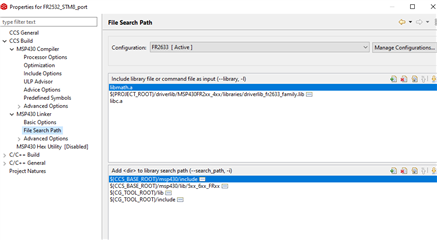
Where can I find the page within the project's Properties (alt-Enter) that allows me to add or remove library files (of extension type *.a, for example) that will involve the use of the -l (dash-L) on the linker command line?
Currently, I get the following linker line in a build:
"C:/Users/Jon/Documents/ti/ccs1120/ccs/tools/compiler/ti-cgt-msp430_21.6.0.LTS/bin/cl430" -vmspx --code_model=small --data_model=small --use_hw_mpy=F5 --advice:power=all --advice:hw_config=all --define=__MSP430FR5994__ --define=_MPU_ENABLE -g --printf_support=minimal --diag_warning=225 --diag_wrap=off --display_error_number --silicon_errata=CPU21 --silicon_errata=CPU22 --silicon_errata=CPU40 -z -m"FPTEST.map" --heap_size=0 --stack_size=0 --cinit_hold_wdt=on -i"C:/Users/Jon/Documents/ti/ccs1120/ccs/ccs_base/msp430/include" -i"C:/Users/Jon/Documents/ti/ccs1120/ccs/ccs_base/msp430/lib/5xx_6xx_FRxx" -i"C:/Users/Jon/Documents/ti/ccs1120/ccs/ccs_base/msp430/lib/FR59xx" -i"C:/Users/Jon/Documents/ti/ccs1120/ccs/tools/compiler/ti-cgt-msp430_21.6.0.LTS/lib" -i"C:/Users/Jon/Documents/ti/ccs1120/ccs/tools/compiler/ti-cgt-msp430_21.6.0.LTS/include" --priority --reread_libs --define=_MPU_ENABLE --diag_wrap=off --display_error_number --warn_sections --xml_link_info="FPTEST_linkInfo.xml" --entry_point=RESET --use_hw_mpy=F5 -o "FPTEST.out" "./main.obj" "../lnk_msp430fr5994.cmd" -llibmpu_init.a -llibmath.a -llibc.a
Note that at the end there is: -llibmpu_init.a -llibmath.a -llibc.a
I don't need them, though. And I've not yet been able to locate the Property page where I can remove them.
Meanwhile, I have located the offending lines in a file called ".cproject". They are these:
<listOptionValue builtIn="false" value="libmpu_init.a"/>
<listOptionValue builtIn="false" value="libmath.a"/>
<listOptionValue builtIn="false" value="libc.a"/>
Listed within the XML there, within an option.
But I cannot seem to find them in the alt-Enter Properties so that I can delete them there.
It does work to simply edit the .cproject file and remove those options. This does get the job done.
But I'd like to know if there is a 'standard way' to do this, where I'm just failing to find it on my own.
Note: I do understand the linker doesn't necessarily haul library contents into my project just because the libraries are listed on the linker command line. My reason for wanting to remove them is purely a pedantic desire and isn't motivated by a false belief.
Thanks!
Context
I'm using version 11 of CCS and working on an assembly-only project. I am also completely new to CCS (only about a week's off-hours time, so far.) I am not new to assembly coding (probably thousands of assembly projects so far in my lifetime) and I'm not new to programming the MSP430 (my last such project used the IAR Kickstart tools over a decade ago and IAR appears to have changed their relationship for hobby purposes -- assembly used to be unlimited in size but appears to be limited, now, unless a full paid-for license is engaged.)
I created what I believe to be an assembly-only project using the standard project wizard. And to begin things, I started writing and testing code using the built-in debugger tool (which is useless for counting cycles, but that's another story.) But as I have gradually resolved more important issues, I've come to take a much closer look at the linker command line and also at the Property pages for the project. Most of what I see makes sense to me and I can see the impacts. But I have one particular problem in my understanding where I'd like some help.
So that's the context for this question. I do not need a general education on assembly coding. This question is very specific to the CCS IDE and more particularly to the Property pages within it and controlling the options that are added to the linker command during a build process.