This thread has been locked.

If you have a related question, please click the "Ask a related question" button in the top right corner. The newly created question will be automatically linked to this question.

MSP430BT5190: MSP430 header file

Part Number: MSP430BT5190
Other Parts Discussed in Thread: MSP430WARE

Hi Experts,

I know that some of the flags set on an MSP430 are set on generic header files that are called on the specific MSP430 header. Do you need to do something in order for these interlaced headers to work?

I was trying to call one of the flags OFS_UCAxTL1, using an MSP430BT5190. As I tried to compile it says that the flag is not recognized.

I went to the msp430bt5190.h file which also showed that you need a generic.h file, the flag is defined in the generic.h file but it seems like my program cannot see that.

I can find all the linking files definition, look they are all tied through msp430.h.

So does that mean that I should bypass that file and add it as a redundancy?

Thank you.

Regards,
Archie A.

SPImaster_Example.zip

  • I looked at the linked example and it is doing register access in a peculiar and roundabout way. Using symbols for a base address and offset instead of the explicit symbols. Such as for UCA0CTL1.

  • Hi Archie,

    It seems to me that the project is based off the Driver Library, but when I looked at your file I didn't see #include "driverlib.h" in it. I went ahead and added the Driver Library and compiled it. There was also an error in the SPI settings on the clock selection so I updated that as well.

    Just an FYI to add the Driver Library here are the steps I took.

    Adding the Driver Library Files

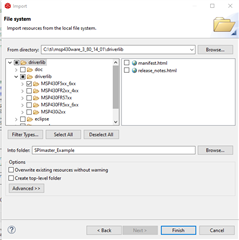
    1. Right click on project -> Import -> file system -> browse -> C:\ti\msp430ware_3_80_14_01\driverlib
    2. Click the down arrow -> driverlib -> MSP430F5xx_6xx (Image shown below) -> Finish

    Including the Driver Library into the Compiler Path

    1. Right click on project -> Properties -> Build -> MSP430 Compiler -> Include Options
    2. Click the icon that looks like a paper with a green + (this is add)
    3. Add ${PROJECT_ROOT}/driverlib/MSP430F5xx_6xx 
    4. Click Ok -> click apply and close

    Including the Driver Library into Code

    1. In the main add #include "driverlib.h"

    SPImaster_Example_Fixed.zip

    Regards,

    Luke

  • Hello Luke,

    I see your solution and I understand why you would suggest that.

    Unfortunately, we are trying to get the SPI example to work without using all the headers and includes noted driverlib. For this reason I am trying to not use this as an included file. Still if you look at the #include <msp430.h> and with using the bt5190 the include for the MSP430F5xx_6xx_generic should be defined. Is there a way to do it?

    Thank you.

    Regards,
    Archie A.

  • Hi Archie,

    I would suggest looking at the register level example for the SPI communication which can be found here: SPI Controller Example. This would be the best for optimizing memory and compiling. I did look through the file and I'm surprised that the OFS_UCAxTL1 can't be found, as I am seeing it in the header file for that device. It probably has to do with the weaving of files like David mentioned.

    You could also include the specific eusci_a_spi.h or eusci_b_spi.h file if you want to stick with the DriverLib functions. Might need to walk through and include the header files one by one. Though you would probably waste more time than its worth as it will definitely have complications in it.

    Regards,

    Luke

**Attention** This is a public forum