This thread has been locked.

If you have a related question, please click the "Ask a related question" button in the top right corner. The newly created question will be automatically linked to this question.

MSP430G2553: Manual modification of R7 during debugging using CCS

Part Number: MSP430G2553

Hello,

My goal is to modify register R7 during debug.

I have set a breakpoint in my assembly program and run the code to that point. The value of R7 is 0x0001.  Then I manually change R7 to the value 0x0005. It seems to be accepted.  When I Step into the next line, R7 reverts to 0x0001.

Is this the expected behavior or is there a way to set R7 during debug to the value that I want and continue the program.

Thank you.

  • Hi Skylar,

    Can you explain a little more about where you are setting the R7 register (in CCS)?

    Does the next line manipulate the R7 register as well? It is possible an assembly instruction could be reloading the register with the previous value.

    Here is a snippet of Code Composer Studio 12's User's Guide

    Regards,

    Luke

  • I am manually setting R7 after I click debug and run the program to the breakpoint at LINEC (see below).  Then in the Registers panel, I click on the value of R7 and change it to 0x0005 and press enter.  My change was accepted. 
    Here is the main loop I am executing.  it's rudimentary and it's intent is to teach me how to use the msp430 and CCS.
    ; Main loop here
    ;-------------------------------------------------------------------------------
    ;
    LAB1 mov.w #01, &0200h ;set a number on location $0200
        mov.w #02, &0202h ;set a number on location $0202
        mov.w #03, &0204h ;set a number on location $0204
    LINEA clr R7 ;clear the entire R7 register
        clr R8 ;clear the entire R8 register
        clr R9 ;clear the entire R9 register
        clr R10 ;clear the entire R10 register
    LINEB mov.w &0200h, R7 ;copy a word from &0200h to R7
        mov.w &0202h, R8 ;copy a word from &0202h to R8
        mov.w &0204h, R9 ;copy a word from &0204h to R9
    LINEC mov.b R7, R10 ;start accumulator in R10 with value form R7
        add.b R8, R10 ;add to it the content R8
        add.b R9, R10 ;add to it the content R9
        mov.b R10, &0206h ;now store the sum back in memory
    Mainloop jmp Mainloop ;Infinite Loop
    These are the steps that I take:
    1 Run the program to the first breakpoint at LINEC
    2 change the register value of R7 to 0x0005
    3 click the assembly step into button 1 time
    4 R7 has changed back to 0x0001.
    Thank you for your help
  • Hi Skylar,

    I copied your code into one of our example assembly code, MSP430g2xx3_P1_01.asm

    I then opened the Register View and clicked on Value, then changed R7 from 0x0001 to 0x0005 and continued the code.

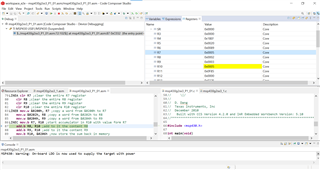
    Here you can see I stepped one more line and R10 is now populated with the value of R7.


    After stepping through some more I get the end result of R10 = 0x000A, which is expected.

    I can't replicate your issue, what current version of CCS are you using? For hardware, are you using the Launchpad or a custom board?

    Regards,

    Luke

  • Thank you for your help.  I have no idea what is going on, but the problem seems to have resolved itself. It is working now.

    I wish I knew what changed for future problems.

    Thank you for your help.

**Attention** This is a public forum