This thread has been locked.

If you have a related question, please click the "Ask a related question" button in the top right corner. The newly created question will be automatically linked to this question.

MSP430FR6989: Bootloader MSP430

Part Number: MSP430FR6989
Other Parts Discussed in Thread: MSP-FET, UNIFLASH, MSP430FR5043

Hi, 

I'm currently working on MSP430FR6989.

I need to upload my program using UART bootloader for example : LED blinking.

So, where should I start from, I'm new to this bootloader.

Thanks in advance.

  • Hi Sai,

    What debugger are you using? 

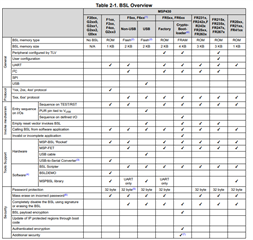
    Table 2-1 of the MSP430 FRAM BSL User's Guide (SLAU550) gives a summary of the different BSL options by MSP430 device. 

    If you are using MSP-FET, you can program via Uniflash, or Bootloader (BSL) Scripter (SLAU655). With MSP-FET those tools should automatically invoke BSL mode on the MSP430FR6989 via the TST/RST pins. It is also possible to do a software invocation of BSL which is covered in that BSL user's guide. 

    Best Regards,
    Brandon Fisher

  • Yes, I'm using MSP-FET only.

    So, what I have to do is, just connect the FET pins to MSP430 as per the BSL invocation in user guide and using either BSL scripter or uniflash I can 

    program right.

    Is this same applicable for MSP430FR5043?

    To program using BSL Scripter download BSL_SCRIPTER.EXE and run this in terminal like this 

    (user: file\bsl_scripter.exe\led_blink.txt). 

    Is that right or I need to do any other step before this? 

  • Hi Sai,

    So, what I have to do is, just connect the FET pins to MSP430 as per the BSL invocation in user guide and using either BSL scripter or uniflash I can 

    program right.

    You will also need to connect VCC, GND, UART TXD and UART RXD in order for BSL to work. 

    Is this same applicable for MSP430FR5043?

    To program using BSL Scripter download BSL_SCRIPTER.EXE and run this in terminal like this 

    (user: file\bsl_scripter.exe\led_blink.txt). 

    Is that right or I need to do any other step before this? 

    Inside the BSL Scripter install directory there are example scripts located by default at: C:\ti\BSL-Scripter\ScriptExampleWindows in windows. Those script files are actually what you want to pass to BSL-Scripter. I would look at the FRxx_uart example and try running that after correcting the COM Port. 

    You will see that script file also points to the ti-txt file you want to flash. 

    Best Regards,
    Brandon Fisher

  • I did the below attached steps.

    AIM.docx

  • Hi Sai,

    Did you cross your TXD/RXD pins? I.e. The RXD from your board needs to be connected to the TXD of the Debugger.

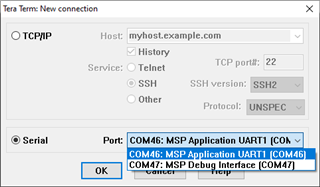
    Also, make sure the COM port you selected is the Application serial port, and not the debug interface serial port. The image below shows these in Tera Term, but you can also check which is which in the Device Manager in Windows.

    Best Regards,
    Brandon Fisher

**Attention** This is a public forum