This thread has been locked.

If you have a related question, please click the "Ask a related question" button in the top right corner. The newly created question will be automatically linked to this question.

MSP430F247: MSP430F247 reprogrammed once locked

Part Number: MSP430F247
Other Parts Discussed in Thread: MSP-FET

Good afternoon, I'm trying to rewrite an MSP43F247 (with blown fuse)

Yes, it can be rewritten with a Softbaugh MSP430 Flash Bootloader


But I need to reschedule with
-MSP-FET
-MSP430-BSL (Rocket)

And I have not had success with the programs:
- Lite FET-Pro430 Elprotronic
- BSL_USB_GUI.exe
- MSP430 Flasher
- BSLDEMO

I would appreciate help
Regards,
Jose Miguel

  • Hi Jose,

    For reprogramming the MSP430F247 via UART BSL, you should be able to use the MSP430 BSL Rocket.

    Do you have the proper connections made between the MSP430 and the BSL Rocket? 

    Best Regards,
    Brandon Fisher

  • 462 / 5.000

    Resultados de traducción

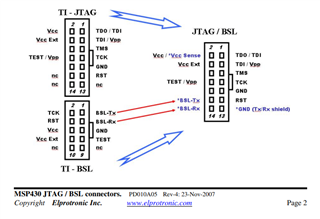
    Good morning Brandon, thanks for the reply On the PCB we have a JTAG/BSL connector like the one in the figure, and an adapter cable for the TI-BSL connection. This same cable with the SoftBaugh works fine. However with the BSL-Rocket, I have not succeeded. Apparently it is reprogrammed but only internally not in the MSP430F247.
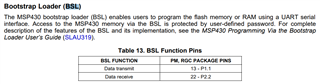
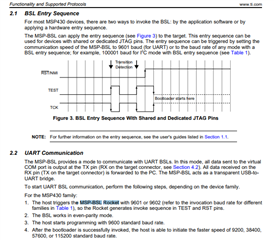
    I had read this:
    but the MSP-BSL Rocket does not appear on the PC as a virtual UART and I don't know how to configure it with 9601 baud.
    Regards,
    Jose Miguel
  • Hi Jose,

    BSL-Demo should handle that setting for you. The 9601 baud rate command that the user's guide references is just used a signal to our boards to invoke BSL. 

    The combination of BSL-DEMO and BSL-Rocket should work for programming this device provided everything is setup correctly. 

    Best Regards,
    Brandon Fisher

  • Good morning,
    the connection is:
    MSP-BSL PCB (MSP430F247)
    1 BSL-TX P1.1 (BSL-TX)
    2 BSL-TCK TCK
    3 BSL-RX P2.2 (BSL-RX)
    4 BSL-RST RST
    5 GND GND
    6 Vdc Vdc

    With BSL-DEMO and BSL-Rocket, I have not been able to reprogram.
    Example:

    Could you tell me a sequence to record? or documentation to consult?

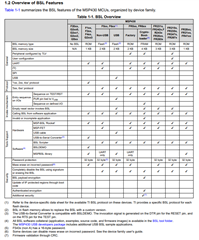
    With the device: MSP-FET is it possible to reprogram (BSL)?

  • Hi Jose,

    With the device: MSP-FET is it possible to reprogram (BSL)?

    MSP-FET does not support the MSP430F1xx, F2xx, or F3xx devices. 

    Your issue does look like the one described in this thread: https://e2e.ti.com/support/microcontrollers/msp-low-power-microcontrollers-group/msp430/f/msp-low-power-microcontroller-forum/778241/msp430f2418-programming-processor-over-uart-port/2903152#2903152

    Luis has a workaround listed there for getting the device in BSL Mode via BSL Rocket, which involves using a serial monitor like tera term. That would require your BSL Rocket to be getting recognized by your machine as a virtual com port. How is your BSL rocket recognized in device manager when you plug it in? 

    Best Regards,
    Brandon Fisher

  • Hi Brandon,

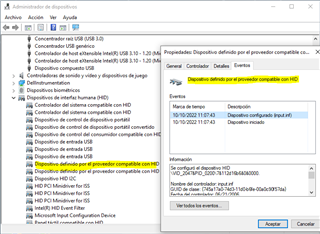
    BSL Rocket when connected appears in device manager as USB Device - HID

    Best Regards,

    Jose Miguel

  • Hi Jose,

    You should be seeing the MSP-BSL rocket connect as a Virtual COM Port:

    By default, the device should be recognized automatically in windows on first plug-in. Maybe this is a windows issue. Its also possible that when the BSLDEMO tool reprogrammed your rocket board it changed it to an HID, which is possible, I'm working on getting a setup on my end to verify whether or not this is correct.  

    In the meantime, try the device on another PC if you have one available. 

    If that does not work, I would also recommend reflashing the MSP-BSL Rocket. You can do this by doing the following:

    1. Download the MSP-BSL Programmer's Source code, this includes the firmware file for the MSP-BSL Rocket. 
    2. Download the Python Firmware Upgrader tool from our USB Developers Package
    3. Put the MSP-BSL Rocket in BSL mode, by holding both the Reset and USB-BSL buttons on the underside of the board while it is powered, and releasing the reset button first.
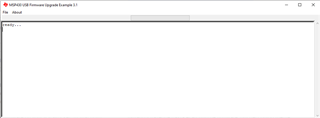
    4. Run Python_Firmware_UpgraderGUI.exe, it should say "ready..." if your board is properly in BSL mode, if not, try the switches again, and then go to File -> "Rescan HID Bus"
    5. Once it says it is Ready, go to File ->Open User Firmware, and navigate to the .out firmware file from the MSP-BSL Programmer's Source Code.

    That should reprogram the firmware on your BSL-Rocket. At that point it should definitely be recognized as a com port. 

    Best Regards,
    Brandon Fisher

  • Hi Brendan,

    We have 2 MSP-BSL Rocket units, and I had already tested both on 2 PCs with Windows and later under Linux where they do not appear as a COM port either.

    I had used "Python_Firmware_UpgraderGUI.exe".

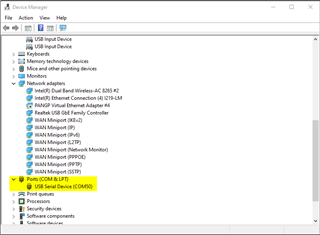
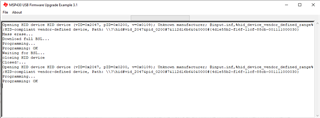
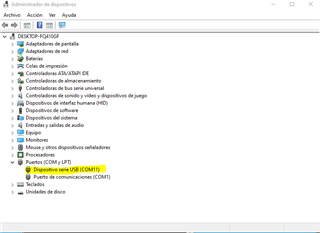
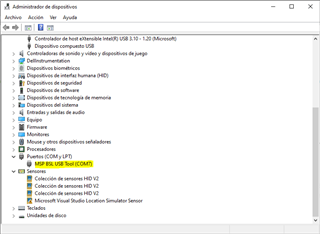
    Executing point 5 that you mention, loading the file "MSP_BSL-640.txt" (from MSP-BSL Programmer's Source Code) a COM port appears (see screenshot)

    I guess it's because you can't upgrade with "Python_Firmware_UpgraderGUI.exe." because it is not in BSL mode.

    Trying with BSLDEMO, although from TeraTerm I change the baud to 9601 or 9602 (the one indicated for the MSP430F2xx) as indicated in the datasheet


    I:\ITC\JMM>BSLDEMO -cCOM11 +epvr kk.txt
    MSP430 Bootstrap Loader Communication Program (Version 2.03 - 2019)
    Mass Erase...
    ERROR: Synchronization failed!
    Device with boot loader connected?

    When resetting MSP-BSL Rocket, the COM port disappears again.

    Regards,

    Jose Miguel

  • Hi Jose,

    It seems to me like your MSP-BSL rocket is what is again what is being reprogrammed rather than your target. 

    Can you reflash your MSP-BSL Rocket board one more time, and then try to manually install the drivers for the MSP-BSL Rocket tool? 

    You can download the drivers from Olimex here: https://www.olimex.com/Products/MSP430/BSL/MSP430-BSL/resources/MSP430_CDC.zip

    You will likely need to disable signed driver enforcement. That repository has a readme file which includes the steps you will need to take to install these. 

    Best Regards,
    Brandon Fisher

  • Hi Brendan,
    I have already updated the drivers downloaded from:
    https://www.olimex.com/Products/MSP430/BSL/MSP430-BSL/resources/MSP430_CDC.zip

    But still giving the same error (testing with the 2 Rocket that I have):

    I:\ITC\JMM>BSLDEMO -cCOM7 +epvr kk.txt
    MSP430 Bootstrap Loader Communication Program (Version 2.03 - 2019)
    Mass Erase...
    ERROR: Synchronization failed!
    Device with boot loader connected?

  • Hi Jose,

    With the drivers properly installed I believe you would want to use the -tRocket flag rather than the -cCOM# flag. If I recall correctly, the -cCOM flag is for generic USB-UART adapters. 

    Best Regards,
    Brandon Fisher

  • Hi Brendan,

    When it didn't appear as COM, if I accepted to put -tRocket, although it didn't work.
    Now with MSP BSL USB Tool (COMx) it gives error:

    C:\Proyectos\Meler\Micron\BSLDEMO>BSLDEMO -cCOM7 +epvr kk.txt
    MSP430 Bootstrap Loader Communication Program (Version 2.03 - 2019)
    Mass Erase...
    ERROR: Synchronization failed!
    Device with boot loader connected?

    C:\Proyectos\Meler\Micron\BSLDEMO>BSLDEMO -tRocket +epvr kk.txt
    MSP430 Bootstrap Loader Communication Program (Version 2.03 - 2019)
    ERROR: Opening COM-Port failed!

**Attention** This is a public forum