Part Number: MSP-GANG
Other Parts Discussed in Thread: MSP430F67771
I have a device that requires a specific order of steps to properly program and I'm attempting to automate the process. I'm having trouble getting the board to program using the commands listed in MSP Gang Programmer User's Guide.
I have a text file that we upload and then write to device. I'm able to get this to work when using the app downloaded from TI's website. When I attempt to run the c# example it crashes saying it cannot load the dll. Also looking through the code I don't see how to program the board.
Currently I'm running the following commands
- MSPGANG_API.InitCom("COM66", 115200);
- MSPGANG_API.Default_Config();
- MSPGANG_API.Set_MCU_Name("MSP430F67771");
- MSPGANG_API.Interactive_Open_Target_Device("MSP430F67771")
- MSPGANG_API.SetConfig(ConfigIndexes.CFG_TARGET_EN_INDEX, 0x01); // Trying with only one device connected to the first connector.
- MSPGANG_API.Read_Code_File(filePath);
- MSPGANG_API.MainProcess(1000);
- MSPGANG_API.Interactive_Close_Target_Device();
All steps above return a status of 0 but the firmware does get loaded onto the device.
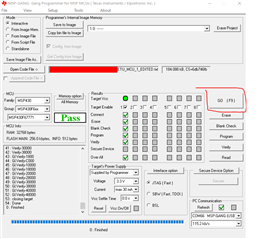
Here's a screencap of the TI app after a successful run.