This thread has been locked.

If you have a related question, please click the "Ask a related question" button in the top right corner. The newly created question will be automatically linked to this question.

MSP430FR4133: MSP430FR4133 Connection Issue

Part Number: MSP430FR4133
Other Parts Discussed in Thread: MSP-EXP430FR2433, UNIFLASH

Hello,

We have a strange problem for the connect MSP430FR4133 MCU.  I tried to explain which type of issue we face to face.

1)When we tried to connect SBW with MSP430FR4133 on MSP-EXP430FR2433 Dev kits programmer and we connect without problem but, at the point of the development process, we won't access with Dev kit programmer.

2)After facing this problem many times, We tried to connect with MSP-GANG programmer, This programmer connected the MSP430FR4133 MCU without problem. But some of the MCU's gives the connection response after 30-40 times tried the connect.

3)After the connecting MSP430FR4133 with MSP gang programmer, we didn't see any of the connecting problem with MSP-EXP430FR2433 Dev kit's on board programmer and the other programmer's we have.

During this time MSP430FR4133 drive LCD, read ADC values and detect another hardware interrupts without any problem. 

How we eliminate the connecting problems,

1) Reset pin's capacitor and programming pin's resistor values are true.

2)Supply voltage was ok.

3)Any of the short circuit detected on SBW connection line.

Thank's for a reply

Best Regards

  • at the point of the development process, we won't access with Dev kit programmer.

    Do you mean you use the eZ-FET on the launchpad to debug the device  on the board you design? Any error you do you see when you connect the device? What's the software do you use on the PC?

    Dose the eZ-FET emulated correctly on your PC?

    Reset pin's capacitor and programming pin's resistor values are true.

    What's the values are?

  • Hello Harry,

    Thank's for a fast reply.

    1) Yes we use eZ-FET programmer on the MSP-EXP430FR2433 dev kit on development process also MSP Captivate MCU development board's embedded programmer.

    2) We develop on the IAR Embedded Workbench for MSP430 IDE, V:7.21.1

    3)  Yes we had seen "Fatal Error: Could not find device (or device not supported) Session aborted!" on IAR.

    4) Yes There is no issue for the eZ-FET or the other programmers connection also we tried to upload a program with UNIFLASH program. All devices framework on the lastest version.

    5)Reset pin's capacitor was 1nF during the development process and after the face to face with tihs issue we tried to 330pF,470pF and 820pF for the reset pins capacitors.

    We looking for a answer.

    Best Regards

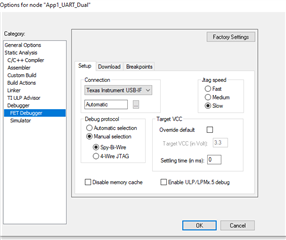
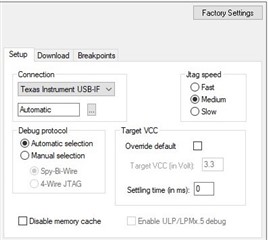
  • Could you show me the setting of the debugger? Could you help to try the settings below?

  • Hello Garry,

    Thanks for a reply. We tried to your offered solutions with our's unconnectable MCU's and it's not working.

    Is your advice help's to connect news MCU's problem?

    We looking for a answer.

    Best Regards

  • I really got some connection issue with the new launchpad, but it works when I update the firmware of the eZ-FET, I try to down load a blank FR2433 with no issue with IAR. So you can to update the the firmware of the eZ-FET to see if any helps there.

  • Hello Gary,

    Thanks for a reply.

    1) As I said belowed mention, we just use the MSP-EXP430FR2433 dev kits programmer.

    1)When we tried to connect SBW with MSP430FR4133 on MSP-EXP430FR2433 Dev kits programmer and we connect without problem but, at the point of the development process, we won't access with Dev kit programme

    2) Why we lived some of the MCU with tried to MSP-GANG programmer?

    But some of the MCU's gives the connection response after 30-40 times tried the connect.

    3) We made an update on the UNIFLASH 8.2.0 for the eZ-FET(MSP-EXP430FR2433) and during this development process we sure the our's all eZ-FET's and software have latest version.

    I update the firmware of the eZ-FET, I try to down load a blank FR2433 with no issue with IAR

    4) When we connect the MCU with MSP GANG Programmer( eZ-FET wasn't connect this MCU.) If we have an software version issue on the eZ-FET, how to possible belowed mention? 

    3)After the connecting MSP430FR4133 with MSP gang programmer, we didn't see any of the connecting problem with MSP-EXP430FR2433 Dev kit's on board programmer and the other programmer's we have

    We looking for a answer.

    Best Regards

  • As you have test before, this issue should be with no problem with the hardware. So that is highly related with the software that means the image firmware in the eZ-FET. And this issue has been happen on my side too. So the think this issue should be related with the firmware in the eZ-FET. Update it to latest version will solve the issue.

  • Hello Gary,

    Thanks for a reply

    1) Beginning of the face to face with that issue, we tried to connect with UNIFLASHER program. As you to know, if your's eZ-FET's software don't have a latest version, UNIFLASHER don't permit to connect or flash yours MCU. 

    2) Is there any different method to update eZ-FET's software?

    3) How was it possible?

    But some of the MCU's gives the connection response after 30-40 times tried the connect.

    Thanks

    Best Regards

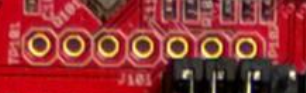
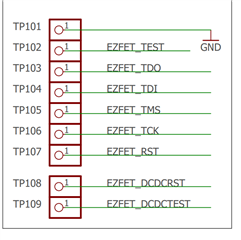
  • Is there any different method to update eZ-FET's software?

    You can use other eZ-FET to update it by the ports below that TP101 to TP107

    You can use this firmware 

    eZ-FET_noHsPin.txt

  • Hello gary,

    Thanks for a reply.

    We tried this solutions as soon as possible we can do and I'll give an information.

    Best Regards 

  • Hi  Any update about this?

**Attention** This is a public forum