Part Number: MSP430FR5962
Other Parts Discussed in Thread: MSPDRIVERLIB, MSP430FR2433, MSP430WARE
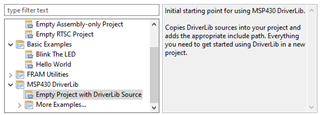
My installation of Code Composer Studio ( Version: 12.4.0.00007 running on Windows 10) when creating a new CCS project does not present a project template for "Empty Project with DriverLib Source". I found an e2e thread at https://e2e.ti.com/support/tools/code-composer-studio-group/ccs/f/code-composer-studio-forum/877204/ccs-msp430f6736-how-to-connect-the-driverlib-h-library-for-a-new-project that informs me such a template exists and in that thread James Evans advises me to "download MSPDriverLib, extract the .zip file, copy the folder into your C:\ti or C:\ti\msp folder". Supposedly after doing the download and restarting CCS I should get that template option.
In following this advice, I found there existed already a directory at c:\ti\msp430ware_3_80_14_01 which - though admittedly not the same as C:\ti\smp - did in fact contain the files I want to include at C:\ti\msp430ware_3_80_14_01\driverlib\driverlib\MSP430FR5xx_6xx. This leads my to believe I already HAVE the MSPDriverLib downloaded. I should note the my installation is only a few weeks old and with it I was able to import a demo program for a MSP430FR2433 Launchpad that included a driverlib for that device.
Nonetheless I followed the procedure proposed by James Evans placing it in a new directory at C:\ti\msp. This had no effect. Ideally, I would like to have my CCS be able to create a project "from scratch" (i.e. not imported from an example) that instantiates the driverlib includes for the target device e.g. by means of the "Empty Project with DriverLib Source" template. Ultimately I will accept any guidance on instantiating the driverlib includes for my target in my project.
Thanks - Philip Navratil