This thread has been locked.

If you have a related question, please click the "Ask a related question" button in the top right corner. The newly created question will be automatically linked to this question.

MSP430F5510: DRV2700EVM - No USB FET was found

Part Number: MSP430F5510
Other Parts Discussed in Thread: UNIFLASH, DRV2700EVM

Hi, T.I.

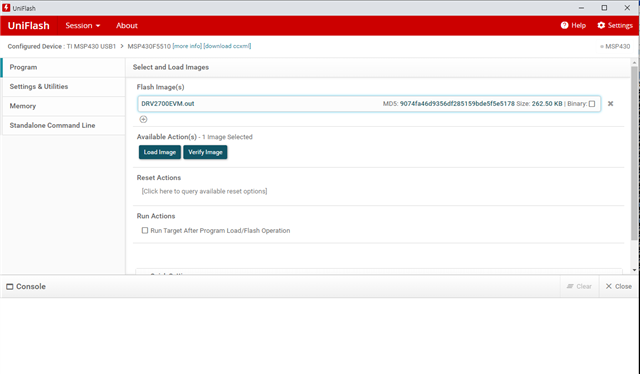
I am trying to update the DRV2700EVM's firmware to the latest version, 1.7, using UniFlash.

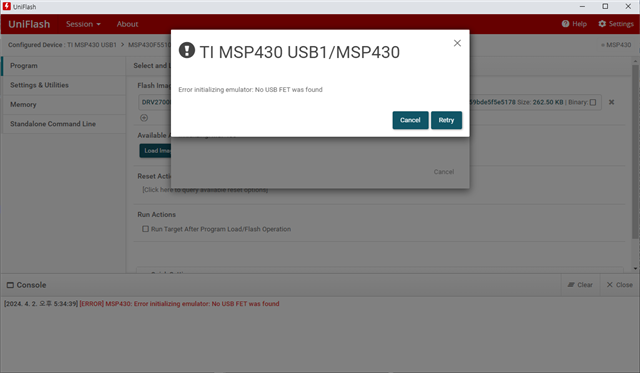
But I keep getting the “No USB FET was found” error.

I installed ti_msp430driver_setup_1.0.1.2, but the TI driver doesn't seem to be recognized in Device Manager.

What more should I do?

The environment is as follows:
================================================
Target : DRV2700EVM
OS : Windows10 Pro x64bit
CCS : ccs_setup_6.2.0.00050.exe
UniFlash : uniflash_sl.8.6.0.4688.exe
MSP430Driver : ti_msp430driver_setup_1.0.1.2.exe
================================================
Thank you in advance.

Regards,
Simon

  • Hello Simon,

    If you can't find the USB port of MSP430 in device manager, it seems that your computer is lack of the driver of corresponding USB interface. You can look for the "interface driver download" or "Serial driver download" in website and look for the download guide from website. Remember to restart the computer after you download the driver.

    Best Regards,

    Janz Bai

  • Hello. Janz,


    Thank you for your answer.

    I successfully upgraded to Version 1.7 using Piezo Control Console.

    However, firmware upgrade still cannot be performed on UniFlash.

    Can DRV2700EVM only download firmware from Piezo Control Console?


    Regards,
    Simon

  • Hello Simon,

    I am sorry that I am out of office from 4th April to 14th April. You can check whether the USB port of the EVM can be found in the "device manager" of your PC. If it can't be found, your issue is not caused by TI device, it is caused by that your PC don't have the driver of the USB interface (not related to TI device, just related to the USB interface), you should look for the driver of the USB interface and download it to your PC.

    Best Regards,

    Janz Bai

**Attention** This is a public forum