This thread has been locked.

If you have a related question, please click the "Ask a related question" button in the top right corner. The newly created question will be automatically linked to this question.

CODECOMPOSER: sdk

Part Number: CODECOMPOSER

hi

i notice that when importing a package from the SDK, not all files are copied to the project folder.

i want to create a project folder containing all the files, without any links, so that when i zip the project and give it to a colleague. all the files remain as-is.

thanks, 

  • Hi  ,

    As you have posted this on MSP forum, I assume that you have been trying it with some SDK for MSP device. Please specify if that is not the case and there's any difference noted.

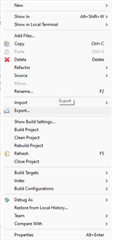
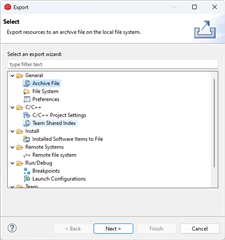
    Generally, when an example is loaded into CCS, it may link to some already loaded or common files linked with the project from its settings. This prevents bulky projects when common files like dependencies can be shared among projects. But, you can right-click on a project and select Export to export a project 

    where you will find relevant options to export the project files, be it in the form of an archive, directory itself or its project settings and shared indexes.

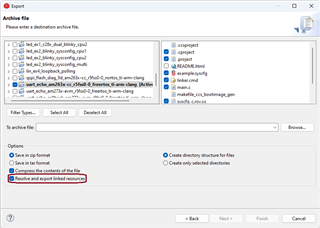
    Say if Archive Export had been chosen, there's an option to resolve linked resources and export them. Be sure to check it if that's what is needed.

    Please give it a try and see if this helps for your project file sharing. Usually, importing SDK projects is recommended for usage directly from the corresponding SDK version package, but let us know if this isn't working out.

**Attention** This is a public forum