This thread has been locked.

If you have a related question, please click the "Ask a related question" button in the top right corner. The newly created question will be automatically linked to this question.

MSP430G2553: MSP430G2553

Part Number: MSP430G2553
Other Parts Discussed in Thread: MSP-EXP430FR2355, , MSP-EXP430G2ET

Tool/software:

Hi,

I am trying to download a program into my new project and the code at memory location 0xC000 is all zeros. The system comes back saying it can not verify the memory. This is a new part.

Any help would be appreciated.

regards,

Charles

  • Hi Charles,

    What HW tool and SW are you using?

  • I'm using Code Composer V12.80 connected to a MSP-EXP430FR2355 via USB and I disconnected the SBWTDIO and SWBTCK from the 2355 and connected it to my project with the MSP430G2553 processors SBWTDIO and SWBTCK and ground.

  • Hi Charles,

    Ok, I have same setup as you and I am able to download G2553 code to the G2553 target using FR2355 LP.  Did try swapping the SBWTDIO and SBWTCK  just in case you had them mixed up?

  • Hi Dennis,

    Yep first thing I did. It found the processor then and downloaded the code. However the symbols are there but no actual code.

  • Hi Dennis,

    I created a simple project and loaded it into the board and here is what I get back.

    MSP430: File Loader: Verification failed: Values at address 0xC000 do not match Please verify target memory and memory map.
    MSP430: GEL: File: C:\Users\charl\OneDrive\Desktop\Mikes LED Project\LEDProject Firmware\LEDProject\BlinkLED_MSP-EXP430G2ET\Debug\BlinkLED_MSP-EXP430G2ET.out: a data verification error occurred, file load failed

  • Hi Charles,

    I'm sure you have already confirmed that the devices you have installed are MSP430G2553, correct?  The message indicates that the device ID of the target device does not match the expected G2553.  And if you have more than one G2553, you tried those as well, correct?

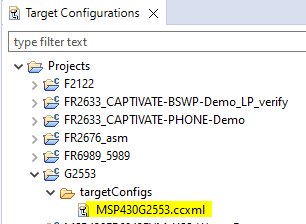
    Here is something you can try if you are using CCS ...  from the main menu select View>Target Configurations.  You should see a new window appear called Target Configurations.  Navigate to the G2553, right click on the MSP430G2553.ccxml.

    The debug window should appear.  Right click on the second line and select Connect Target.  Let me know what error message you see.

  • Hi Dennis,

    Thanks for the suggestion. I checked it is saying that it is the correct processor. The problem is that after downloading the software into the Flash, the system comes back saying that the Flash contents does not match what was downloaded.

    I am also learning that I may have a design error for the RST/NMI/SBWTDIO line. I took this design from a friend but I think there is an error with it. My RST/NMI/SBWTDIO line has no pullup/cap for the RES signal

    What do you have for yours?

    regards,
    Charles

**Attention** This is a public forum