This thread has been locked.

If you have a related question, please click the "Ask a related question" button in the top right corner. The newly created question will be automatically linked to this question.

MSP-FET: Window 11 driver

Part Number: MSP-FET
Other Parts Discussed in Thread: MSP430FG479

Tool/software:

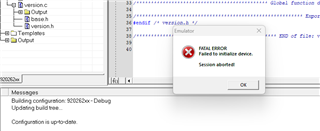
I need to use the MSP430 Embedded Workbench V4.32from IAR, but cannot connect to the MSP-FET430UIF on a Windows 11 PC.

It simply refuses to connect. I have installed the lates Window driver (1.0.1.2) wich is indicated to work on Windows 10.
Our IT supporter says the there is quite a big difference in USB drivers for Windows 10 and 11.

So my question is if anybody found a solution for this.

I could buy the newer MSP-FET Debugger, but this is not supported in the old IAR Embedded Workbench and it is not an option to upgrade this.

  • Hi Flemming,
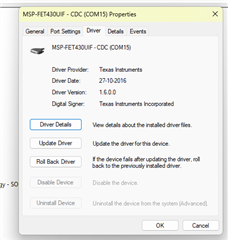
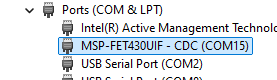
    I tested an MSP-FET430UIF using a blinking example from our Resource Explorer in CCS for an MSP430FG479 on an MSP-TS430PN80 board. My computer recognizes the device and can program it. My current Operating System is Windows 11 Pro. Could you send a screenshot of your device manager so I can see if I'm missing something that can help you fix this issue?
    Best Regards,
    Diego Abad

  • Hi Diego.

    Appreciate your help.

    Pls. see attached images.

    Devmgr.png

    Driver.png

    IAR EWI msg.png

    Best regards
    Flemming

  • Hi Diego, it seems as the links in the previous reply cannot be shared public :-/

    Please see the pictures here instead.

    Br. Flemming

  • Hi Flemming,
    It seems that your computer recognizes the device. Can you try using the FET with CCS to see if you can program with it?
    Best Regards,
    Diego Abad

  • Hi Diego,

    I think you are right. If I use the newest version of the MSP430 IAR IDE it also seems as it connects correctly to the MSP-FET (because it signals on the Mode LED when I select Port 15 and it also reacts by signaling on the Mode LED when I start the debugger).

    It still does not let me start the debugger which makes me think that the reason could be that the protection fuse is blown in the chip. I don't know how the environment will react on a protected device, what do you think?

    If it is blown, I guess I will encounter the same problem using the CCS. 

    I will try using a "fresh" unprotected chip.

    Br. Flemming

  • Hi Flemming,
    I think it is worth trying the chip that may have the protection fuse blown in CCS just to verify it can't be programmed. If the same problem occurs, then you are correct, and it probably will be a good idea to try the "fresh" chip.
    Best Regards,
    Diego Abad

  • Hi Diego,

    I haven't tried the CCS, since its not that simple to convert my IAR project to CCS, and I didn't find a possibility to import a .hex file and program it to the target.

    Instead I have installed and tried the MSP430 Flasher tool from TI.

    It connects without any problems to the MSP_FET, but when it tries to access the target it returns "unknown device" error.

    I guess it indicates that the protection fuse is blown (irreversible), which I know is a requirement for our released products. I will get some fresh samples of the chip and try again. I will let you know if it works.

    I was not aware that the protection is irreversible, for other chips we use it is possible to do a bulk erase to remove the protection.

**Attention** This is a public forum