This thread has been locked.

If you have a related question, please click the "Ask a related question" button in the top right corner. The newly created question will be automatically linked to this question.

MSP430F5438A: GPIO interrupt flag failure

Part Number: MSP430F5438A

Tool/software:

Hi,

I am facing an issue with the GPIO interrupt function. I am using PORT1 pins 0, 1, and 2, which are pulled up using 1K ohm resistors.

Whenever a pin goes LOW, an interrupt occurs, but now it is triggering randomly. However, when I run the code in debug mode and place a breakpoint in the interrupt function, it works properly.

What could be the problem, and how can I solve it?

Additionally, I tested with a multimeter by connecting one probe to the ground pin on my board and the other probe to the controller pin(P1.1). In this case,the interrupt worked perfectly.What is the reason behind it?

Thanks,

Anbu

  • This sounds rather like switch bounce. What is connected to the pin?

  • Hi,

    That pin is connected to a push button.

    You said the switch bounces but, how exactly does it work? When I put a multimeter on it, what happens there?

    note: Multimter in Voltage mode.

  • You won't see it with a multimeter you need a scope.

    https://www.allaboutcircuits.com/textbook/digital/chpt-4/contact-bounce/

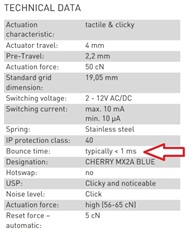
    Most switches will specify how long they bounce, there are many ways to take care of it, like locking out the interrupt for the contact bounce time.

    (This is for a Cherry MX1)

  • If you Google "switch bounce" you'll get (many) descriptions/solutions better than what I have. Briefly: when the contacts on a (physical) switch close, there will be many brief contacts (arcs/ricochet), each of which will be recorded in PxIFG. Durations are in the microsecond range, and they may continue for milliseconds. You need to wait until this bouncing finishes to know the position of the switch. (It's also easy to forget that switches bounce when released as well.)

    Your multimeter is averaging over (something like) a second or two, so it can't see a microsecond-long event.

  • Hi Bruce,

    Thank you for providing this clarification!

    I have a couple of follow-up questions based on your response:

    1.What are the ways to reduce switch bounce and minimize the debounce time to less than 1 millisecond?

    2.When I measure the voltage at the input pin of the controller using a multimeter to check whether it is high or low, the circuit functions correctly only when the probe is touching the input pin. Otherwise, it behaves unpredictably. What could be the reason for this?

    Thanks,

    Anbu

  • The multimeter might have enough capacitance to slow down the bounce,

    I already listed one way to prevent switch bounce - once you get an interrupt set a timer for a millisecond or so - and only respond to the next interrupt after that time.

    The page I linked shows a hardware solution: put a capacitor to slow down the rise time.

    You cannot "minimize the debounce time to less than a millisecond." That is a mechanical characteristic of the switch. You can only mitigate it.

    The best way is probably to poll the switch rather than having it trigger an interrupt.

**Attention** This is a public forum