Part Number: EVM430-F6736
Other Parts Discussed in Thread: UNIFLASH
Tool/software:
Encountered Problem
The issue observed with the meter lies in the discontinuity of data synchronization on the user interface (UI).
Once data transmission begins, the UI synchronizes correctly every second, displaying the system data in real-time. However, after a certain period (which varies from test to test: sometimes a few seconds, sometimes a few minutes...), the interface freezes.
Test Conditions
I used the project provided among the EMDC examples: EVM430-F6736_CT_1V_1C_50Hz.
I flashed it onto the EVM430 board using Code Composer Studio, then opened it in EMDC.
The HID firmware .txt file was flashed using UniFlash.
Cables were connected as specified in the guide provided by Texas Instruments (Energy Measurement Technology Guide 1.40.00.03).

Tests Conducted to Identify the Cause of the Issue:
Test 1:
Unplugged the USB cable, unchecked the “Connected” box, then reconnected the cable to a different USB port.
After clicking "Connected" again, synchronization resumed, but the interface froze again after a while.
Test 2:
Same procedure as in Test 1, but the cable was reconnected to the same USB port. The result was the same: data synchronized again, but the UI eventually froze.
Test 3:
Installed EMDC on Ubuntu 22.04 (stable version). Opened the same project and ran the test: the freezing issue persisted.
Test 4:
Test conducted on a friend’s computer with a fresh EMDC installation: same behavior observed.
Test 5:
Replaced the USB cable connecting the HID to the PC, then re-ran the test: same result, the UI eventually froze.
Test 6:
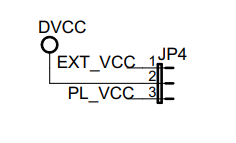
I removed the HID, and connected the EVM430 directly to an FT232RL USB to UART TTL 5V/3.3V. The FT232RL was then connected to the PC.I did not connect the EVM430 to the mains supply or the load. Instead, I used an external 3.3 V DC power supply to directly power the microcontroller of the EVM430, making sure to correctly adjust the position of the JP4 jumper.
I launched Serial Port Utility and configured the serial port as follows:
-
Baudrate: 250000
-
Databits: 8
-
Parity: None
-
Stop bits: 1
-
Flow control: None
In the receive settings, I checked Hex, and in the send settings, I also checked Hex.
I then tried to send the following command:
0x55, 0xAA, 0x06, 0x04, 0x01, 0x01, 0x01, 0x07, 0x00
to prompt the EVM to send me data.
I attempted to manually enter each byte into the command bar and send them one by one, i.e., I typed 55, clicked Send, then typed AA, clicked Send, and so on—exactly as mentioned in the previously referenced thread.
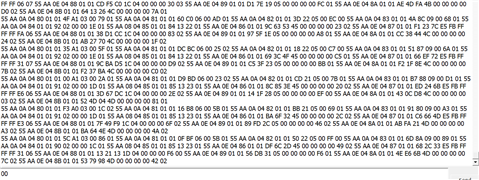
The EVM started sending data
The test lasted 50 minutes without interruption, until I decided to stop it myself.

So my question is:
-
what could be the root cause of the issue? Is it the EMDC , the HID, or something else?