This thread has been locked.

If you have a related question, please click the "Ask a related question" button in the top right corner. The newly created question will be automatically linked to this question.

MSP430 Flash Gang Programmer - DLL_usage_Examples


Hi

I'v written a custom Excel VBA  app using the Gang430.dll. The app works fine

on 2 PC's - 1 with Windows 2k & 1 with Windows XP. Your sample app GANG430_DLL_test.xls

also works OK on these PC's.

However on a 3rd PC with Windows XP both my app & GANG430_DLL_test.xls

report an error message  = Error 10 could not read Gang430.ini. The INI file is in the same folder as the GANG430_DLL_test.xls

and my app. The error occurs after the GangLoadImage command. All other commands within GANG430_DLL_test.xls appear to

work successfully without error. What might be causing this error?

  • Hi

    Update!

    Of the 2 PC's which were working OK - 1 is no longer working. It is now reporting that it can't find Gang430.dll. The Dll is present in the same folder as the Workbook!

    I have the workbook + Gan430.dll + Gang430.ini in a folder on a memory stick. When it is plugged into the 3 pc's in turn and the workbook run - I get the following results

    On 1 PC the workbook works OK, on the 2nd it reports Can't fing Gang430.ini, on the 3rd it reports Can't find gang430.dll

    Anyone any ideas???

    thanks

    Brendan


  • Maybe for some reason, the PCs path variable has been corrupted. It defines where to search for DLLs. In Windows, DLLs are not automatically loaded from the current directory. They use the same search path as .exe/.com files. Not including the current folder.
    It depends on how the application is loading the DLLs, as there are several ways to do it. And many ways to mess it up.

  • Thanks for the reply Jens-Michael

    The example Excel app supplied with the gang430 SW installer states that the dll and ini files must in in the same folder

    as the workbook. The example Workbook VBA code contains a starement to set the Application.DefaultFilePath to the workbook

    folder so it looks this statement was put there for the above reason.

    I solved the problem on both PC's this morning by copying both Gang430.dll & Gang430.ini to the windows\system32 folder and I've removed

    the above statement from the code as it serves no apparent purpose.


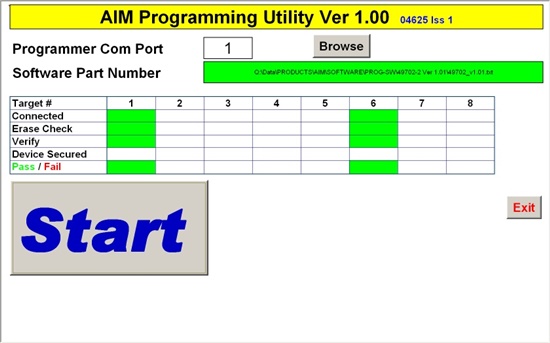
    My app is intended to make the programming  cycle idiot proof i.e. users can't mess with settings etc.I've ttached a screenshot.

  • Brendan Lambe said:
    I solved the problem on both PC's this morning by copying both Gang430.dll & Gang430.ini to the windows\system32 folder

    Looks like the 'Application.defaultFilePath' is not the workbook folder for some reason.
    By putting the files into system32 (and therefore into a defined location), and lettign the system do the default stuff, you solved the problem.

    At the risk of another program coming and messing with these files by overwriting them. At least you know now where to look for a 'final' solution.

    I had a similar problem with CygWin, which is used to provide a linux-like shell environment for programs that are deveoped for Linux but compiled for Windows.
    Two compilers, AVRStudio and MSPGCC, are both abse don Cygwin. Both require the Cygwin DLL to be in the DLL search path. Now the program installed as the second will get the DLL of the first isntalled as the two paths are added to the system path and searched in the order of installation. I fboth version of Cygwin are the same, this is no problem, btu they aren't. If you install AVR studio first, MSPGCC won't run. Luckily the DLLs are backwards compatible, so installing MSPGCC first (or renaming the AVR version) did solve the problem.
    Loading the DLL from a dedicated folder (relative to the program path) will avoid version conflicts. But of course this may rise other problems when no two instances of the DLL may be active at the same time.

    I hope you won't run into a similar problem.

    Brendan Lambe said:
    I've ttached a screenshot

    Unfortunately not. :(

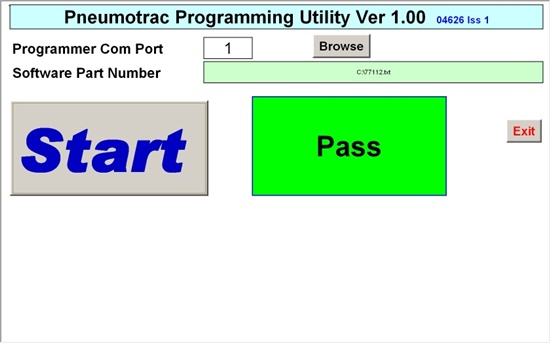
  • I've attached screenshots of the 8 Gang Programming workbook and also one I did for the Single MSP-PRG430 Programmer

    The Excel Interface is totally hidden from the user.


  • Looks nice. Exactly the type of program one needs for the production department, where no engineers are working on the devices. Just plug and click

**Attention** This is a public forum