This thread has been locked.

If you have a related question, please click the "Ask a related question" button in the top right corner. The newly created question will be automatically linked to this question.

CAPTIVATE-PGMR: Captivate Pgmr not detected by pc

Part Number: CAPTIVATE-PGMR

Tool/software:

When I try to connect the captivate programmer to my computer, it keeps giving me the following prompt on design center: 


No other devices were connected at the time of this message. In addition to this message, I used to get another error message exclaiming that the "HID device was found, but unable to connect". Any help / direction on how to get this working would be appreciated. 

  • Hi Henry,

    What OS and version are you running?

    One possibility is there is a driver conflict or cached driver information.  If you are running Windows, you can try downloading USBDeview (by NirSoft).

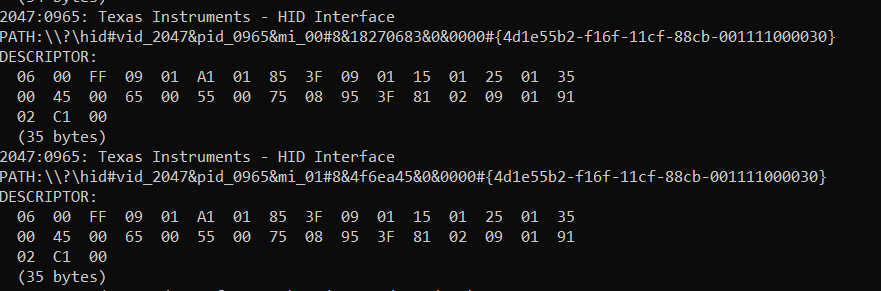
    Next you can try viewing the HID descriptor of the CAPT-PGMR during enumeration using a tool like usbhid-dump on Linux or win-hid-dump on Windows. These tools allow you to retrieve and display the report descriptor of connected HID devices, which provides information about the device's functionalities and how it communicates with the system.  If you try this, can you share a copy so I can view?

    Note: I don't have the ability to test either of the 2 suggested utilities myself due to IT limitations here at TI, so I can't confirm this will help solve this particular issue.

  • I am using Windows 10. Here are the results: 

  • Hi Henry,

    I see in the screen shot there appears to be more than one instance of HID interface VID/PID 2047/0965. When you captured this data did you have 0,1 or 2 CAPT-PGMRs connected?  If so, disconnect that board and see if 1 or both HID 2047/0965 disappear.  If after disconnecting the CAPT-PGMR 1 instance of the HID device remains, then this indicates Windows "remembers" an instance of the HID device.  I'm not sure how to clear or remove this entry so you may have to search for help on this from the web.

  • Hi Henry,

    I'm working with our SW tools team to see if we can reproduce this issue.

  • Hi Henry,

    By chance have you tried running the GUI on another PC?  It should work.  In this case, would you be willing to run some diagnostics on both PCs to help us determine the possible cause?

  • Hi Henry,

    In this case, could you show us what you see in the device manager w.r.t the captivate programmer? Is it being detected twice in the device manager as well for your PC? This is to help wittle down the issue and see if it's related to the OS vs GUI.

**Attention** This is a public forum