


Part Number: MSPM0C1104
Other Parts Discussed in Thread: MSPM0C1103
According to the technical reference manual p. 310 the Flash Memory in the NVM section can be used by the application.
www.ti.com/.../slau893c.pdf
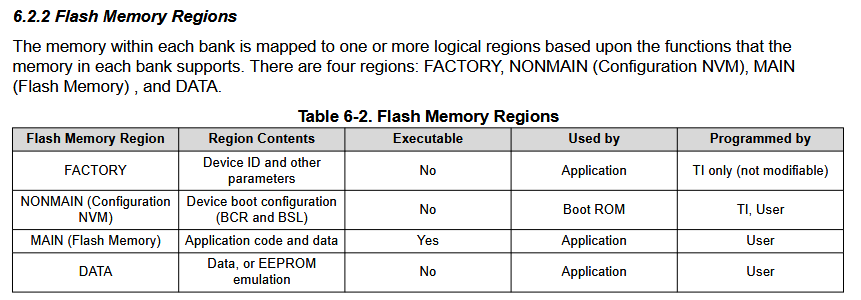
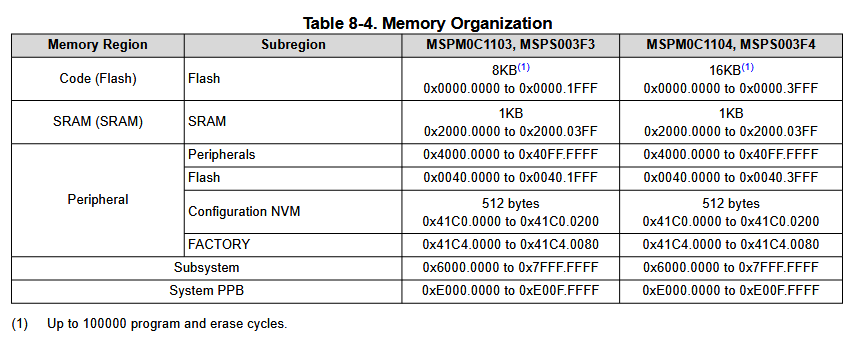
According to the datasheet for the MSPM0C1103/MSPM0C1104 p.29, in the peripheral memory region lies, amongst others, the Flash subregion. I assume this to be the same as the Flash Memory region specified by the technical reference.
At the start of my main function I run the following code, but I cannot read the data from the flash memory. The failure status returned DL_FLASHCTL_FAIL_TYPE_ILLEGAL_ADDRESS.
    SYSCFG_DL_init();

    DL_FlashCTL_executeClearStatus(FLASHCTL);
    DL_FlashCTL_unprotectSector(FLASHCTL, (uint32_t) &device_config_persistent, DL_FLASHCTL_REGION_SELECT_MAIN);
    DL_FlashCTL_readVerify32(FLASHCTL, (uint32_t) &device_config_persistent, (const uint32_t*) &device_config);
    DL_FlashCTL_waitForCmdDone(FLASHCTL);
    DL_FLASHCTL_FAIL_TYPE failType = DL_FlashCTL_getFailureStatus(FLASHCTL);
   if (failType != DL_FLASHCTL_FAIL_TYPE_NO_FAILURE) {
       __BKPT(0);
   }
device_config's type is exactly 32B, device_config_persistent is defined as such:
__attribute__((section(".device_config")))
ST_DEVICE_CONFIG device_config_persistent =
{
    .setting1 = BL_SHORT_CYCLE,
    .setting1 = FALSE,
    ...
}
How can I read an write from and to a persistent memory region?
Kind Regards
Update:
The protection registers are unchanged before and after the unprotect operation.
FLASHCTL->GEN.CMDWEPROTA = 0xFFFF
FLASHCTL->GEN.CMDWEPROTB = 0x0000
FLASHCTL->GEN.CMDWEPROTC = 0x0000
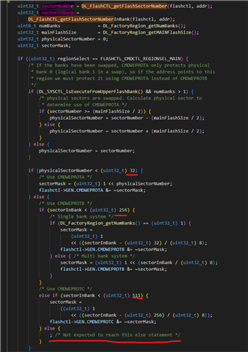
Reason being the sectorNumber and sectorInBank equaling 0x1000 (4096).
This API is obviously not meant for writing to that memory section. At least not on my controller.
Update2:
I am instead attempting to write the data to the last section of the 8kB code flash.
But I keep getting error 0x20, DL_FLASHCTL_FAIL_TYPE_VERIFY_ERROR when reading. Unclear as to why.
The writing also doesn't work wih the DL_FlashCTL_programMemory32, as the ROM data does not get updated.
MEMORY
{
    FLASH           (RX)  : ORIGIN = 0x00000000, LENGTH = 0x00001BFF
    SRAM            (RWX) : ORIGIN = 0x20000000, LENGTH = 0x00000400
    DEVICE_CONFIG   (RW!x) : ORIGIN = 0x00001C00, LENGTH = 0x000001FF
    BCR_CONFIG      (R)   : ORIGIN = 0x41C00000, LENGTH = 0x000000FF
}
