This thread has been locked.

If you have a related question, please click the "Ask a related question" button in the top right corner. The newly created question will be automatically linked to this question.

MSPM0G3507: Bootloader Firmware Update issue

Part Number: MSPM0G3507

Hi Team,

We are trying to update MSPM0G3507 Firmware using BSL. But during this update we are facing some issue. 

Master: IMX93 Arm based processor

Slave: MSPM0G3507

We found python script which was provided in GUI Source code to implement firmware update steps using IMX93. 

But we are failing to do so. Sometimes it updates but second or 3rd time we are not able to do it.

Please provide any reference to follow the implementation. 

Thanks and regards,

Vinay

  • Hi Vinay,

    Which GUI are you referring to? 

    We have the following Documentation for performing firmware updates: MSPM0 Bootloader User's Guide (Rev. A)

    We also have many software examples with our MCU receiving updates: Bootloader (BSL)

    Best Regards,
    Brian

  • Hi Brian Lee,

    Thank you for your reply.

    Now we are able to update Firmware of MSPM0G3507 Using BSL from UART using a external processor.

    But the problem is we are not able to update the firmware we have built for MSPM0G3507. The Binaries provided in Bootloader Directory are working fine.

    LFU_App1_tima_toggle_PB27_LP_MSPM0G3507_ticlang and LFU_App2_tima_toggle_PB22_LP_MSPM0G3507_ticlang.

    We have changed the Linker script of the application same as LFU_App1_tima_toggle_PB27_LP_MSPM0G3507_ticlang's Linker Script. 

    The binary size provided in bootloader is 3kb and the custom application what we have developed is of size 15kb. 

    Will it cause issue. We are able to flash custom binary using Python Script provided in bootloader. But the application is not booting after updating.

    Please let me know where we are lagging.

    Thanks and regards,

    Vinay


  • Hi Vinay,

    If the flash length defined in the linker of the example (3 KB) is smaller than your custom application, attempted writes will spill into the adjacent memory section and result in an "illegal address" error. Once the bootloader jumps to the application, since it is incomplete, the CPU will lock up. To fix this, increase the LENGTH of the FLASH region in your linker script to accommodate your 15 KB application.


    There is also a known issue in some of our example linker files where SRAM is defined as starting at 0x20000000 instead of
    0x20200000. If the SRAM base address is wrong, data and stack will be placed at an invalid address, which will also prevent the
    application from booting. Can you confirm SRAM is defined as 0x20200000 in all linker scripts - BSL and application?

    Best Regards,
    Brian

  • Hi Brian Lee,

    The flash range of given example starts from 0x4000 and the length is 0xe000. And our custom application flash range starts from 0x4000 and the length is 0x46000. And SRAM in linker of example starts from 0z20201500 and length is 0x6b00. And we have not changed start address of SRAM in our custom application, but we have changed the length of it to 0x21700.

    But still we are not able to boot the application once it updates from BSL.

    Thanks and regards,

    Vinay

  • Hi Vinay,


    Both lengths exceed the physical memory of the device. Flash can be extended up to 0x1C000 (the remaining 112 KB after the 16 KB BSL at 0x4000) — 0x46000 is invalid. The SRAM length must be no larger than 0x6B00 from origin 0x20201500, as the device has only 32 KB total.

    The SRAM length is the cause of your boot failure. With 0x21700, the linker places the initial stack pointer at 0x20223200 — well outside physical SRAM. The CPU loads that address into SP on reset, faults on the first stack operation, and never reaches main.

    Best Regards,
    Brian

  • Hi Brian Lee,

    We have changed the linker file of custom application as per your input. Flash starting address is 0x4000 and length is 0x1C000 and SRAM address is 0x20201500 and length is 0x6E00. Still we are facing the same issue. Please we need your help.

    Thanks and regards, 

    Vinay

  • Hi Vinay,

    Are you able to hold an active debug session after the bootloader attempts to jump to your target application?

    If so, can you check the xPSR and share the exception value:

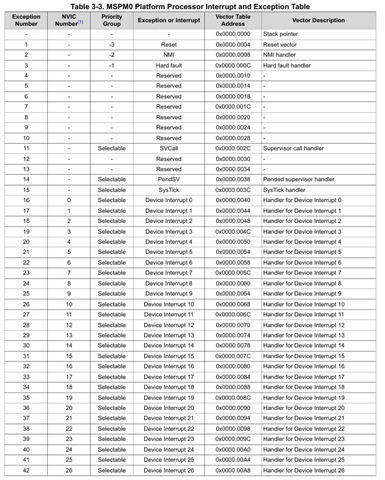
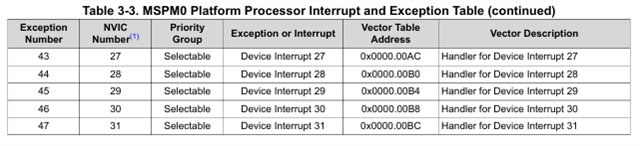
    The following table can be used to decode it:

    If it's an NMI (0x2), please also check the SYSCTL NMIIIDX register and compare with the included table:


    If the above is not the case, are you able to recreate the issue on firmware you would be able to share with me so I can debug on my side?

    Best Regards,
    Brian

  • Hi Brian Lee,

    I tried debugging bootloader application and when I update custom application using BSL python script 

    followed below steps:

    1. Started bootloader application.

    2. Placed breakpoint @switch (app_area_flag) in void CMD_API_startApplication(void) api.

    3. Ran python script for BSL Firmware Update.

    4. Added GPR to Watch expressions.

    5. Updated Custom application firmware using BSL Python script.
    6. Update successful returned in Script.

    7. Breakpoint got hit.

    8. Reading xPSR Register.

    added screenshots for your reference.

    Thanks and regards,
    Vinay

  • Hi Brian Lee,

    Adding some note:

    We observed small applications like blink led or take any small sized applications are working absolutely fine. There is no issue at all.

  • Hi Brian Lee,

    waiting for your inpur. Please guide us with the solutions

  • Hi Vinay,

    Looking back over the thread, I see that you modified the SRAM length to 0x6E00. 0x6E00 places the initial stack pointer at 0x20208100, which is 256 bytes beyond physical SRAM. Change it to 0x6B00 exactly. 

    To catch the fault in the debugger, implement a HardFault_Handler in your custom application, then set a breakpoint inside it. The screenshots show the xPSR captured while still inside the BSL before the application jump, which will always show a clean state.

    Best Regards,
    Brian

  • Hi Brian Lee,

    We have changed the linker script and generated the application. But we observed that .vtable segment is not getting created in the .map file.

    will this create any issue in jumping to the application?

    Thanks and Regards,

    Vinay

  • Hi Brain Lee,

    Sharing you the bootloader and Custom application with this response. Kindly please let us know the issue we are facing.

    Thanks and regards,

    Vinay

    App.rarLFU_Bootloader_LP_MSPM0G3507_freertos_ticlang.rar

  • Hi Vinay,

    Thank you for the project files. After looking these over, I found three potential issues that can cause the application not to boot.

    Issue 1: App runs out of stack space during initialization

    What's happening:

    Your bootloader doesn't perform a traditional firmware handoff. Instead, it launches your application as a FreeRTOS task with only 256 bytes of stack space allocated (main-tasks-create.c:51):

    #define config_test_STACK_SIZE  ((unsigned short) 64)  // 64 words = 256 bytes
    

    Your application initializes I2C, ADC, GPIO, timers, VREF, and POST checking before entering the main loop (main.c:20-40). The build map shows this requires at least 10 nested function calls during startup. Each function call consumes stack space for return addresses and local variables. 256 bytes is exhausted before main() completes initialization.

    Simple example apps like LED blink work because they have minimal initialization — just a GPIO toggle. Your application has significantly more peripheral setup, which exceeds the available stack.

    When the stack overflows, it silently corrupts adjacent memory (the FreeRTOS heap), causing unpredictable crashes or hangs.

    Why the linker-defined .stack doesn't help:

    Your linker script allocates 2048 bytes for .stack at address 0x20207800. This stack is only used when the CPU boots normally from reset. Because the bootloader launches your app as a FreeRTOS task instead of doing a CPU reset, this 2KB stack region is never used — your app only gets the 256-byte FreeRTOS task stack.


    Issue 2: Your application's interrupt handlers never execute

    What's happening:

    Your application uses I2C slave mode, ADC conversions, and timers — all of which generate hardware interrupts. However, these interrupts are currently being routed to the bootloader's handlers, not your application's.

    When the CPU starts, the Vector Table Offset Register (SCB->VTOR) points to address 0x0 — the bootloader's interrupt vector table. Your application's startup code (startup_mspm0g350x_ticlang.c:181-187) never updates VTOR to point to your application's vectors:

    void Reset_Handler(void) {
        __asm("b _c_int00");  // jumps to C init, but VTOR still points to bootloader
    }
    

    Your linker script reserves a .vtable section in RAM for relocating the interrupt vectors, but nothing ever copies the vectors there or updates VTOR. The map file confirms the .vtable section doesn't exist in the final binary.

    Result: When your I2C hardware fires an interrupt, the CPU jumps to the bootloader's I2C0_IRQHandler (which just loops forever in Default_Handler), not your application's handler. Your i2cSlaveServices() and adc_services() never see the interrupts they're waiting for.

    Simple apps work because they don't use peripheral interrupts — just polled GPIO.


    Issue 3: Firmware updates after the first one erase themselves

    What's happening:

    The bootloader supports two firmware slots:

    • Slot 1: 0x4000 to 0x11FFF
    • Slot 2: 0x12000 to 0x1FFFF

    Your application is linked to start at 0x12000 (Slot 2) — confirmed in mspm0g3507.cmd:52 and the map file showing interruptVectors at 0x00012000.

    On first boot:

    1. BSL programs your firmware to 0x12000 (Slot 2)
    2. Bootloader checks: Slot 1 empty → Slot 2 valid → runs Slot 2 ✓
    3. app_area_flag = 2

    On second update:

    1. BSL programs new firmware to 0x12000 (Slot 2 again)
    2. You send CMD_START_APPLICATION
    3. Bootloader executes (main-tasks-create.c:338-341):
      case 2:  // because app_area_flag = 2
          DL_FlashCTL_eraseMemory(FLASHCTL, APP_AREA_2_START_ADDR, ...);  // erases 0x12000!
      
    4. Bootloader resets the device
    5. On reboot: both slots empty → no app runs

    The LFU (Live Firmware Update) scheme expects you to alternate between slots. Each update should program to the opposite slot from the currently running firmware. The bootloader then erases the old slot and reboots to the new one.

    Since your app is always built for Slot 2 (0x12000), every update writes to Slot 2, then immediately erases Slot 2 before rebooting.

    Additional issue: The linker configuration specifies length = 0x1C000, which places the end at 0x2E000 — beyond the device's 128KB flash boundary at 0x20000. While your current code size (6.2KB) doesn't trigger this, it could cause link failures as the application grows.

    Best Regards,
    Brian

  • Hi ,

    Thanks for the detailed list, I will be looking into this activity. I will go through and update.

    give me some time, Thanks for waiting.

  • Hi Brain Lee,

    Few corrections in the source

    1. Updated the STACK to 2048

    #define config_test_STACK_SIZE  ((unsigned short) 64)  // 64 words = 256 bytes
    2.Updated the Code in the Application FW with Register the ISR
    Ex:   for I2C  DL_Interrupt_registerInterrupt(((uint32_t) I2C_1_INST_INT_IRQN), I2C_1_INST_IRQHandler_RAM);

    Still FW is not jumping to Application code.

    Please do suggest where to add the ISR register in Application FW or Bootloader FW ?
  • Hi Mallikarjuanreddy,

    Can you try replacing the xTaskCreate app launch with a start_app() function that performs a clean CPU handoff -- same pattern used in the MSPM0 MCUboot reference:

    static void start_app(uint32_t *vector_table)
    {
    __asm volatile(
    "LDR R3,[%[vectab],#0x0] \n"
    "MOV SP, R3 \n" ::[vectab] "r"(vector_table));

    SCB->VTOR = (uint32_t)vector_table;

    ((void (*)(void))(*(vector_table + 1)))();
    }

    Then restructure main_tasks_create so that if a valid app is found, the bootloader calls start_app() and never enters the FreeRTOS scheduler.

    void main_tasks_create(void)
    {
    app_area_flag = TI_MSPBoot_AppMgr_AppisValid();

    if (app_area_flag == 1) {
    start_app((uint32_t *)APP_AREA_1_START_ADDR);
    /* never returns */
    } else if (app_area_flag == 2) {
    start_app((uint32_t *)APP_AREA_2_START_ADDR);
    /* never returns */
    }

    /* No valid app found — start BSL and wait for update */
    xQueue = xQueueCreate(mainQUEUE_LENGTH, sizeof(uint32_t));
    xTaskCreate(prvBootloader_Task, "BSL", configMINIMAL_STACK_SIZE, NULL,
    mainQUEUE_RECEIVE_TASK_PRIORITY, &Bootloader_Handler);
    xTaskCreate(prvRTOS_LED0_Toggle_Task, "LED", configMINIMAL_STACK_SIZE,
    (void *)mainQUEUE_SEND_PARAMETER, mainQUEUE_SEND_TASK_PRIORITY,
    &RTOS_LED_Toggle_Handler);
    vTaskStartScheduler();
    for (;;);
    }

    Best Regards,
    Brian

  • Hi Brain,

    Apology for delayed response,

    I have modified as per suggestion 

    With this CPU hand off is happening, but App stops running.

    I will observation after testing further.

  • Hi Brian,

    thanks for inputs .

    After looking into the bootloader and custom app with your inputs Issue1/2.

    I have gone through the code review.

    Few observation and modification is done

    1. Few GPIO pin are re-used in the application fw like PA0, now removed from the bootloader.

    2. updated and registered the all the ISR to RAM 

    DL_Interrupt_registerInterrupt
    3. Few GPIO are used as Interrupt driven in the Application firmware, i have removed and using as normal GPIO.

    With these changes i am able to flash successfully and run the APP in the EVK.

    Next step we will check with our custom Board.
  • Hi Millikarjuanreddy,

    I'm glad you're making progress! Please let me know if you run into any further issues and I'll be happy to assist further.

    Best Regards,
    Brian

**Attention** This is a public forum