MSPM33C321A-Q1: IAR compiling issue

Part Number: MSPM33C321A-Q1
Other Parts Discussed in Thread: SYSCONFIG
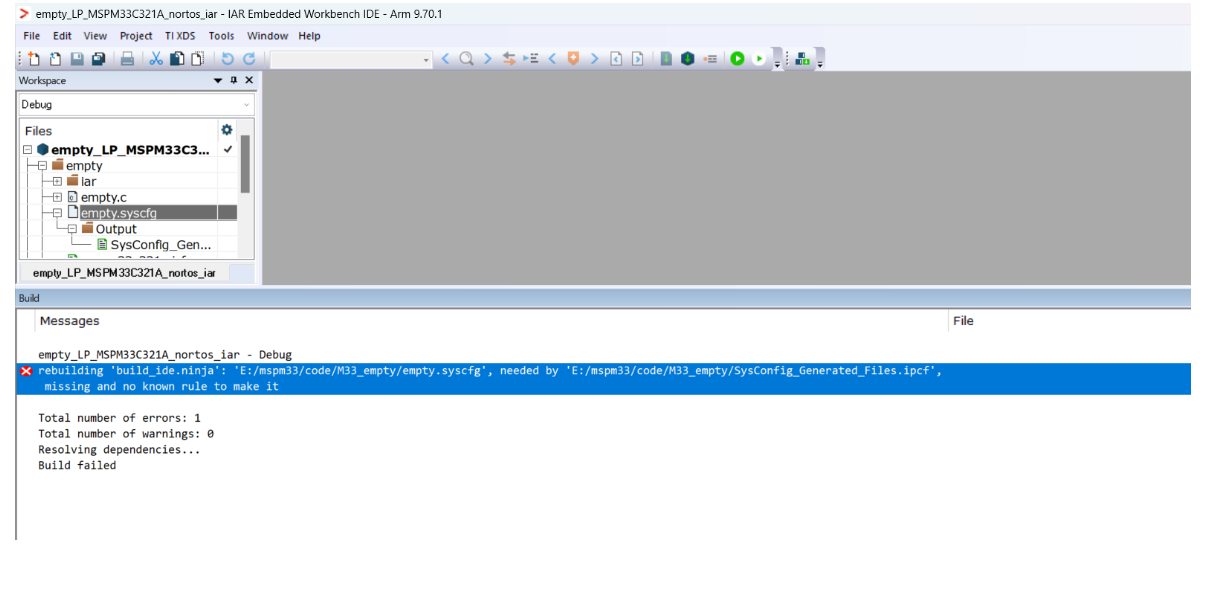
image.png

We followed the IAR user guide, and can compile the project on my computer. However, at customer's laptop, it reports the uppon error. We check the .sysconfig file exist. And import the workspace directly from the SDK without any change. Any setting is missing?

  • Hi Sophie,

    Root cause

    The error is a stale path, not a missing file. Ninja is looking for empty.syscfg at the hardcoded absolute path E:/mspm33/code/M33_empty/empty.syscfg — the location on your machine. On the customer's laptop the project lives elsewhere, so the dependency can't be resolved even though empty.syscfg is present in the project tree.

    This happens when pre-generated build artifacts (build_ide.ninja, SysConfig_Generated_Files.ipcf, and the Debug/ or settings/ output) are carried over with the project instead of being regenerated locally.

    Fix on the customer's laptop

    1. Delete the stale artifacts in the project directory, then re-open the workspace:
      - SysConfig_Generated_Files.ipcf
      - build_ide.ninja and any Ninja/dependency files
      - Debug/ (or active config) output and settings/ folder

    2. Verify the SysConfig integration is installed on that machine — these are per-installation IAR settings that do not travel with the project:
      - Configure Viewers: Tools → Configure Viewers → Import <MSPM33_SDK_INSTALL_DIR>/tools/iar/sysconfig_iar_setup.xml to associate .syscfg files with SysConfig 1
      - Global argument variables: Import <MSPM33_SDK_INSTALL_DIR>/tools/iar/MSPM33_SDK.custom_argvars, and confirm SYSCONFIG_ROOT points to the installed SysConfig directory on that laptop 1
      - If the SDK was installed to a non-default location on the customer's machine, MSPM33_SDK_INSTALL_DIR must be corrected to match.

    3. Open empty.syscfg, save it, then rebuild. Saving triggers the custom build step, which regenerates the files into the SysConfig Generated Files folder with paths local to that machine 2.

    The custom build step itself invokes $SYSCONFIG_ROOT$/sysconfig_cli.bat with the SDK metadata path, --compiler iar, and $FILE_PATH$, producing SysConfig_Generated_Files.ipcf 1 — so if SYSCONFIG_ROOT is unset or wrong, the step silently fails to refresh the dependency.

    If it still fails

    Import a clean reference example directly from the SDK on the customer's machine and build it unchanged, e.g.:

    <MSPM33_SDK_INSTALL_DIR>/examples/nortos/LP_MSPM33C321A/driverlib/gpio_toggle_output/iar/
    

    This isolates whether the problem is the transferred project or the local IAR/SysConfig installation 2.


    1. MSPM33 SDK SysConfig Guide
    2. MSPM33 SDK IAR Quickstart Guide

    Could these methods effective?

    Thanks and Best Regards,

    Ella Tang

**Attention** This is a public forum