This thread has been locked.

If you have a related question, please click the "Ask a related question" button in the top right corner. The newly created question will be automatically linked to this question.

Trouble using map.h - Key/Value pairs in CCStudio

Other Parts Discussed in Thread: CCSTUDIO, MSP430G2231, MSP430F4619

Greetings,

I am a relative newbie to the C programming language. I am trying to use a “map” structure – it’s similar to a “dictionary” in Python or Objective C where the map structure provides key/value pairs.

CCStudio is generating the following error:

line 2: fatal error #5: could not open source file "map.h"

Below is a screen capture of the C perspective. It shows the snippet of code, the compiler includes search path in the Project Explorer and the error.  

I suspect that I’m not referencing the map package correctly. Any help with this is greatly appreciated.

I am using CCStudio  Version: 5.1.0.09000 and the LaunchPad MSP-EXP430G2 with a MSP430G2231 value line chip.  I have successfully compiled run and modified the Temp Sense and other demo software so I know the CCS and debugger are working correctly.  Cheers.

  • Hi,

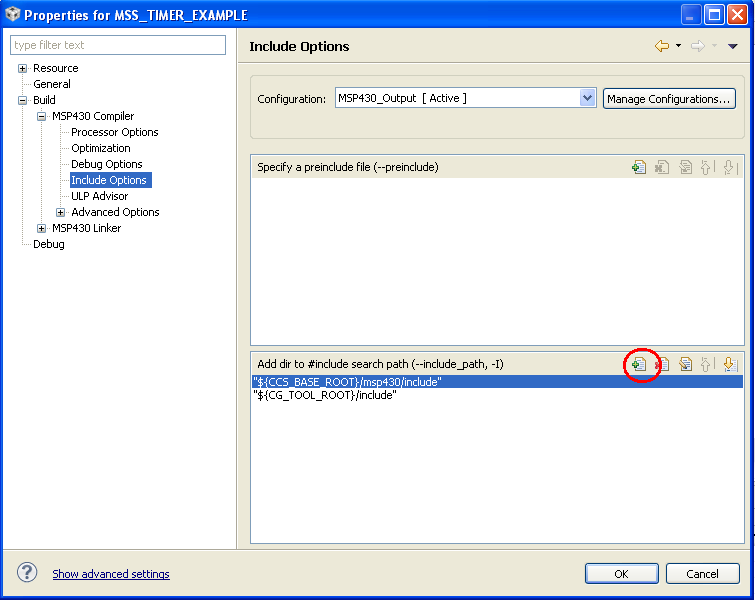
    try to add the directory path where the map.h resides in the project options like this:

    anyway, where did you get this map.h? do you implement it yourself? i don't think that it would be feasible to build python-like dictionary in a small microcontroller like MSP430 value line due to the memory constraints.

  • Henry Grant said:

    CCStudio is generating the following error:

    line 2: fatal error #5: could not open source file "map.h"

    Since this is part of the C++ Standard Template Library, it should be #include <map>

    There is a map file in the MSP430 compiler include directory.

    However, on a MSP430G2231 with 2KB of flash and 128 bytes of RAM not sure if you will have enough memory to use map.

  • Ihend,  Thanks for the tip on how to modify the Include Options, this will come in handy. Actually, there is no "map.h" file only a "map" file as can be seen in the screen capture of the Project Explorer window. The map file is just the default software that comes with the CCS V5 kit. At any rate, I suspect that I am not using the correct syntax when attempting to define the key/value map. Perhaps the "#include <map.h> is really not required?

  • Chester, thank you. Ok on the C++ Standard Template Lib and memory issues. I'll rethink my design and forget the map idea, a simple hash table might be the best way forward. At any rate, here is a screen shot of the console log and errors generated when I tried the #include <map> - they all seem to be syntax errors - would this be indicative of  the memory issue you mentioned?

  • Hi Henry,

    i am not famliar with the C++ map library, however as i thought and mentioned by Chester above, it is not feasible to do this on a small MSP430 Value Line devices which have scarce memory size.

  • Ihend, yes - this is probably the case. Thank you for your help. I will revise my design and use a simple has table.

  • Henry Grant said:
    At any rate, here is a screen shot of the console log and errors generated when I tried the #include <map> - they all seem to be syntax errors - would this be indicative of  the memory issue you mentioned?

    Your source file is called main.c, so the C compiler is invoked and hence the errors.

    I just tried this example in main.cpp, so the C++ compiler is used, and compiles without error:

    #include <msp430.h>
    #include <map>

    int main (void)
    {
        WDTCTL = WDTPW | WDTHOLD;

        std::map<char,int> mymap;
        std::map<char,int>::const_iterator it;

        mymap['a'] = 50;
        mymap['b'] = 100;
        mymap['c'] = 150;
        mymap['d'] = 200;

        int total = 0;
        for (it = mymap.begin(); it != mymap.end(); ++it)
        {
          total += it->second;
        }
    }

    Single stepping in the debugger on a MSP430F4619 showed the correct results, in that the total variable ended up with the value of 500. However, even this trivial example used 13618 bytes of code.
     

**Attention** This is a public forum