This thread has been locked.

If you have a related question, please click the "Ask a related question" button in the top right corner. The newly created question will be automatically linked to this question.

Firmware update for MSP-GANG430

Other Parts Discussed in Thread: MSP-GANG, MSP430F477, MSP430F413, MSP430F435

I need to update the firmware of the MSP-GANG430 programmer to add in support for new series of the MSP430, but I couldn't find it on TI website.

Can anyone point to me where I can get it from TI website or someone who has it, pls post it.

Thks

  • Chew Kim Low said:

    I need to update the firmware of the MSP-GANG430 programmer to add in support for new series of the MSP430, but I couldn't find it on TI website.

    The MSP-GANG430 is obsolete.  Now that newer MSP-GANG is available, the older MSP-GANG430 kit will not get periodic device support updates.

    Reference: MSP-GANG430

  • Yes, I know that there is a newer gang programmer.

    But there should be firmware update available to download to support till MSP-GANG430 Software (v1.57).

    I've installed the MSP-GANG430 Software (v1.57) & it cannot run along with my current firmware ver of 1.29 in the gang programmer.

  • Hi,

    what you just need is to download and install the new MSP-GANG430 software which is available under the product web page: http://www.ti.com/tool/msp-gang430 under "Software" section. The new software should be able to do the firmware update.

  • Hi,

    see also the FAQ section of the MSP-GANG430 documentation: http://www.ti.com/lit/ug/slau101q/slau101q.pdf

    3. Q. How can I install a new software version?
    A. After downloading the .zip file from above link, unpack it, and start the .exe file. Follow the
    on-screen instructions during installation. Older versions can coexist with newer ones.
    The Gang Programmer hardware contains firmware. This firmware must always match with the
    version installed on the PC. When the new software version on the PC is started the first time with
    Gang Programmer hardware connected, a window opens, recommending to upgrade the firmware.
    This should be followed. Next, a file dialog opens to select the file containing the firmware. This file
    resides in the directory where the Gang Programmer software was installed. The filename is similar to
    GANG430-xxx.txt, where xxx represents the revision number. If the request to upgrade the firmware
    is denied, the programmer might not work correctly and might show unexpected behavior. The
    download process of the firmware should not be interrupted.


    4. Q. Can I upgrade the firmware manually?
    A. If, for any reason, the previously described firmware upgrade fails, the upgrade can be performed
    manually: From the GUI, make sure that the Baud Rate in section Communication Settings is set to the
    default value 115200, and if not, change it. Click Maintenance → Category → Upgrade Firmware, then
    click Execute. Follow the file selection dialog as described in the previous question.

  • Hi Leo

    I did download the slac028w, but there is no GANG430-xxx.txt file when I unpack the zip file

  • Hi Leo

    When I run ver 1.57 program, the gang programmer program prompt an error "Configuration file GANG430.INI version must not be lower than 1.57. Please update your GANG430 system"

  • Hi,

    could you try to install the MSP-GANG430 software on another computer and see whether it works? Have you tried to upgrade the firmware manually as stated in FAQ #4?

  • Hi Leo

    Yes I manage to  update the firmware to ver 1.57 while running version ver 1.46 of the gang programmer.

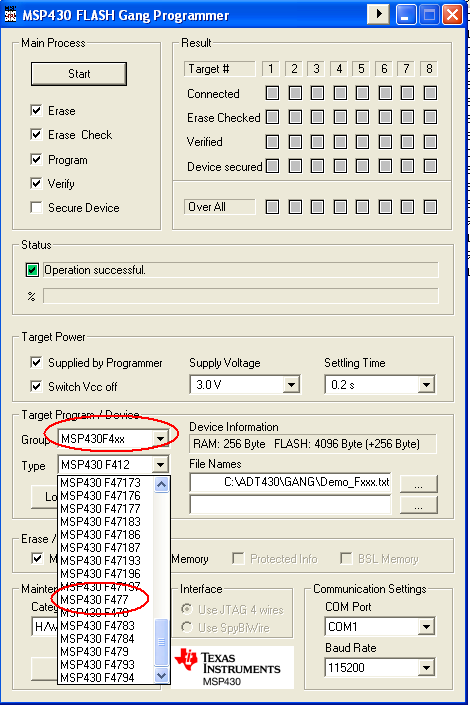
    On the device type, I couldn't find the MSP430F477 device type, pls advice.

    Thks

  • Hi Chew Kim,

    i just had the same problem as you did. I had MSP-GANG430 software v1.56 on my PC, and then tried to install the v1.57. However if i try to run the software i got this "Configuration file GANG430.INI version must not be lower than 1.57. Please update your GANG430 system".

    The solution was to reinstall the v.157 to another directory and run it from the new directory. It seems if it is installed on the same default directory C:\ADT430\GANG, the problem will occur.

    Anyway i check the v1.57 software, MSP430F477 should be supported:


  • Thks Leo

    It works as you had suggested to install into a separate directory.

    I have no problem in loading the txt file for MSP430F477, but found a new problem when loading the txt file for MSP430F413 , it give '"ERROR: Image range 0x0000-0x0001 placed out of existing memory"

    When I check the MAKE files output for both the MSP430F413 & MSP430F477 txt files, there is an additional 2 lines in the MSP430F413 MAKE file output :

    @0000
    E4 0C

    Only after I remove the above 2 line then I can load it into the gang programmer. Please advice how to set the Embedded Workbench 6.0 Kickstart program to remove the 2 lines during the MAKE process to give the txt file or what is needed to amend the .S43 asm file.

    Thks

  • Hi Chew Kim Low,

    I am not sure how the IAR compiler can generate some binary data on the address 0x0000. This address basically belongs to the peripherals memory. The only way to find it out is to see your whole IAR project source code. Would that be possible?

  • Hi Leo

    I had been using MSP430F413 & MSP430F435 since 2006.  Only the MAKE file of MSP430F413 have the binary data on the address 0x0000.

    All this while we have no problem in loading up the txt file into the MSP-GANG430 till now when I have to upgrade the program & firmware for the gang programmer to cater for the MSP430F477.

    Rgds

  • Hi Chew Kim Low,

    which compiler are you using actually?

  • Hi Leo

    I'm using IAR - Embedded Workbench 6.0 Kickstart 

  • Hi,

    can you show the MAKE file which contains this 0000 address?

  • Here is part of the MAKE file output that I've copy

    @0000
    E4 0C
    @E000
    31 40 00 03 F2 40 42 00 0E 02 82 43 09 02 82 43
    0B 02 C2 43 67 02 F2 40 05 00 0C 02 82 43 A8 02
    82 43 AA 02 C2 43 A5 02 F2 40 C0 00 2E 00 F2 40
    C0 00 2A 00 B2 40 00 C0 68 02 B2 40 3D 00 6A 02
    92 53 AA 02 F2 93 AA 02 FB 2B 82 43 AA 02 E2 B3
    00 10 13 24 B2 40 E0 0A 40 02 B2 40 00 11 42 02
    B2 40 50 05 60 02 B2 40 10 0A 62 02 82 43 48 02
    B2 40 00 0F 4A 02 B0 12 D8 F7 F2 C0 07 00 0D 02

  • Hi Chew Kim Low,

    well, i still don't understand how the compiler can generate the binary data at 0x0000. You mentioned that you have used MSP430 since long time, but how come this problem just occur recently? Are you writing new software? 

    If you want, you can send me the code to look at privately, just add me as a friend, and we can start private conversation and no body else can see it.

  • Hi Leo

    This problem occurred only when I upgrade the Gang Programmer firmware & software to version 1.57 as all the while I've been using version 1.29

  • So in case someone would be interested in this case.

    After our online conversation, we found out that this is basically a problem in the application which makes the compiler generating variable at address 0x0000.

**Attention** This is a public forum