This thread has been locked.

If you have a related question, please click the "Ask a related question" button in the top right corner. The newly created question will be automatically linked to this question.

PC based Oscilloscope


Sir, I am Designing PC Based oscilloscope on my own by using visual Basic 2008 Express edition with the help of MSP430rf2500 Microcontroller. what i want is to display an analog signal on oscilloscope window on computer. i designed oscilloscope window(form 1) my level best. i connected an analog signal to A1 pin from function generator with a frequency 25hz.

Black Box (Picture box) is going to display an analog waveform
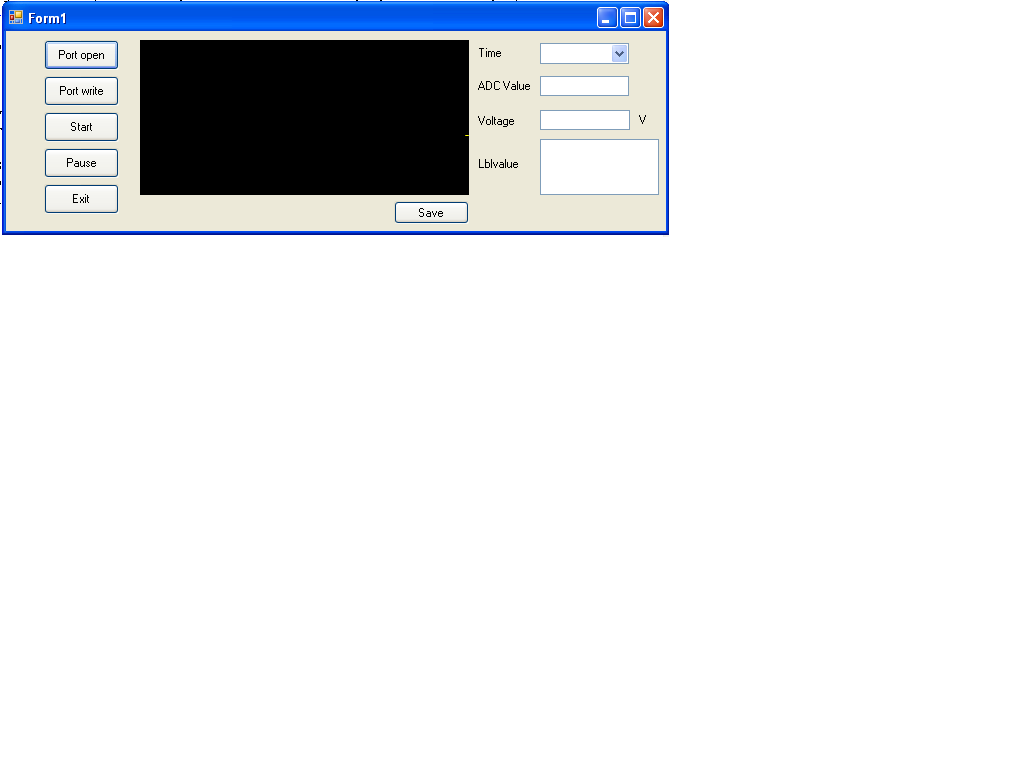
i used temperature sensor moniter program to get an analog signal and transmited from access point to end point. ENd point  which is connected to USB port

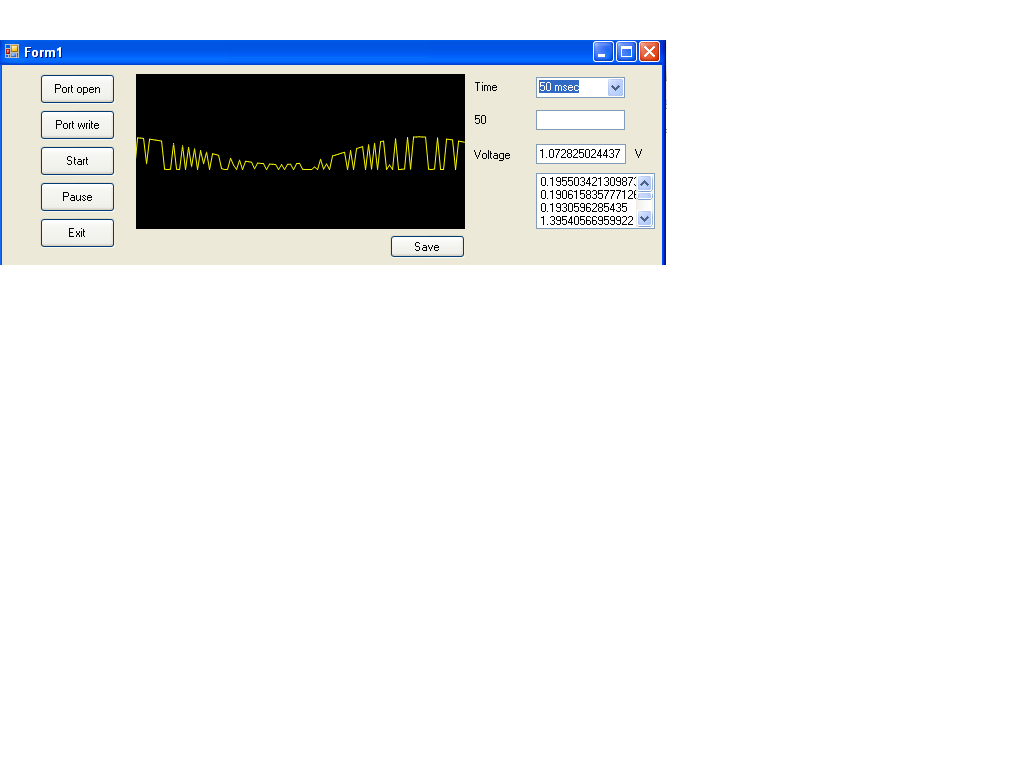
after running program , oscilloscope displays a signal but not exactly what im looking. its looks like an noise signal. see below

please help me. my question is

1.how can i get an pure analog signal on oscilloscope window?

2.how to get all ADC Value (from 0000, 0001, 0002,0003, 0004.,005 upto 1024) through hyperterminal? if i get all ADC values it will show pure sine waveform.

  • johnson kennady said:
    i connected an analog signal to A1 pin from function generator with a frequency 25hz.

    johnson kennady said:
    i used temperature sensor moniter program

    Are you sure that temperature monitor program sample rate is high enough for 25Hz signal? You need at least 250 samples per second sampling rate here. If sample rate is less than 50Hz, then output most probably will be like you see now - seemingly random data.

    johnson kennady said:
    2.how to get all ADC Value (from 0000, 0001, 0002,0003, 0004.,005 upto 1024) through hyperterminal?

    Huh? What's exactly your problem? I would say: use hex coding and that's it. If data shall be human-readable in hyperterminal, then show it as ASCII decimal numbers.

  • sir, thanks for your quick reply

    i'm made some modification in the temperature sensor monitor program. here it is

     P2DIR |=0xFD                                                                                                                                                                       ;
        P2REN = 0x02;
        ADC10AE0 = BIT1;
        ADC10CTL1 = INCH_1 + ADC10DIV_7;       // Temp Sensor ADC10CLK/8 and analog input to A1
        ADC10CTL0 = SREF_1 + ADC10SHT_3 + REFON + ADC10ON + ADC10IE + ADC10SR;
        for( degC = 240; degC > 0; degC-- );    // delay to allow reference to settle
        ADC10CTL0 |= ENC + ADC10SC;             // Sampling and conversion start
        __bis_SR_register(CPUOFF + GIE);        // LPM0 with interrupts enabled
        results[0] = ADC10MEM;

    ADC10SR (sampling rate) is 50ksps(from datasheet) which is greater sampling rate than you mentioned(250 samples) . so that i gave 25hz analog signal (sample rate = 2* input frequency).

    in my visual Basic program, i'm export hyperterminal value to picture box via serial port. oscilloscope wondow draws a line as per hyperterminal value . but my hyperterminal output looks like this as below

    0000

    0234

    0576

    0999

    0345

    0096

    0000

    0124

    and goes on. it receives random value as you said.

    but if hyperterminal receives all ADC value like this

    0000

    0001

    0002.

    .

    .

    0100

    0100

    .

    .

    .

    1023

    1022

    1021

    .

    .

    0500

    0499

    .

    .

    0001

    0000

    i will get pure sine wave in the oscilloscope window
       

  • johnson kennady said:
    ADC10SR (sampling rate) is 50ksps(from datasheet) which is greater sampling rate than you mentioned(250 samples) . so that i gave 25hz analog signal (sample rate = 2* input frequency).

    This is capability of ADC, not necessarily actual sample rate. How often ADC values are actually read and transmitted to your application - is completely different thing. You shall check not only how fast ADC sample your input but how often those samples are sent to your software! Again I highly doubt temperature monitor application will update reading 50000 times per second. Try to set 0.1 Hz on your function generator and check graph you are getting in result. Try to add timer to your host software and count samples per sec it receive.

    p.s. Oscilloscope with 0.5Hz bandwidth... cool :)

  • Sir,

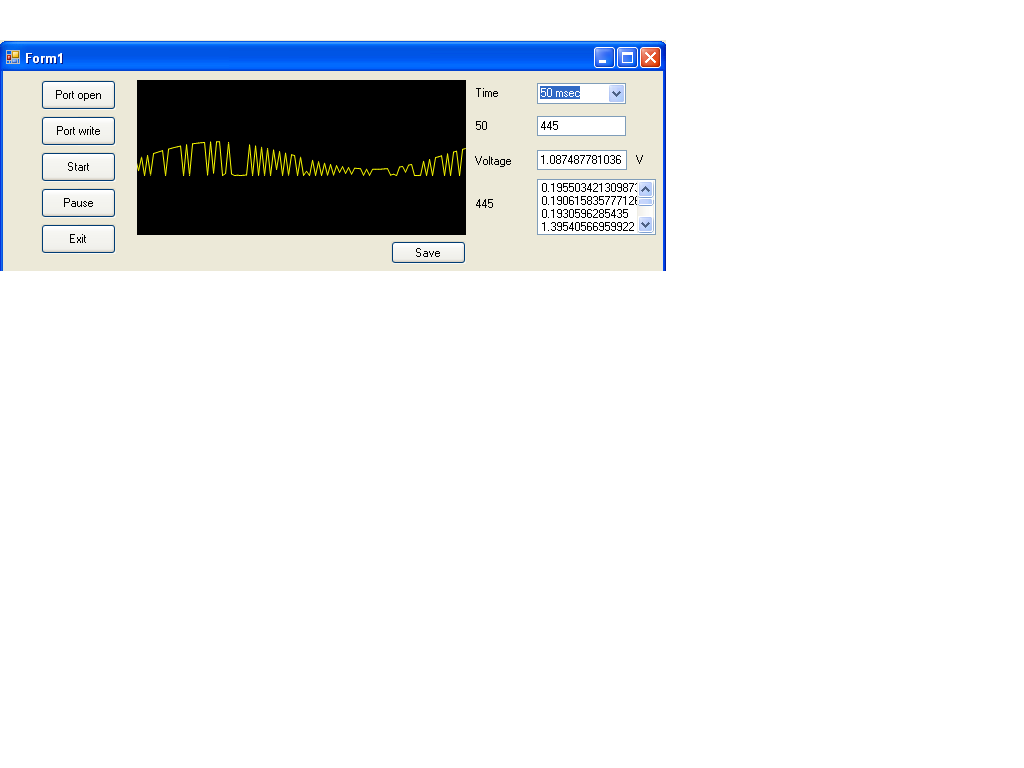
    i changed my input to 0.1 Hz. now the output gets improved compared to previous result. thanks for this.see below

    please look at the Red 1 area, it looks like a good result that i want. here the hyperterminal values are 1.58768, 1.62324, 1.784673.

    But in the Red 2 Area, i dont want this result. here the hyperterminal values are as follows

    1.56263

    0.32455

    1.48643

    0.17462

    1.32344

    0.17385

    for every value, the intermediate value are coming( green coloured values). i dont want the green coloured values. i want only 1.56, 1.48, 1.32

    why is it coming?

    here should i consider the synchronisation ?

  • Your "sine" is clipped. It seems that your ADC is getting not only positive but also negative voltage input. You need to set DC offset for your generator like 1V and let it output +/- 1V AC signal resulting voltages in range 0 upto 2V.

    johnson kennady said:
    i dont want the green coloured values.

    Obviously :) Debug your application and find out where those wrong values come from. At the moment nobody can tell you because not enough info.

  • SIr, i think you are right. the output gets improved  . First i adjusted the voltage of input waveform. here is the output below. If you the boundary of output , it looks like

    sine waveform. but no improvement in the output after adjusting dc offset.

    may be the problem in microcontroller program right?. here is ADC program. i used extension pin 4 for my input. i'm little bit confused in SREF_1(which supports positive cycle). i dont see Vref_ anywhere.

         ADC10AE0 = BIT1;
        ADC10CTL1 = INCH_1 + ADC10DIV_7;       // Temp Sensor ADC10CLK/5
        ADC10CTL0 = SREF_1 + ADC10SHT_1 + REFON + ADC10ON + ADC10IE + ADC10SR;


    from the datasheet

    SREFx Bits 15-13 Select reference.
    000 VR+ = VCC and VR- = VSS
    001 VR+ = VREF+ and VR- = VSS
    010 VR+ = VeREF+ and VR- = VSS. Devices with VeREF+ only.
    011 VR+ = Buffered VeREF+ and VR- = VSS. Devices with VeREF+ pin only.
    100 VR+ = VCC and VR- = VREF-/ VeREF-. Devices with VeREF- pin only.
    101 VR+ = VREF+ and VR- = VREF-/ VeREF-. Devices with VeREF+/- pins only.
    110 VR+ = VeREF+ and VR- = VREF-/ VeREF-. Devices with VeREF+/- pins only.
    111 VR+ = Buffered VeREF+ and VR- = VREF-/ VeREF-. Devices with VeREF+/- pins only.

  • Are you sure you read ADC data register right after conversion - every time? And there's no reads before conversion is finished? I suggest to use ADC in IRQ mode, save reading in global volatile variable, send contents of this variable to host application.

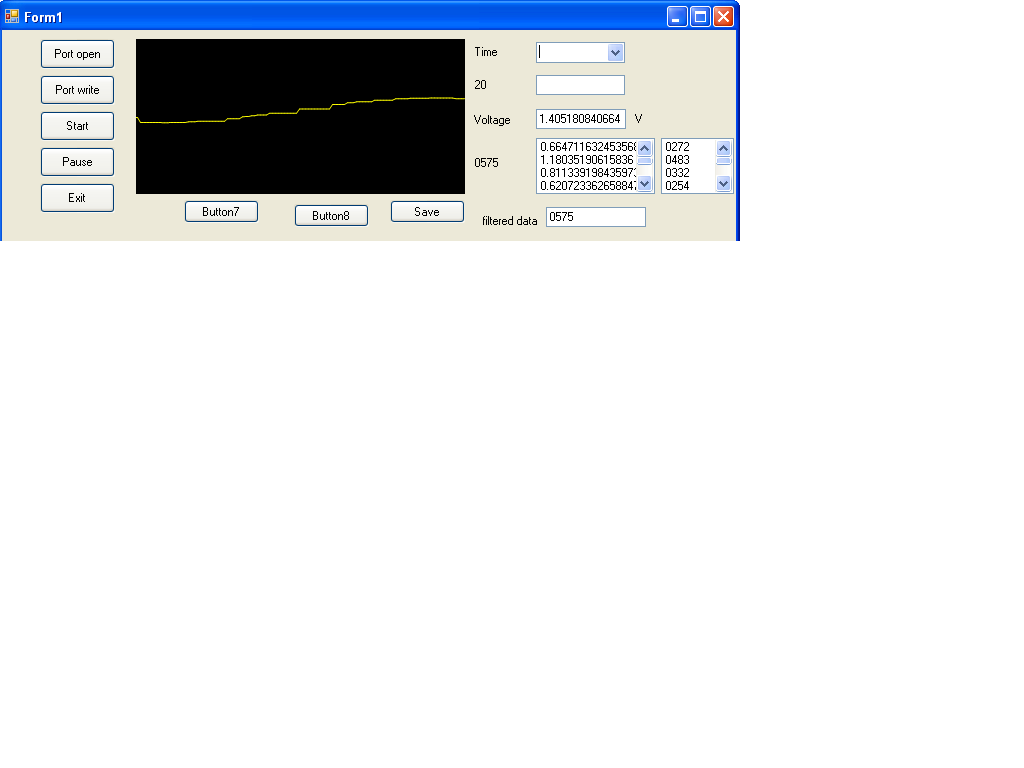
  • yes i am using IRQ mode. no problem in Microcontroller program. Problem in VB program.  i received unwanted special characters like !@#$%^&* etc leads to error in output signal. now i  made a program to filter out the special characters. now i got 90% of output

    look below

    Thank for your great Help sir

  • johnson kennady said:
    i received unwanted special characters like !@#$%^&* etc leads to error in output signal.

    Where did these characters come from? IMHO it's more important to detct where they come form and stop them being sent than filtering them. Best case, tehy waste bandwidth, worst case they are valid values that were somehoe crippled and you're missing them in your scope timeline then.

  • These characters are coming through serial port.  looks good when i checked my output in Hyperterminal the output is in four digits (0046, 0048, 0059 etc...) . In VB.net i import  that ADC output through Serial port to Listbox. here i received 1 digit, 2 digit and 3 digit  which they are error values. i need only 4 digits. so it has to be filtered out.

    if you look at the numbers below  without bordered that looks like sine waveform

    Bordered Numbers are error values needs to be filtered out (1 digit , 2 digit value and 3 digit values)

    Error Values are from special characters like   !@#$%^&*()_+?<> and so on


    Decreasing     

    1.10459433040078              

    0.603616813294233             /// ASCII code 246(3 digit value) . special character is ;

    1.0019550342131

    0.0342130987292278                  //// Ascii code 14 (2 digit Value). Special characters shift out

     0.00733137829912024

    0.679374389051808

    0.613391984359726

    0.0513196480938416

    0.466764418377322

    0.354349951124145

    0.32258064516129

    0.0439882697947214

    0.254154447702835

    0.0171065493646139


    Increasing

    0.285923753665689

    0.351906158357771

    0.403225806451613

    0.444770283479961

    0.0146627565982405

    0.618279569892473

    0.681818181818182

    0.0171065493646139

    0.935972629521017

    1.00928641251222

    1.06060606060606

    0.0122189638318671

    1.18279569892473

    0.0122189638318671

    1.27321603128055

    0.0195503421309873

    1.29521016617791

  • As I said - debug and find where those wrong numbers are coming from. Is is ADC or just math error - hard to say. Because not enough info.

    Main question - does raw ADC output also have such "wrong" measurements?

  • johnson kennady said:
    looks good when i checked my output in Hyperterminal the output is in four digits (0046, 0048, 0059 etc...) . In VB.net i import  that ADC output through Serial port to Listbox. here i received 1 digit, 2 digit and 3 digit  which they are error values. i need only 4 digits. so it has to be filtered out.


    Well, if the HyperTerm output shows you the right thing, then it is VB or how you use it.

    I assume, your digits are litteral digits, consisting of four ASCII number digits.

    It's possible that your VB listbox automatically interprets some of them as double-byte characters due to some weird automatic conversion.

    '0064' converts to '@' (test: hold down ALT and type '0064' on the num pad). This auto-conversion might be triggered by the leading zero. Actually, Windows too often automatically does unexpected things and you have to run circles to make it stop.

  • Ilmars said:

    As I said - debug and find where those wrong numbers are coming from. Is is ADC or just math error - hard to say. Because not enough info.

    Main question - does raw ADC output also have such "wrong" measurements?

    The error from only in VB not ADC. ADC works perfect

    Ilmars said:

     does raw ADC output also have such "wrong" measurements?

    I used to level shift the input analog signal (making bipolar input to single polar)

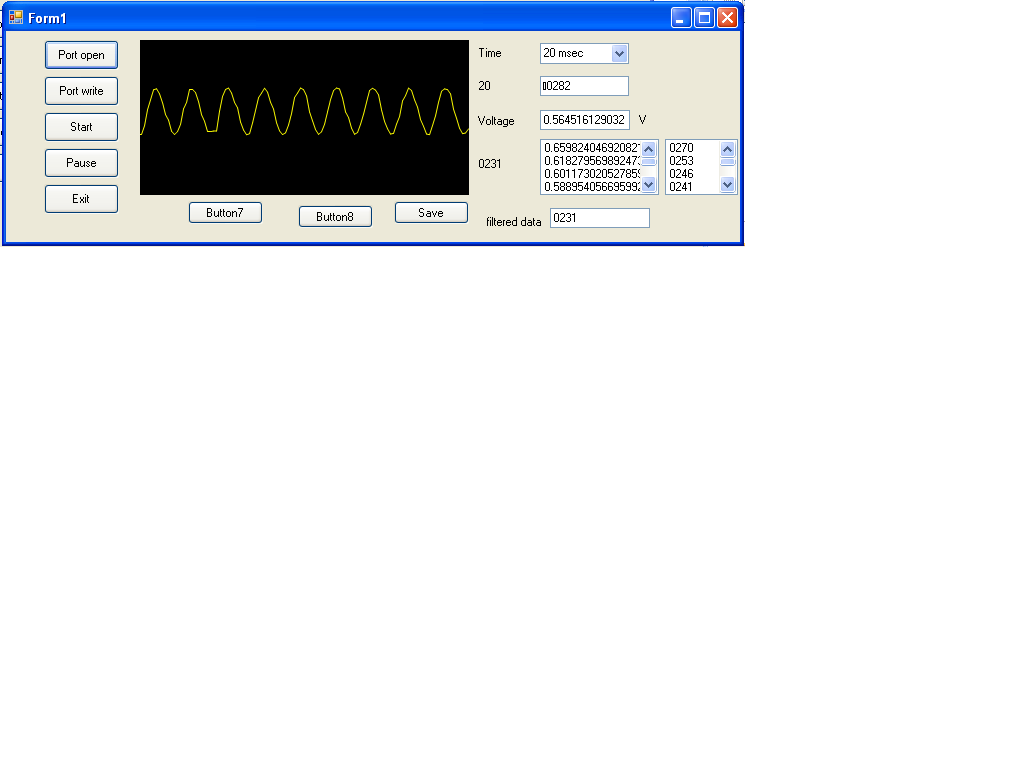
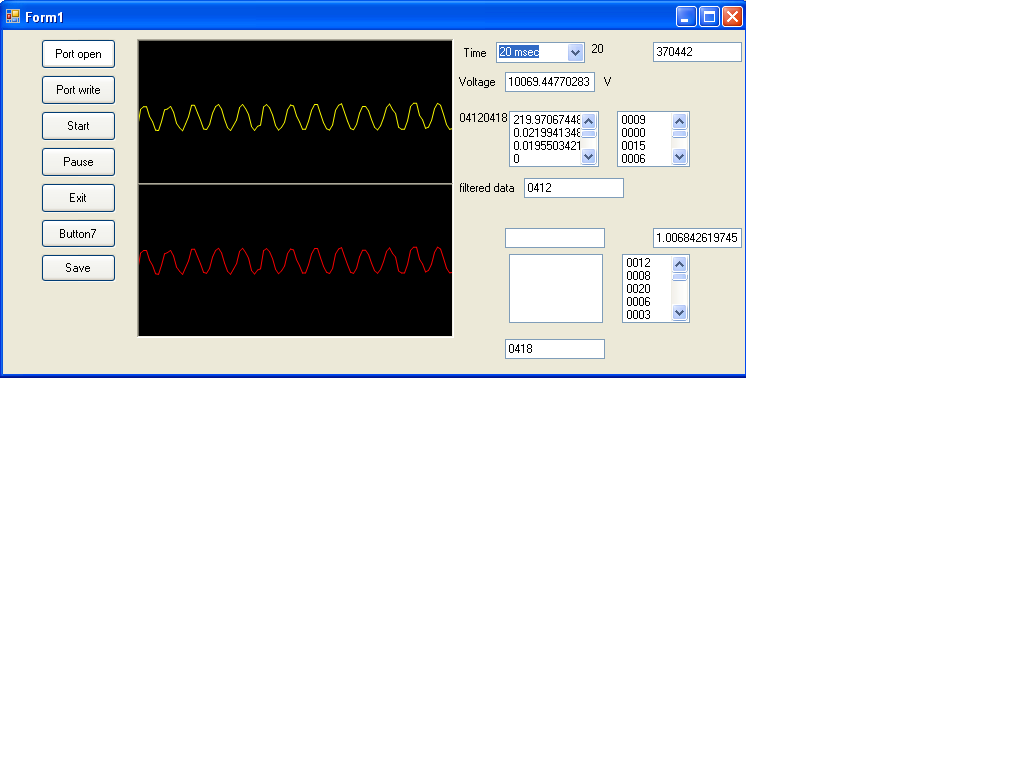
  • finally i got output. look below

  • thank for your suggestion in previous post. Now i am going to design 2 channel PC based oscilloscope on my own. i changed my microcontroller(MSP430rf2500) program for another analog input. i sent two different ADC outputs to serial port. my question is how VB program differentiate two different ADC outputs through serial port.

  • johnson kennady said:
    differentiate two different ADC outputs through serial port.

    Easily. Add one extra bit if information. In case of 10-bit ADC you need to add 1024 to 2nd channel samples. In VB when incoming data >= 1024, you just know that it's 2nd channel data, substract 1024 and use data.

  • sir im using different way. please clarify me my procedure is correct. i am going to show hyperterminal as 8 digit data(XXXXYYYY). first four digit(XXXX) for first channel and the next 4 digit (YYYY) for second channel. when i ran my program, my first four digits(XXXX)  were only changing. but not YYYY. why it happened?

    i changed my microcontroller program as below

          char msg [6];
          char addr[] = {"HUB0"};
          char rssi[] = {"000"};
          int degC, analoginput,analoginput1;
          volatile long temp;
          int results[2];
          
         ////for analog input 1
        ADC10CTL1 = INCH_1 + ADC10DIV_7 + CONSEQ_3;       // Temp Sensor ADC10CLK/5
        ADC10CTL0 = SREF_1 + ADC10SHT_1 + REFON + ADC10ON + ADC10IE + ADC10SR;
        for( degC = 240; degC > 0; degC-- );    // delay to allow reference to settle
        ADC10CTL0 |= ENC + ADC10SC;             // Sampling and conversion start
        __bis_SR_register(CPUOFF + GIE);        // LPM0 with interrupts enabled
        results[0] = ADC10MEM;
        
        ADC10CTL0 &= ~ENC;

    //////for analog input 2
        ADC10CTL1 = INCH_2 + + ADC10DIV_7 + CONSEQ_3;    ;                
          ADC10CTL0 = SREF_1 + ADC10SHT_1 + REFON + ADC10ON + ADC10IE + ADC10SR;
         for( degC = 240; degC > 0; degC-- );  // delay to allow reference to settle
         ADC10CTL0 |= ENC + ADC10SC;           // Sampling and conversion start
         __bis_SR_register(CPUOFF + GIE);      // LPM0 with interrupts enabled
         results[1] = ADC10MEM;
         ADC10CTL0 &= ~ENC;
     
      
          ADC10CTL0 &= ~(REFON + ADC10ON);      // turn off A/D to save power
          
         analoginput = results[0];
        
        
        analoginput1 = results[1];
       
        msg[0] = analoginput&0xFF;
        msg[1] = (analoginput>>8)&0xFF;


        msg[2] = analoginput1&0xFF;
        msg[3] = (analoginput1>>8)&0xFF;
          transmitDataString(addr, rssi, msg );
          BSP_TOGGLE_LED1();
          sSelfMeasureSem = 0;
        }

    hyperterminal display program as below

    output_verbose[2] = '0' +  ((analoginput/1000)%10);             
        output_verbose[3] = '0' +  ((analoginput/100)%10);                   
        output_verbose[4]=  '0' +  ((analoginput/10)%10);
        output_verbose[5] = '0' +  (analoginput%10);


         output_verbose[6] = '0' +  ((analoginput1/1000)%10);             
        output_verbose[7] = '0' +  ((analoginput1/100)%10);                   
        output_verbose[8]=  '0' +  ((analoginput1/10)%10);
        output_verbose[9] = '0' +  (analoginput1%10);

  • johnson kennady said:
    my first four digits(XXXX)  were only changing. but not YYYY. why it happened?

    Debug it :)

  • Sir, I debugged it. my hyperterminal output as below. if you see first four digit, it provides good result decreasing  from 0499 to 0104 and again increasing 0104 to 0499.

    but in the Next four digit, the output is not oscillating . it provides poor result compared to first four digit. i need YYYY as XXXX.

    04990591
    04910576
    05050597
    04870570
    04990588
    04880568
    04900570
    04950580
    04850563
    04940578
    04750595
    04900574
    04790603
    04790608
    04900575
    04760597
    04930580
    04770599
    04860568
    04820554
    04670580
    04830559
    04630573
    04780601
    04670584
    04670584
    04720590
    04600570
    04730592
    04600569
    04660580
    04580564
    04580562
    04640574
    04520550
    04680581
    04520552
    04590564
    04570559
    04450591
    04570564
    04380580
    04490545
    04380578
    04380583
    04460595
    04290566
    04460594
    04320570
    04400583
    04330573
    04280560
    04350574
    04230551
    04340571
    04210545
    04280556
    04260553
    04150589
    04240553
    04070574
    04190542
    04040565
    04040570
    04150591
    03960555
    04130585
    03960553
    04060573
    04020566
    03910542
    04030565
    03870531
    03950543
    03860523
    03880525
    03890529
    03800571
    03870533
    03660541
    03800573
    03680552
    03670549
    03760566
    03600531
    03750564
    03600530
    03720555
    03640539
    03530511
    03610524
    03460558
    03560522
    03430554
    03470567
    03510577
    03390553
    03470566
    03290525
    03390545
    03300523
    03270514
    03350532
    03220503
    03290513
    03200492
    03240500
    03210493
    03040520
    03250508
    03000513
    03130547
    02980515
    03000515
    03070534
    02920498
    03010515
    02900490
    02940497
    02860547
    02850555
    02950513
    02790535
    02960508
    02760524
    02860553
    02820547
    02720522
    02780534
    02620496
    02690506
    02550545
    02610496
    02650494
    02440515
    02660501
    02480524
    02590487
    02490525
    02450523
    02560477
    02350489
    02460520
    02350497
    02370498
    02360494
    02280474
    02360489
    02150514
    02340493
    02180518
    02190528
    02300487
    02100499
    02250468
    02090493
    02180519
    02150520
    02060495
    02150516
    02010481
    02050486
    01920452
    01950456
    01990467
    01880511
    02000477
    01820499
    01950465
    01810494
    01800498
    01860512
    01810504
    01920456
    01740474
    01820500
    01800498
    01660463
    01790490
    01580512
    01780495
    01570510
    01620455
    01670459
    01510490
    01680464
    01550499
    01630456
    01570504
    01520498
    01600446
    01500484
    01590515
    01500498
    01520496
    01510498
    01460484
    01500492
    01330450
    01460474
    01360451
    01340445
    01470477
    01290437
    01480476
    01320442
    01430467
    01380456
    01280428
    01410457
    01220485
    01360453
    01260495
    01280436
    01330439
    01230485
    01310444
    01160468
    01260499
    01180484
    01170480
    01270504
    01170483
    01300440
    01160467
    01290435
    01230484
    01110463
    01250495
    01060452
    01190479
    01090457
    01090453
    01170473
    01030443
    01200476
    01100459
    01180477
    01130467
    01090455
    01160470
    01060447
    01200477
    01060447
    01150467
    01140467
    01090455
    01140465
    01000431
    01100450
    01000428
    01040433
    01140460
    01020436
    01180473
    01090455
    01160470
    01140468
    01060446
    01190478
    01070451
    01150469
    01090456
    01110458
    01160471
    01110461
    01170475
    01050445
    01180474
    01100458
    01090453
    01230488
    01120465
    01260499
    01170482
    01270506
    01250503
    01150479
    01340450
    01110457
    01270500
    01190488
    01240497
    01310446
    01210480
    01350454
    01190479
    01360453
    01260495
    01280437
    01380450
    01280427
    01460469
    01360451
    01430467
    01450475
    01370455
    01500486
    01320445
    01530490
    01410470
    01460478
    01570508
    01410472
    01610445
    01510488
    01600444
    01580504
    01570513
    01720480
    01580510
    01760489
    01630454
    01720468
    01750480
    01680462
    01800491
    01640455
    01810494
    01720475
    01790492
    01920454
    01760478
    01970466
    01860505
    01990477
    01970465
    01920448
    02080485
    01940458
    02120499
    02020480
    02090495
    02150515
    02160518
    02240468
    02070489
    02190523
    02190529
    02210536
    02390511
    02250470
    02410503
    02310486
    02440513
    02470528
    02400510
    02530541
    02430522
    02570481
    02450515
    02570480
    02600478
    02560468
    02670495
    02540539
    02720520
    02680506

  • Good news. Now i got output. My YYYY digit keep oscillating as XXXX. I changed my microcontroller program

    for channel 1

    ADC10CTL1 = INCH_1 + ADC10DIV_7 + CONSEQ_3;  

    for channel 2

    ADC10CTL1 = INCH_1 + ADC10DIV_6 + CONSEQ_3;  

    now i go for VB Program for 2 channel Oscilloscope.  illmars sir ,  thanks for supporting.

  • johnson kennady said:
    ADC10CTL1 = INCH_1 + ADC10DIV_6 + CONSEQ_3;  

    This looks a bit strange.

    First, the ADC10 requires a clock frequency of 0.45 to 6.3MHz. With ADC10DIV_x you divide the selected clock (ADC10OSC by default, which is 3.7..6.3MHz). As long as this doesn't move the resulting frequency outside the allowed range, this shouldn't have any influence on the conversion.

    Of course, the clock has an influence on the sampling time. A high sampling time results in a low-pass filtered input signal. But not too much. A too-short sampling time may lead to incorrect results, especially if the signal source is high-impedance.
    Nevertheless, the sampling time should be selected using the ADC10SHT_x bits.

    I'm surprised that you use CONSEQ_3. It means you convert a repeates sequence of channels. So the ADC10 wil convert INCH_1, then INCH_0, then INCH_1 then INCH_0. But you only use one conversion result (maybe the first - if you read if quick enough.

    My suggestion: use ADC10DIV_1 or _2, maybe set ADC10SHT_1 or _2 for a higher sampling time. Then use CONSEQ_0 for one single conversion. And change INCH_x to convert exactly the channel you want.

    I think you current success is pure coincidence by matching the converison tiem with the code execution time, so you'll get the 'right' result in time. Any change in your code will likely break this again.

  • Jens-Michael Gross said:
    I think you current success is pure coincidence by matching the converison tiem with the code execution time, so you'll get the 'right' result in time. Any change in your code will likely break this again.

    Yes, In microcontroller program , i set my timer in millisecond. so that the hyperterminal displays data for every 1millisecond.  my application is to sample both 2 channels at the same time. here my channel 1(first four digit XXXX) and channel 2(Next four digit YYYY) are oscillating.

    Sir , Please clarify me that my approaching is right?

    01310136
    01280133
    01280131
    01340137
    01520151
    01780178
    01850187
    01870193
    01840190
    01710176
    01660171
    01610164
    01570163
    01550159
    01560159
    01560161
    01660168
    01970198
    02190222
    02250228
    02270231
    02090214
    02060212
    01900195
    01950199
    01880193
    01890195
    01890193
    01930196
    02010203
    02230223
    02480249
    02520255
    02680273
    02560259
    02540262
    02400246
    02420247
    02320237
    02320235
    02290234
    02320236
    02340239
    02420243
    02640263
    02730275
    02880288
    02810285
    02700274
    02660270
    02660270
    02680272
    02690273
    02710275
    02730277
    02780282
    02800283
    02850292

    Jens-Michael Gross said:
    My suggestion: use ADC10DIV_1 or _2, maybe set ADC10SHT_1 or _2 for a higher sampling time. Then use CONSEQ_0 for one single conversion. And change INCH_x to convert exactly the channel you want.

    As your suggest i changed what you mentioned. No difference in the output . just same output as what i got in previous settings(ie:  (ADC10DIV_6 and CONSEQ_3)

    Here is my output

    08460846
    08530854
    08340836
    08360836
    08130816
    08150817
    07910794
    07880790
    07670767
    07930789
    08170814
    08230824
    08330832
    08200823
    08260828
    08110812
    08120813
    07930794
    07890792
    07740775
    07590760
    07530751
    07690766
    07850783
    07880788
    07940792
    07810780
    07780780
    07640765
    07520755
    07370738
    07220724
    07020703
    06860689
    06860683
    07170716
    07320726
    07390738
    07440744
    07260728
    07250727
    06980701
    06950696
    06670669
    06670667
    06420644
    06400640
    06530651
    06750673
    06930692
    06900689
    06970698
    06780681
    06800680
    06630664
    06560659
    06360639
    06280629
    06060606
    05900591
    05990595
    06160614
    06370635
    06370638
    06420641
    06250627
    06160619
    05960600
    05800582
    05630565
    05520554
    05350537
    05290530
    05470544
    05710572
    05840583
    05840582
    05860589
    05670567
    05610566
    05420544
    05350537
    05110515
    05090509
    04820483
    04880485
    05080504
    05260526
    05430541
    05340533
    05380540
    05210522
    05210522
    05030506
    05020501
    04790482
    04740477
    04590458
    04710469
    04890490
    04890488
    04950495
    04840483
    04860486
    04660468
    04650467
    04490451
    04380439
    04150419
    04010402
    03940390
    04170413
    04280425
    04320430
    04400438
    04250423
    04220425
    03980400
    03900390
    03610364
    03480351
    03130316
    03080307
    03060304
    03260325
    03460344
    03530349
    03620360
    03440347
    03380340
    03120313
    03100312
    02920294
    02860289
    02630265
    02570260
    02490246
    02650263
    02900285
    02990299
    03160315
    03090310
    03020304
    02800282
    02660270
    02430245
    02270230
    02060206
    01910193
    01900190
    02170212
    02360236
    02480250
    02560255
    02470250
    02380238
    02160219
    02080209
    01890191
    01790181
    01550158
    01470150
    01430140
    01710167
    01910186
    02050203
    02190219
    02140214
    02100212
    01890190
    01910193
    01720172
    01680170
    01450147
    01530154
    01620161
    01880187
    02120209
    02100208
    02200219
    02060206
    02070205
    01870188
    01820185
    01670171
    01520155
    01360136
    01310129
    01440140
    01660161

  • this is my 2 Channel Pc Based Oscilloscope. Thanks to everyone, illmars and Jens. :)

  • Congratulations. Looks nice too.

**Attention** This is a public forum