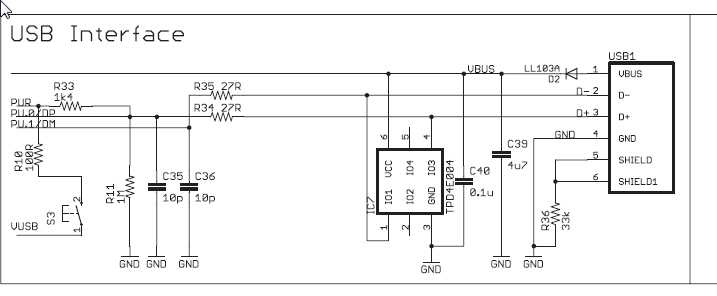
We have our first working prototype using the MSP430F5528IRGCT processor although we are unable to program the device via USB BSL. We can program the MSP430F5528IRGCT Target board. The difference is that our circuit is self-powered versus the USB powered target design. I understand that the logic level of the PUR pin is evaluated following a BOR reset. Currently the PUR input pulls high when the USB is inserted but the problem is that the design is self-powered and the BOR already occurred and evaluated the PUR as low (USB BSL not enabled).
Do you know of any recommended ‘self-power’ USB interface circuits?
I’m wondering if the solution is to simply reconnect the 100R (R13) resistor (MSP430 USB Interface attached) from VUSB to VCC so that the device enters USB BSL (if the switch that you cannot see is activated) when the design is initially powered?

NOTE: We can program the prototype MSP430 using the USB interface using the software method (MSP430 Methods by which the USB BLS can be invoked below) but are trying to get the hardware method to work.

I am not very familiar with the software tools but I am wondering…
1. The design is powered and BOR occurs but no BSL USB due to PUR not pulled high (no VUSB)
2. USB is inserted and the LDO output VUSB is available.
3. The switch is enabled pulling PUR high via VUSB
4. The MSP430 is reset via an onboard push button. The MSP430 should be in USB BSL.
5. How do you get the software to re-initiate?
From what I have seen the software is triggered at the instant that it is inserted into the target (no good).