


Hello,
Sorry if this is a repost but I have searched with no effective results. I cannot get my MSP430FR5739 + CC3000 communicating through Putty. Here are the steps I have taken.
- Flash MSP430 with download_cc3000_patch_programmer_driver
Result LED5 + LED8 - Flash MSP430 with download_cc3000_patch_programmer_firmware
Result LED5 + LED8 - Flashed MSP430 with download_cc3000_fram_Basic_WiFi_App from installer in swrc275a.zip
Result LED5 (Note that the confirmation states that LED1 should be lit)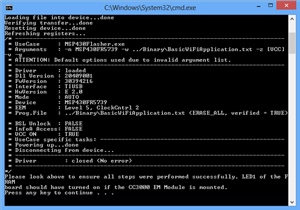
- Configure Port Settings (Windows)

- Configure Putty Settings
(Note I did change the Local Echo settings and matched the serial settings with Windows config)
- Open the COM connection (click Open on the Putty screen)
Blank terminal screen with flashing cursor - Hit Reset Button on MSP430
No effect for putty terminal output - LED5 lights up

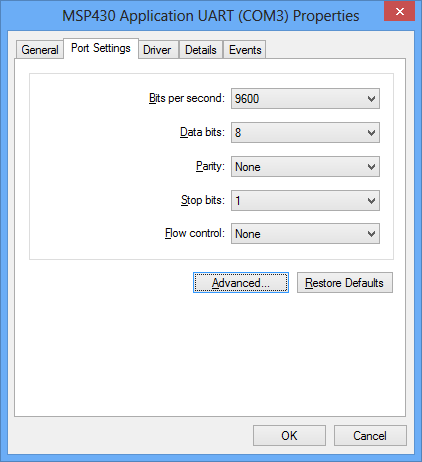

I have played around with the Baud rate changing from 9600 to 115200. I am hopeful that the MSP430 is on the correct COM port because I am able to get the "putty terminal" If I use the incorrect COM port it notifies me that it is unable to open a connection.
I have uninstalled/reinstalled the MSP430 drivers with no difference.
I am open to any suggestions.
Thank you,
Brian
