This thread has been locked.

If you have a related question, please click the "Ask a related question" button in the top right corner. The newly created question will be automatically linked to this question.

USB Launchpad drivers problem


Hi,

 I have two of the USB Launchpads and want to create something.

However, there is a problem with drivers on my windows7  64-bit machine.

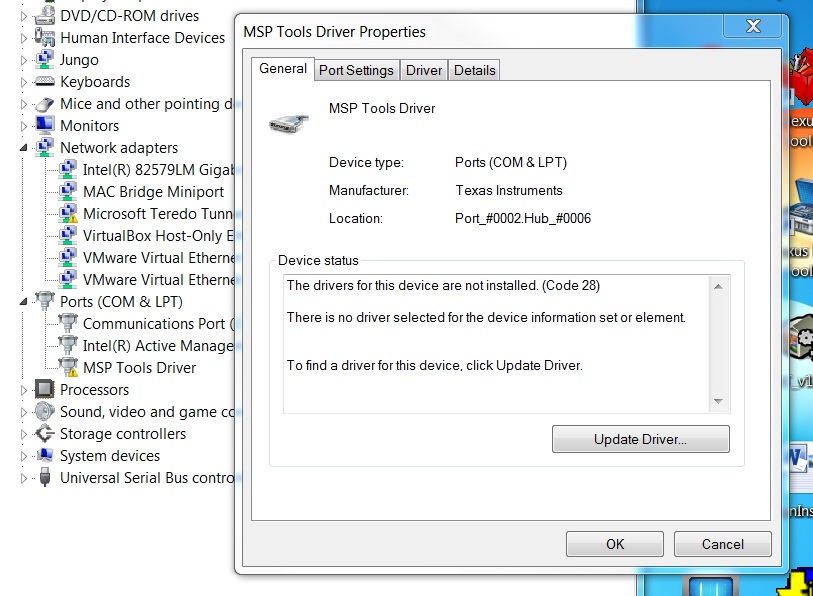
1. When plugged in

and the device manager shows
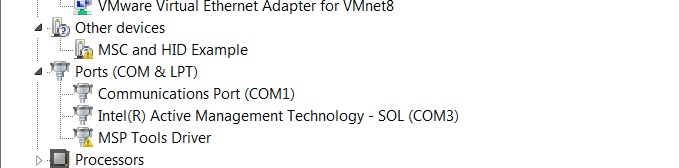
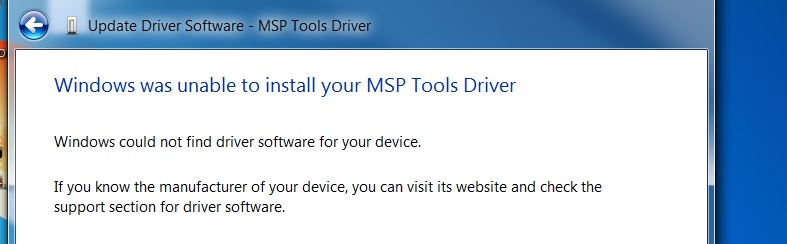
2. When trying to point to the drivers downloaded from the product folder:
3. When attempting to load drivers from my machine

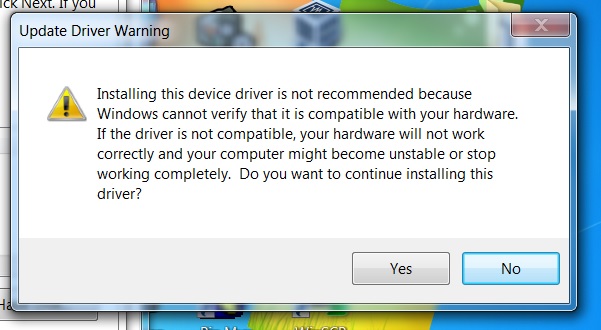
 

After I press "Yes" I have a BSoD and my PC reboots.


More info:

S/Ns are: 1309002998, 1309001204

both have a "TEST PASS" stickers.


Is it fixable? If yes, how?


I will order another 2, but it is a very long waiting time and I think that my feedback might help others.


Jan 


  • Hi,

     Here is an update on the drivers problem.

    I managed to find someone, who has a good USB Launchpad. When plugged in into my computer, the drivers are installed without any problem and everything works fine. The conclusion is that there is something wrong with my lot of Launchpads, either hardware or firmware. I disconnected all the onboard jumper, so only USB Hub eZ-FET lite is active.

    Can someone at TI give me a hint on possible fix. Do you have any return/exchange policy for non-working new items?

    Is there a way of reflashing the Hub's IC?

    What are the proper drivers?

    Jan

  • Hi,

    There is more drama and I really need some help here.

    Today I have received 2 more Launchpads S/N 1309002279 and 1309002679

    and I have now 4 being bricked.

    When plugged into USB I have "MSP Tools Driver"

    Interestingly the other peoples hardware works on my computer without any problem.

    I really need help here, as I have 4 bricked USB Launchpads.

    Has anyone had a similar experience, if yes please advise how to fix.

    Regards

    Jan

**Attention** This is a public forum