This thread has been locked.

If you have a related question, please click the "Ask a related question" button in the top right corner. The newly created question will be automatically linked to this question.

calculating a sampling frequency for analog input signal

Other Parts Discussed in Thread: MSP430F5419A, CC430F5137

Hi ,

I  have an incoming signal with a frequency of 2hz.So,I want to sample the signal at a sampling rate of 500Hz using the ADC12 channel.For getting a sample frequency of 500hz I am using the below calculation

ACLK=32KHz,resolution=12bit,ADC conversion cycles=13,DIV=2,ADC12SHT_2=>2*13( 13 Conversion cycles for 12bit resolution)

Fs=32K/(2*13+13)*2=410Hz

Is this the right of calculating the Fs.

How to get a 500hz sampling frequency as the above calcualtion is not upto the mark of 500Hz

Thanks.

  • I think it is better (and may be also easier) to program one of the Timers to start the ADC12 conversion every 1/500 of a seconds. 

  • Yes ,I will use the timer later but as of now I am planning to use the below

    void main(void)

    {

    ADCchannel settings and etc 

    while(1)
    {
    for (i=0;i<500;i++)
    {
    ADC_Result[i] = ADC12MEM0;
    }
    if(i=500)
    { i=0; }
    }

    }

    1 ADC conversion is made in around 2ms making a collection of 500 samples in 1 sec.After collecting 500 samples in 1 sec the ADCresult will start again to collect the converted ADC values.

    Will this works for collecting 500 samples in 1 sec or need to switch to timer implementation.

  • You need to wait for the ADC to finish the current conversion before you copy ADC12MEM0 to your ADC_Result[i]. The CPU is much faster then the ADC, hence (with the current code) you end up with lots of copies of the same conversion. The rest of what you said is correct.

  • Thanks old_cow_yellow for the information,

    When conversion results are written to a selected ADC12MEMx, the corresponding flag in the ADC12IFGx
    register is set.To get copied with correct converted values instead of the copies of the same conversion  can be made by checking the sate of ADC12IFGx(i.e.,  set or not)

    This will result in a problem of getting lesser samples <500 in 1sec if the ADC takes more than 2ms for a single conversion as the expected was 2ms for a single ADC conversion.

    Isn't it true and out to get the correct samples of around 500  so that the ADC conversion will be done in 2ms.

    Is there a way?


  • You shall read datasheet of your chip, "ADC Timing Parameters" where you can read that slowest allowed ADC12 conversion clock is 0.45 MHz. So you simply can't get 500Hz samplerate using just slow ADC clock. As old_cow already suggested - you shall use timer instead.

  • You can set up the ADC12 to finish each conversion within 0.1 msec or less. Do not let it start another conversion right after it finishes the current one. Use a Timer to start a new conversion every 1/500 of a second (i.e. every 2 msec)

  • Using timer  to generate interrupt after every 2ms =>sampling rate of 500hz=2ms and 1 ADcsample in 1.2ms

    void main(void)
    {
        WDTCTL = WDTPW + WDTHOLD;                 // Stop WDT
        PXSEL |= 0x0X;              // using Px.x as an input to channel x of ADC.
    	
    	/*---time for 1 ADC conversion=32K/(2*13+13)=820hz=1.2ms--*/
    /* Initialize ADC12_A */
        ADC12CTL0 = ADC12ON+ADC12SHT0_2+ADC12MSC; // Turn on ADC12, set sampling time 2*13 conversion cycles
                                                  // set multiple sample conversion,
        ADC12CTL1 = ADC12SHP+ADC12CONSEQ_2+ADC12SSEL_1; // ACLK=32KHz ;Use sampling timer(Pulse sample mode), repeat signle channel mode
        ADC12CTL2 =ADC12RES_2 ;//12-bit (13 clock cycle conversion time)
        ADC12MCTL0 = ADC12INCH_X;//selecting the ADC channel 3
        ADC12IE = 0x01;                           // Enable ADC12IFG.0
        
    	/*timer will run for 32KHz=>64*32=2ms*/
    	TAR=0;
    	TACCR0 = 64- 1;  //ACLK @32KHz=>64*32=2ms
    	TACCTL0|=CCIE;//ccro interupt enabled
    	TACTL = TASSEL_1 + MC_1 + TACLR;  //SMCLK - up_mode - clear the counter
    
    __bis_SR_register(LPM4_bits + GIE);           //enable interrupts
    __no_operation();                             // For debugger
    }                   // Start conversion
    
    // Timer A0 interrupt service routine
    #pragma vector=TIMERA0_VECTOR
    __interrupt void Timer_A (void)
    {
      ADC12CTL0 |= ADC12ENC;                    // Enable conversions
        ADC12CTL0 |= ADC12SC;                     // Start conversion
    }
    #pragma vector=SD16_VECTOR
    __interrupt void ADC12ISR(void)
    { 
      sample = ADC12MEM0;  //get the data and clears the interrupt flag
      ADC12CTL0 &= ~ADC12ENC;                     //disable the ADC
     }

    It works as follows :

    The timer starts counting from 0 to 63 making 2ms in the mean while it will jump to the ADC12ISR where the converted value in ADC12MEM0 is copied to sample and ADC is disabled and waits untill the timer completes 2ms to start the next conversion of ADC.

    Will this work as above stated or is there anything I'm missing?

    thanks

  • stefan 12 said:
    Will this work as above stated or is there anything I'm missing?

    Kind of strange question you ask. It is up to you to test your code. Did you test it? It works? - You can put GPIO pin set/reset in the ADC ISR and check ADC sample rate using scope.

  • Hello Ilmars ,

    I don't have the board right now with me as it will arrive next week.So,I started learning and writing the things I need in the mean while.

    Thanks for suggesting a good point of verifying the sample rate using GPIO by scope.

    If I want to make the above code to run for continuously acquiring 500 samples in 1 sec and resetting the values after 1 sec can I do the following

    Void main()
    {
    ADC settings(1ms)
    Timer settings(2ms)
    while(1)
    {
          for(i=0;i<500)
         {
         if (TACCR0==63)
            {
                 Result[i]= ADC12MEM0;
                  i++;
             }
         if (i==500)
           { i=0;}
          }
    }
    }
    ISR for timer
    ISR for ADC

    I 'm confused in writing this as only verifying the condition of TACCR0==63(or TACCR0==0?) will satisfy the above job or wondering about the CCIFG condition.
    And also I guess after the timer has done with its counting of 64 ticks making 2ms only the MEMo will be copied like it will continue copying all 500 samples and starts again.

    Can you Suggest if any corrections are to be done.

    Thanks.

  • You shall read ADC result and fill array in the ADC ISR, not in the main() application code. When 500 samples are done, then you shall stop timer that generates conversion start for ADC and signal main() code using global (volatile) flag - to process data. After processing you can zero array and restart ADC sampling. If you need true continuous sampling/processing w/o stopping ADC then you need two arrays that are swapped between sampling/processing 

  • Hi Ilmars, I just made as you suggested for counting the samples upto 500 samples and then stoppping the process 

    Void main()
    {
    ADC settings(1ms)
    Timer settings(2ms)
    }
    ISR for timer
    ISR for ADC
    {
    while(1)
    {
          for(i=0;i<500)
         {
         if (TACCR0==63)//check if the timer has counted 64 ticks=>2ms
            {
                 Result[i]= ADC12MEM0;
                  i++;
             }
         if (i==500)
           { TACCR0==0;}//stops the timer
          }
    }
    }

    I didn't understood this "signal main() code using global (volatile) flag - to process data."

    For continuous sampling :I am planning to send the data(i.e, 500 samples) through UART after every 1 sec by inserting the uart code inside the ADC ISR where the index(i) of  result will be made'0'  after sending through UART and TACCR0==0.

    Can I implement the continuous sampling like this or do I need to process with two arrays by swapping them.

  • stefan 12 said:
    ISR for ADC
    {
    while(1)
    {
          for(i=0;i<500)

    ADC interrupt is called once per each conversion. So you can't put any while() loop waiting for data here as you did in main() routine. ISR is different.

    stefan 12 said:
    I didn't understood this "signal main() code using global (volatile) flag - to process data."

    volatile int signal = 0;

    isr() {

     if (buffer == full) {

        stop_timer();
        signal = 1;

    }

    main() {

    while (1) {

      if (signal) {

        process_data();
        signal = 0;
        restart_timer();
      }
     }
    }

  • Hello lmars,

    Can you please explain a bit clearly about the ISR(),When this will be called.

    And also what is this process_data() and where should I place the result loop of

    for(i=0;i<500)

         {
             Result[i]= ADC12MEM0;
                  i++;
             }
          }

    Thanks in Advance.

  • I just made-up those function names ISR() supposedly is ISR function of ADC interrupt (IRQ) which will be called when ADC IRQ signal raised. process_data() - function where you do what you want to do with 1 second of data you intend to collect.

  • There are over 100 different MSP430 devices that have ADC12. I do not know which one you are using. You probably already have the Data-Sheet of the device you are using. You probably have a Family User’s Guide too. There are many different Family User’s Guide, make sure you are using the right one for the device you are using. The Data-Sheet usually tells you which Family User’s Guide you should use. Be aware that the device you use almost definitely does not support all the features in its Family User’s Guide. Also the Data-Sheet probably covers quite a few different devices with slightly different features.

    Some of those 100+ devices many not have enough SRAM or FLAH for you. All of them have one or more Timers. All of them support external 32.768 kHz crystal.

    BTW, I would avoid using external crystal unless I really need it. Some of the devices have an internal REFO, factory trimmed to 32.8 kHz. It is less accurate as compared with an external crystal, but it is accurate enough for a lot of applications. Some of the devices have factory calibrated DCO settings for 1, 8, 12, and 16 MHz for that individual chip stored in InfoA of each individual chip. If you do not erase or alter InfoA and your code uses these calibrated settings to set DCO, you can eliminate the chip-to-chip variation of the DCO. It is less accurate as compared with REFO, but it is accurate enough for some of the applications. Check the Data-Sheet for the existence of these features and their accuracy.

    As far as I know, in your application, only the Timer needs a somewhat accurate clock so that you get very close to 500 ADC conversions per second. The ADC12 does not need an accurate clock. The accuracy of the clock for CPU is not important either, but it probably should be >1 MHz.

    I think you should use single-channel-single-conversion ADC12CONSEQ_0, not repeat-single-channel ADC12CONSEQ_2. You do not want multiple-sample-and-convert ADC12MSC either.

    You should configure this single-channel-single-conversion to finish much less than 2 msec. Do not aim it at 2 msec. It should take  <0.1 msec. Set up sample-and-hold-select ADC12SHS to use one of the Timers on the device you are using. Do not use ADC12SC to start a conversion.

    The Timer does not need to generate an interrupt and it does not need an ISR. It only needs to generate an internal OUT signal every 2 msec to start another ADC12 single-channel-single-conversion.

    You can choose to either poll the ADC12IFGx or enable it to generate an interrupt. Either way, after this flag is set, you clear it and copy the corresponding ADC12MEMx into your static global circular result buffer. This way, you are keeping the most resent results in that circular buffer. The sampling rate is determined by the Timer settings, not the ADC12 conversion time.

  • Thanks old_cow_yellow for the neat and clean explain,

    So,this is what I done after getting understood with your explanation

    • uisng singelchannelsingle conversion and not uisng the MSC
    • ADC cnversion of 0.05msec<0.1 uisng 1Mhz clk with div of 2 and SHT0_2
    • Removed Timer ISR
    • used ADCIFG0
    volatile int signal = 0;
    void main()
    {
    ADC settings with 0.05msec conversion 
    Timer setting as 2ms
    while (1)
    	{
    	  if (signal)
    	  {
    		  for(i=0;i<500;i++)
    		       {
    				  while(ADC12IFG)
    				  {
    					  Result[i]= ADC12MEM0;
    					  ADC12IFG=0;//clear the interrupt flag after coying conversion result
    				  }
    		        }
    	   }
    	signal = 0;
    	//restart timer(); 	 }
    }
    }
    #pragma vector=ADC12_VECTOR
    __interrupt void ADC12ISR(void)
    {
    	if (TA1CCR0=0)
    	{
    		ADC12CTL0 |= ADC12SC; 	}
    	if (i == 500)
    	{
    		TA1CCR0=0;//stop_timer();
    	    signal = 1;
    	}
    }


     But I am not clear of where to place the ADC conversion start so that it will start converting again after the timer has done with 2ms and also how to restart timer as Illmar suggested.

    How to use sample-and-hold-select ADC12SHS to use one of the Timers?

    Thanks.

  • stefan 12 said:
    where to place the ADC conversion start 

    In teh timer ISR. (well, there's other option but let's stick with this one for a while)

    You shall stop trying to use main() and for() loops to fill buffer if you have ADC ISR. All the buffer i/o shall be done in ADC isr but without while or for loop.

  •  Ilmars here is the required thing I guess

    main()
    {
    while (1)
    	{
    	  if (signal)
    	  {
          Process_data();
    	   }
    	signal = 0;
    	//restart timer();
    	 }
    }
    #pragma vector=TIMERA0_VECTOR
    __interrupt void Timer_A (void)
    {
      ADC12CTL0 |= ADC12ENC;                    // Enable conversions
        ADC12CTL0 |= ADC12SC;                     // Start conversion
    }
    #pragma vector=ADC12_VECTOR
    __interrupt void ADC12ISR(void)
    {
    	 while(ADC12IFG)
    	{
    	Result[i]= ADC12MEM0;
    	ADC12IFG=0;
    	 }
    	i++;
    	if (i == 500)
    	{
    		TA1CCR0=0;//stop_timer();
    	    signal = 1;
    	}
    }

    As you said in last post "process_data() - function where you do what you want to do with 1 second of data you intend to collect." doesn't this mean to send data through uart?

    And how to make the timer restart the in the code //restart timer();


  • stefan 12 said:
     Ilmars here is the required thing I guess

    Yes, very close to what I had in mind. Except:

    if (signal)
    {
    stop_timer();
    Process_data();
    signal = 0;
    restart_timer();
    }
    

    Again you put while() into ISR!!! AGAIN I have to repeat you that ADC ISR is called once per each ADC conversion!!!!!!!!!!!!!!

  • Thanks for reminding again and again and here I got one doubt

    There are two ways to control the timer I guess as

    to stop  1)TA1CTL = MC_0; and  TA1CCR0=0;

    to restart 1) TA1CTL = MC_1; and 2) TA1CCR0=1;

    What is the difference and which one to be used here.

  • stefan 12 said:
    ACLK=32KHz,

    32kHz is way too low for the ADC. During conversion, the charge will dissipate into the void.
    IIRC, 200kHz is the minimum for reliable results.

    However, the calculation is wrong too.

    ADC12SHT0_2 is 16 clock cycles sampling time. +13 cycles conversion time = 29. *2 for the DIV=2 would give 58 cycles per conversion = 565Hz

  • Hi Jens thank for providing such a good information 

    you said "IRC, 200kHz is the minimum for reliable results."

    You mean the minimum  clock required for 1 ADC conversion should be >200Khz? 

    If I am not wrong then CC4305137  has the maximum  clock  ADC12CLCK =1MHz I guess.If so

    we need the ADC conversion to be >200Khz but the max can be calculated as 1Mhz/(13 cycles conversion time)=76Khz.

    How to get >200Khz ADC cconversion clock?How to solve the charge dissipation problem.

    And  what about this

    to stop  1)TA1CTL = MC_0; and  TA1CCR0=0;

    to restart 1) TA1CTL = MC_1; and 2) TA1CCR0=1;

    Thanks.

  • I tried the following code on a MSP430F5419A. It seems to work.

    #include <msp430.h>
    #define Mclk 1048576u /* default frequency */
    #define Size 100 /* size of result buffer */

    __no_init volatile unsigned results[Size];
    volatile int oldest = 0;
    volatile int filled = 0;

    void main( void )
    {
      WDTCTL = WDTPW + WDTHOLD;
     
    // Set up 5 port pins to show activities and clocks with a scope
    //     --- They do not help nor hurt the program execution
    // P1.1 (pin-18) => TA0CC0 OUT, leading edge starts ADC12 conversion
    // P1.7 (pin-24) => New result arrived and processed
    // P1.0 (pin-17) => ACLK = 32.8 kHz
    // P1.6 (pin-23) => SMCLK = 1.048 MHz
    // P2.0 (pin-25) => MCLK = 1.048 MHz

      P1SEL = BIT6 + BIT1 + BIT0;
      P1DIR = BIT7 + BIT6 + BIT1 + BIT0;
      P2SEL = BIT0;
      P2DIR = BIT0;

    // Initialize ADC12_A
      ADC12CTL0 = ADC12SHT0_4 + ADC12ON;
      ADC12CTL1 = ADC12SHS_1 + ADC12SHP + ADC12CONSEQ_2;
      ADC12CTL2 = ADC12PDIV + ADC12RES_2;
      ADC12MCTL0 = ADC12INCH_3;
      P6SEL = BIT3;
      ADC12IE = ADC12IE0;
      ADC12CTL0 |= ADC12ENC;
     
    // Set up TA0CC0 to generate a 500 Hz square wave to start ADC12 conversion
      TA0CCR0 = Mclk/(2*500) - 1;
      TA0CCTL0 = OUTMOD_4;
      TA0CTL = TASSEL_2 + MC_1;
     
      while (1)
      {
        __bis_SR_register(CPUOFF + GIE);

    // Do data processing here
    // The oldest result is in results[oldest]
        
        P1OUT &= ~BIT7; //new result processed
      }
    }

    #pragma vector=ADC12_VECTOR
    __interrupt void ADC12ISR(void)
    {
      ADC12IV;
      results[oldest++] = ADC12MEM0;
      if (oldest >= Size)
      {
        oldest = 0;
        filled = 1;
      }
      if (filled)
      {
        __bic_SR_register_on_exit(CPUOFF);
        P1OUT |= BIT7; //new result arrived
      }
    }

  • stefan 12 said:
    1)TA1CTL = MC_0; and  TA1CCR0=0;

    Only MC_0 will really stop the timer.
    CCR0=0 will make it count form 0 to 0 (on MC_1). Which is not really a stop, but almost acts as one. Yet the timer is still consuming energy for actively not counting.

    stefan 12 said:
    to restart 1) TA1CTL = MC_1; 

    Not really restart, but rather a 'continue counting in up mode'.

    stefan 12 said:
    to restart 2) TA1CCR0=1;

    Well, in up mode, this will make the timer to count form 0 to 1 to 0 to 1... That#s not a restart too, but a (very specific) mode of operation.

    One could summarize: in up mode (MC_1) CCR0 needs to be >0 to have the timer counting and generating interrupts.
    But only stop mode (MC_0) will switch the timer off and preserve power. Independent of CCR0 value.

    stefan 12 said:
    You mean the minimum  clock required for 1 ADC conversion should be >200Khz?
    If I am not wrong then CC4305137  has the maximum  clock  ADC12CLCK =1MHz I guess.If so
    we need the ADC conversion to be >200Khz but the max can be calculated as 1Mhz/(13 cycles conversion time)=76Khz.

    1MHz or 1.2MHz (depends on MSP) is the maximum for the SD16 ADC.
    The AD12 in the CC5137 is specified for 450kHz (not 200 on this MSP) to 5MHz operation with external reference. See Datasheet. For using the internal voltage reference with external buffering, the upper limit is 4MHz and without external buffering it is 2.7MHz. Above or below, the ADC won't be able to provide the specified performance and linearity.
    ADC12OSC is ~4.8MHz typically. SO without external buffering of the internal reference, it should be used with a divider of 2.

    For the timing, there is a certain minimum time required to charge the sampling capacitor (>1µs). Minimum SHTx setting is 4 clock cycles , so conversion takes at least 17 cycles. So without external buffering of the internal reference, you will be limited to 141kHz. With external reference, 294kHz conversion frequency are possible. More, if you don't care for degraded precision/linearity.

    It's all in the datasheet. :)

  • Hello old_cow_yellow,

    I just used the code you posted with my ADC12 channel being P2.2 (A2) with slight modifications like


     //P1SEL = BIT6 + BIT1 + BIT0;

    //P1DIR = BIT7 + BIT6 + BIT1 + BIT0; P1DIR = BIT7;

    //P2SEL = BIT0; //P2DIR = BIT0;

      P2SEL = BIT2; instead of P6SEL = BIT3;

    ADC12MCTL0 = ADC12INCH_2;

    It was successfully built,debugged and running continuoulsy.

    Can I see the ADC conversion (ADC12MEM0) results in the debug window(as it is being constant)  or should I use the hyperterminal by uart to view the results?


  • As I said before, there are over 100 variations of MSP430 with ADC12.  There are differences between them, and I still do not know which one you are using.

    Tell me which MSP430 variation you are using. I can tell you what needs to be modified.

    The code I showed you is for MSP430F5419A. I was using the default clock settings. If you run it and stop it shortly afterwards, the most 100 results are saved in SRAM in the circular buffer results[0 ...99]. The oldest result is in results[oldest].

    You can also insert you own code to analyze the most resent 100 results at where I marked to do so. You have to finish that task well within 2 msec. Otherwise results[oldest] will be replaced by the newest. You may have to speed up the MCLK to accomplish that in time.

  • Sorry old_cow_yellow for not mentioning the one I am using and  it is CC430F5137.

    Can I know What are the changes to be made for this.


  • old_cow_yellow said:
    I still do not know which one you are using.

    He did mention - four posts above yours. But I had to search for it too before looking into the datasheet.

  • Here is my code for CC430F5137. It is different from MSP430F5419A.

    I also changed the buffer size to 1000. Thus when you stop it anytime after 2 seconds of running, there are 1000 most resent results in the array results[0...999] for you to inspect. Do not use debug single-step or break-point.

    I do not have CC430F5137. Thus I did not test it. It is suppose to read the internal temperature sensor every 2 msec. If you heat up or cool down the chip a few degrees, and repeat the test, you should be able to see the difference between the two sets of data. You should be able to see the slight variation within each set too or even the difference between the beginning and the ending the 2 seconds.

    Good luck!!

  • Hit the wrong key.

    #include <msp430.h>
    #define Smclk 1048576u /* default frequency */
    #define Size 1000 /* size of result buffer */

    __no_init volatile unsigned results[Size];
    volatile int oldest = 0;
    volatile int filled = 0;

    void main( void )
    {
      WDTCTL = WDTPW + WDTHOLD;

    // Initialize ADC12_A to sample internal-temperature-sensor
      REFCTL0 = REFMSTR + REFON;
      ADC12CTL0 = ADC12SHT0_4 + ADC12REFON + ADC12ON;
      ADC12CTL1 = ADC12SHS_1 + ADC12SHP + ADC12CONSEQ_2;
      ADC12CTL2 = ADC12PDIV + ADC12RES_2;
      ADC12MCTL0 = ADC12SREF_1 + ADC12INCH_10;
      P2SEL = BIT2;
      ADC12IE = ADC12IE0;
      ADC12CTL0 |= ADC12ENC;

    // Set up TA0CC1 to generate a 500 Hz square wave to start ADC12 conversion
      TA0CCR0 = Smclk/(500) - 1;
      TA0CCR1 = TA0CCR0 - 20;
      TA0CCTL1 = OUTMOD_3;
      TA0CTL = TASSEL_2 + MC_1;

      while (1)
      {
        __bis_SR_register(CPUOFF + GIE);

    // Do data processing here
    // The oldest result is in results[oldest]
    //   ...   ...  ...  ...
    //   ...   ...  ...  ...
    //   ...   ...  ...  ...
    // This must be accomplished well within 2 msec.
    // You may need to increase the core voltage and speed up MCLK

      }
    }

    #pragma vector=ADC12_VECTOR
    __interrupt void ADC12ISR(void)
    {
      ADC12IV;
      results[oldest++] = ADC12MEM0;
      if (oldest >= Size)
      {
        oldest = 0;
        filled = 1;
      }
      if (filled)
      {
        __bic_SR_register_on_exit(CPUOFF);
      }
    }

  • Thanks old_cow_yellow and when I worked with the above code with replacing the

    P2SEL = BIT2; and ADC12INCH_2

    And used a hyperterminal output for verifying it as below

    #pragma vector=ADC12_VECTOR
    __interrupt void ADC12_ISR(void)
    {
    	ADC12IV;
    	 //ADC12CTL0 |= ADC12SC;
    		 r= ADC12MEM0;
        while (!(UCA0IFG&UCTXIFG));             // USCI_A0 TX buffer ready?
    	UCA0TXBUF = 97;
    	_delay_cycles(100);
    
     //results[oldest++] = ADC12MEM0; 
    if (oldest >= Size)
      {
        oldest = 0;
        filled = 1;
      }
      if (filled)
      {
        __bic_SR_register_on_exit(CPUOFF);
      }
    }


     Otuput:

    1)Using the line "[oldest++] = ADC12MEM0;"  it is showing "error:unable to read" for ADC12 in the register list.

    2)Not using (Commenting) this "[oldest++] = ADC12MEM0;" its running and is displaying a continuous alphabet a on the terminal window.

    Don't know why the line  "[oldest++] = ADC12MEM0;" is making the ADC unreadable.

    Can someone suggest a solution.

    thanks.

  • Hi,

    If you run the code I sent you without any change and stop it after 2 seconds or longer. Can you display the values of the variables oldest, filled, and results[0...999]? What are their values?

    Which debugger are you using? After your change, what baudrate are you using for the UART? Did you get aaaaaaaaaa...?

    You said the line "[oldest++] = ADC12MEM0;" Is it actually "results[oldest++] = ADC12MEM0;"?

    -- OCY

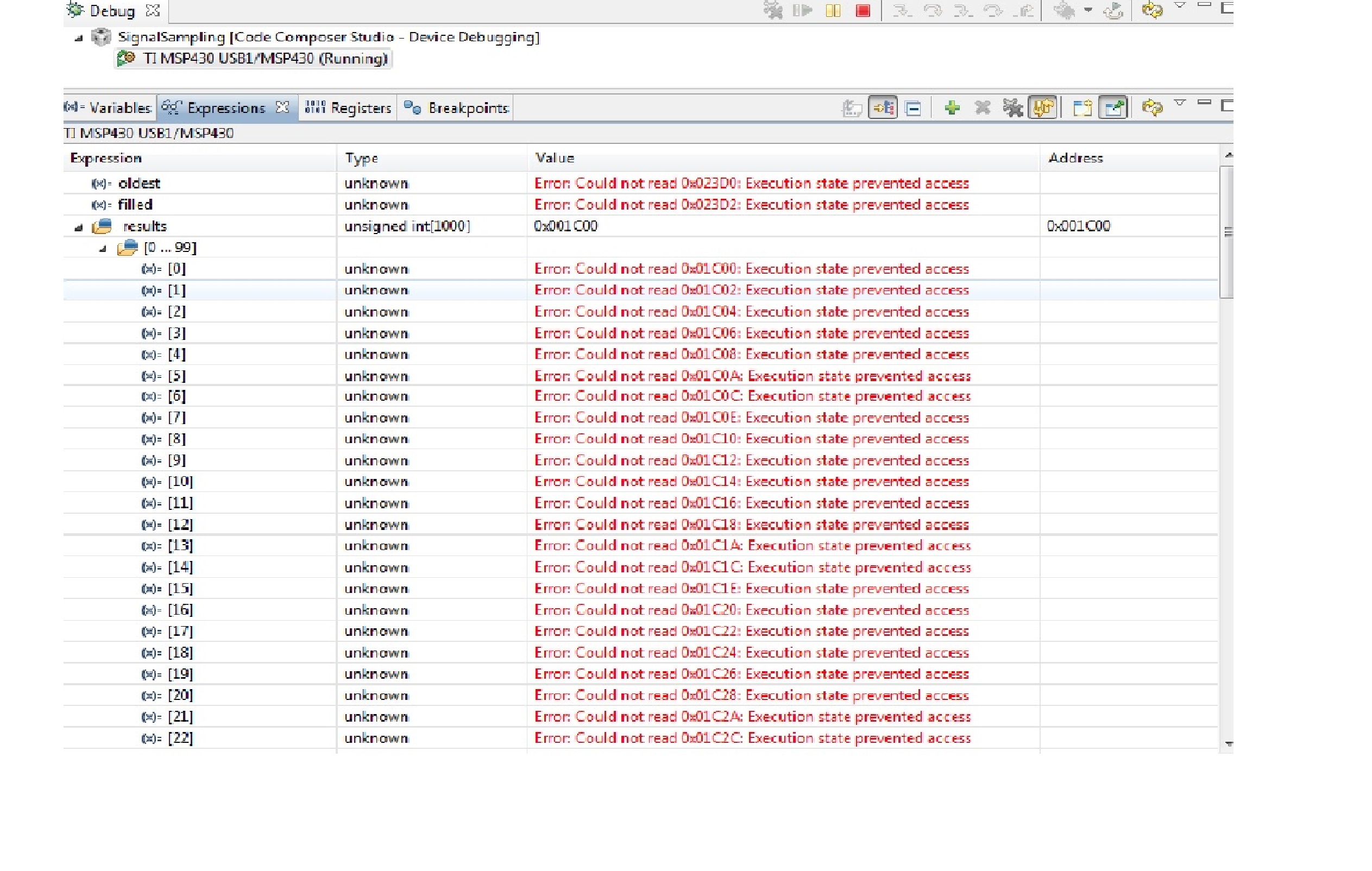
  • Hello old_cow_yellow,

    1)Running the code without any changes. Before stopping it ,the result is


    2) Debugger Using is MSPez430u.Baudarte of 9600 in the uart programme and terminal baudrate also 9600.Yes ,the termianl window is showing aaaaaaa.

    3)Sorry for not writing fully and yes it is results[oldest++] = ADC12MEM0;"?

    I hope you can figure it out.

    Thanks.


  • I do not use CCS (I think it stinks). But in this case, I have to give it some credits. It is telling some almost readable explanation. It says “Error; Could not read 0x023D0; Execution state prevented access” etc. I took that to mean “I cannot run and chew gum at the same time”.

    I anticipated that most debuggers couldn’t do both at the same time. That is why I told you to start to run the code, stop it after a few seconds, and then display the variables after it is stopped. I did not anticipate that it tries to display the variable while running and complains that it could not do that. (I am glad that it did not swallow the gum.)

    Is it possible to start to run the code -- without displaying the variable, without single-stepping, without any break-point, without trying to do anything else at the same time?

    Is it possible to stop running after a few seconds?

    Is it possible to display the variablea after it is already stopped?

    Please give it another try. If that still does not work, I will try to write the code to send the result to a Hyperterminal. Is it possible to use 19200 b/s or higher speed?

  • Thanks old_cow_yellow and here is required information

    1)Yes,It is possible to run the code without doing anything at the sametime.

    2)When it is stopped after a few seconds it is automatically switching to the CCSedit perspective window.

    3)I guess it is not possible as it swtiching to the CCs edit window may be its possible to see the variable reults on the hyperterminal.

    4) Yes, it is possible to use >19200b/s using the SMCLK= 1Mhz as mentioned in the user(slau259e.pdf)  upto a max of 115200 with UCBRx=8.

    And also the diffrence between the below two

    main()
    {
     while(1)
        {
          __bis_SR_register(CPUOFF + GIE);
         }
    }
    ADCISR()
    {
       ADC12IV;
       ADC12CTL0 |= ADC12SC;         // Start conversion
       //result=ADC12MEM0;
    
       result=597; 
        uart_send(result);
    }

    It is giving the ADC result value of 597 on the terminal window continuoulsy.

    main()
    {
     while(1)
        {
          __bis_SR_register(CPUOFF + GIE);
    
          result=597; 
          uart_send(result);
         }
    }
    ADCISR()
    {
       ADC12IV;
       ADC12CTL0 |= ADC12SC;         // Start conversion
       //result=ADC12MEM0;
        //uart_send(result);
    }

    This is running in the debugger window but is not displaying the ADC result value(597) on the hyperterminal even waiting for a long time also.

    I guess this will give you some idea.

    Thanks.


  • Hi  old_cow_yellow ,

    It is not going into the while loop I guess.

    Can I know what is the reason.

    thanks.

  • In both cases, the inclusion of ADC12CTL0 |= ADC12S: is wrong.

    Running the code and showing the CCS  "terminal window" at the same time can potentially mess up the code. When the code is running, you should not do anything else. And that include showing the CCS terminal window.

    Your ISR never uses _ _bic_SR_register_on_exit(...); so the code after _ _bis_SR_register(...); can never be executed.

    I do not use CCS. I cannot help you.

  • Thanks old_cow_yellow for your valuable help.

    Can someone help me out in figuring out the problem as why the ISR never uses _ _bic_SR_register_on_exit(...) and why the code after _ _bis_SR_register(...); is not executing.

    Shouldn't I use the ADC12CTL0 |= ADC12SC.

    what is the prblem with the code.


  • stefan 12 said:
    hy the ISR never uses _ _bic_SR_register_on_exit(...)

    Do you see it there? I don't and so does the compiler.
    You have to use this intrinsic in your ISR to wake main code execution from LPM.

    stefan 12 said:
    why the code after _ _bis_SR_register(...); is not executing.

    because this instruction stops teh CPU. Only on interrupt (and only for execution of the ISR) the CPU is awakened - unless the ISR code contains the proper instruction to exit from LPM.

    Entering LPM is not a 'stop CPU until there is an interrupt' but rather a 'disable CPU for anything except ISR execution' action.

  • Hi Jens,

    Now I used the __bic_SR_register_on_exit(CPUOFF) as shown

    main()
    
    {
    ADC and UART settings
    while (1)
      {
      	result=333;
        conv(result);
    
      __bis_SR_register(CPUOFF + GIE);   }
    }
    #pragma vector=ADC12_VECTOR
    __interrupt void ADC12_ISR(void)
    {
    	ADC12IV;
    	//ADC12CTL0 |= ADC12SC;    // Start conversion
    	//result=ADC12MEM0;
    	//result=567;
        //conv(result);
        __bic_SR_register_on_exit(CPUOFF);
    }

    Now it is running and showing the value 333 only once on the hypertermianl and not displying anything on the termianl after first diaply of 333 .

    And when I use both like to display 333 in while and 567 in ADC ISR it is only displaying 567  at a very faster rate but not the 333(the baudaret used for UART is 9600) but as per the code posted by old_cow_yellow says

     while (1)
      {
        __bis_SR_register(CPUOFF + GIE);
    // Do data processing here
    // The oldest result is in results[oldest]    
        P1OUT &= ~BIT7; //new result processed
      }
    }

    If displaying a value of 333 on terminal is my "Do data processing here" won't it show 333 or is this a problem with the UART settings of 9600.

    Will increasing the baudrate will solve this problem or is the timer isn't doing the job of 2ms.


    Thanks in advance.


  • stefan 12 said:
    And when I use both like to display 333 in while and 567 in ADC ISR it is only displaying 567  at a very faster rate but not the 333

    No wonder.

    your conv() function takes so much time that after sending the '567', another ADC result is already there, so the ISR is entered right again. And main() has no time to do anything, let alone sending another time-consuming '333'. Not to mention that you cannot call conv() inside and outside ISR as this means that the ISR could interrupt execution of conv() and call conv() again while it is already being called by main. I doubt that conv() is reentrant.

**Attention** This is a public forum