This thread has been locked.

If you have a related question, please click the "Ask a related question" button in the top right corner. The newly created question will be automatically linked to this question.

MSP430F5528 USB Start Problem

Other Parts Discussed in Thread: MSP430F5528

Hi,

I'm having trouble with a MSP430F5528 system which is powered from USB.  Hardware and software design are almost finished. During testing I noticed that in rare cases the CPU does not start software execution  after plugging in the USB cable. In these cases the PC immediately detects presence of the USB device which should not happen because the USB module is not enabled yet.  I cannot trace the problem by debugging because it only occurs without debugger. I think it is a hardware problem. It depends on the way I plug in the USB cable (wedged or even, slowly or quickly) and it only occurs with the type A plug side. I have already replaced the cable. Could there be a latch-up problem if DP or DM are connected before +5V or GND?

The CPU is not powered from VUSB but from an external 3.3V LDO.

Here is the relevant section of my circuit:
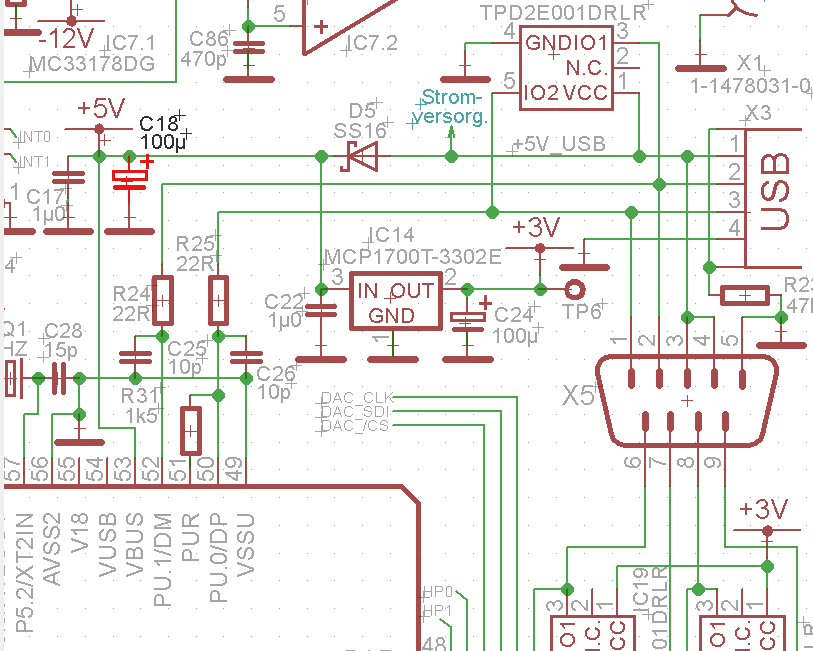
Can anyone help me please?

Regards Jan

  • Jan Burgemeister said:
    I'm having trouble with a MSP430F5528 system which is powered from USB.  Hardware and software design are almost finished. During testing I noticed that in rare cases the CPU does not start software execution  after plugging in the USB cable. In these cases the PC immediately detects presence of the USB device which should not happen because the USB module is not enabled yet.  I cannot trace the problem by debugging because it only occurs without debugger. I think it is a hardware problem. It depends on the way I plug in the USB cable (wedged or even, slowly or quickly) and it only occurs with the type A plug side. I have already replaced the cable. Could there be a latch-up problem if DP or DM are connected before +5V or GND?

    Just to be more clear, when this happen again start MSP430 USB Firmware Upgrade Example (http://software-dl.ti.com/msp430/msp430_public_sw/mcu/msp430/MSP430_USB_Developers_Package/latest/index_FDS.html) and if after selecting "Blink LED Example", "Upgrade Firmware" button is enabled, than your device after plugin is entered to USB BSL mode.

    Jan Burgemeister said:
    The CPU is not powered from VUSB but from an external 3.3V LDO.

    This MPC reg on schematics?

  • Thank you, zrno soli . Yes, my device is recognized by the USB Firmware Upgrade Example, so it seems to hang in BSL mode! But how does it get there,  just after connecting a cable?

    The MCP1700 shown in the schematics is the CPU power supply.

  • I think I have a solution. The hardware has to  avoid that the MSP430 enters USB BSL mode accidentally. This can happen in rare cases if the PUR pin is pulled high before the device gets power during insertion of  the USB plug. A 1 MOhm resistor from PUR to DVSS can avoid this (as suggested in http://e2e.ti.com/support/microcontrollers/msp430/f/166/t/195928.aspx).

**Attention** This is a public forum