This thread has been locked.

If you have a related question, please click the "Ask a related question" button in the top right corner. The newly created question will be automatically linked to this question.

MSP-gang info block unwanted erase during programming

Other Parts Discussed in Thread: MSP-GANG, MSP430F6638

Hello everybody , 

please I am on a F6638 + MSP-GANG.

when I write code in "main Memory "  the "info-memory" is erased .

this happens if I use  the .dll  , while using  TI "MSP-GANG.exe" everthing works .

I call funcion in the DLL (GANG430.dll)  in this sequence :

InitCom()

GangEraseImage()

GangLoadImage()

GangLoadParameters() ---> con programming flags = 0x212

GangMainProcess()

 “programming  flags” are passed to GangLoadParameters() are  0x212

F_ERASE_MAIN        0x000002 // executes erasure     of main memory

F_ERASE_CHECK_MAIN  0x000200 // executes erase check of main memory

F_PROGRAM_MAIN      0x000010 // executes programming of main memory

please where am I wrong ? what should I try ?

thank you very much 

bye

Carlo


  • Hi Carlo,

    I'm a little bit unclear about what GANG programmer and what DLL you are using.

    Are you using the MSP-GANG (this is the new GANG programmer - it is black and has an LCD display), or are you using the old MSP-GANG430 (grey with LEDs, no display)? I am curious because you mentioned the MSP-GANG, but then it looks like you are using the DLL for the old MSP-GANG430 (GANG430.dll). Perhaps you are using the Wrapper DLL with the MSP-GANG (porting a DLL project from the old GANG onto the new GANG?)

    If you are using the new MSP-GANG programmer I generally recommend using the MSP-Gang.dll - this was designed for use with the new MSP-GANG and will let you fully take advantage of all of its new features. There is an example DLL application that you can use as a guide in your MSP-GANG install location, usually C:\Program Files (x86)\MSP-GANG\Examples\C_Applications_MSP_DLL. This example uses the new MSP-GANG.dll and you should be able to just modify it to use the MSP430 device and settings that you desire.

    Regards,

    Katie

  • Hi,

    We are using the new GANG programmer (it has the LCD display).

    Yes, we are using the Wrapper DLL (GANG430.dll) because we are porting a DLL project from the old GANG onto the new GANG. So, in our project we inserted the new MSP-GANG.dll and replaced the old GANG430.dll we the new GANG430.dll that acts as a wrapper.

    With the old GANG programmer (and the old GANG430.dll) the problem is not preset, i.e. when the main-memory is erased/programmed the info-memory is not erased. Instead with the new GANG programmer and the new GANG430.dll (wrapper) the problem is present; I.e when the main-memory is erased/programmed the info-memory is erased too. 

    We have to use the new GANG because the old GANG programmer is "obsolete" and it can no longer be purchased and with the old programmer the programming takes too time (USB port is not available): in our project several big images have to be programmed into the chip.

    Best Regards Luigi (Elemaster group)

  • Hi Luigi,

    Thanks for the additional information. I'll see if I can reproduce your issue with the wrapper DLL on the new MSP-GANG with the sequence that was posted above.

    Regards,

    Katie

  • Hi Luigi,

    I have been unable to reproduce your issue when using a modified version of the Wrapper DLL example that comes included with the MSP-GANG software. You'll have to figure out what is different in our setups - perhaps you can provide the C or CPP file that you are using to use the DLL, or the binary that you are trying to load.

    Here are the steps that I did to test the issue - please follow these steps and let me know if your issue still occurs.

    Hardware used:

    MSP430F6638 Rev. D in an MSP-TS430PZ100USB target board. Jumpers JP5-10 set to JTAG mode, JP11 connecting DVCC and VBAT, and JP3 set to INT power.

    MSP-GANG

    Steps:

    1. I used the MSP-GANG GUI to load the following TI-txt file into Info memory:

    @1800
    00 01 02 03 04 05 06 07 08 09 0A 0B 0C 0D 0E 0F
    q
    This puts the values 00 through 0F at the beginning of INFO memory, @ 0x1800.  

    2. Using the MSP-GANG GUI, read back the INFO memory to confirm that the values are there. Close the GUI.

    3. Open the visual studio project located in your MSP-GANG install location at MSP-GANG\Examples\Wrapper\C_Wrapper_demo. I've attached my modified version of the DLLtest.c file here:  

    // (c) by Texas Instruments Incorporated. All Right Reserved.
    //*----------------------------------------------------------------
    //* All software and related documentation is provided "AS IS" and 
    //* without warranty or support of any kind and Texas Instruments 
    //* expressly disclaims all other warranties, express or implied, 
    //* including, but not limited to, the implied warranties of 
    //* merchantability and fitness for a particular purpose. Under no 
    //* circumstances shall Texas Instruments be liable for any 
    //* incidental, special or consequential damages that result from 
    //* the use or inability to use the software or related 
    //* documentation, even if Texas Instruments has been advised of 
    //* the liability.
    //*
    //* Unless otherwise stated, software written and copyrighted by 
    //* Texas Instruments is distributed as "freeware". You may use 
    //* and modify this software without any charge or restriction. 
    //* You may distribute to others, as long as the original author 
    //* is acknowledged.
    //*
    //*****************************************************************
    /*========================================================================*\
    |                                                                          |
    | DLLtest.c                                                                |
    |                                                                          |
    | Application main                                                         |
    |--------------------------------------------------------------------------|
    | Project:              GANG430 DLL: Application example in C language     |
    | Developed using:      MS Visual C++ 5.0 (WIN32 Console Application)      |
    |--------------------------------------------------------------------------|
    | Author:               FRGR                                               |
    | Version:              1.0                                                |
    | Initial Version:      07/08/03                                           |
    | Last Change:          12/04                                              |
    |--------------------------------------------------------------------------|
    | Version history:                                                         |
    | 1.0   Initial version                                                    |
    | 1.1   PInfoErase was added to GangLoadImage to fit V1.26                 |
    | 1.2   PInfoErase and EraseCheck make fit for v.1.27                      |
    |--------------------------------------------------------------------------|
    | Designed 2003 by Texas Instruments Incorporated                          |
    | modified by Elprotronic Incorporated                                     |
    \*========================================================================*/
    
    /*========================================================================*\
    | Important:                                                               |
    | 1. The GANG430.dll and GANG430.ini files must be in the same directory   |
    |    as DLLTEST.exe (copy from main directory).                            | 
    | 2. Include Lib\GANG430.h into the main application file.                 |
    | 3. The MSP-Gang.dll must be in the same directory as DLLTEST.exe         |
    \*========================================================================*/
    
    #include <windows.h>
    #include <stdio.h>
    #include "..\Lib\GANG430.h"
    
    //--- globals --------------------------------------------------------------
    //
    #define ComPort		"COM7"//"COM3"
    #define Baudrate	115200
    #define Dll430		"Gang430.dll"
    #define FilName		"..\\lib\\blinky.txt"//"..\\lib\\test_1k.txt"
    #define DeviceType  "MSP430F6638"//"MSP430 F2121" //	"MSP430 F1232"
    #define Action		0x0212//(F_ERASE_MASS | F_PROGRAM_MASS | F_ERASE_CHECK_MASS | F_VERIFY)
    #define Vcc			30 		
    #define SettleTime	200
    #define	TestTarget	0
    #define Blink		3
    #define ERR_NO_DLL	100
    
    BYTE Buffer[40];
    BYTE connected;
    BYTE overall;
    WORD Temp;
    LONG status;
    char* Readout[8] = {
    	".\\Readout1.txt", ".\\Readout2.txt", ".\\Readout3.txt", ".\\Readout4.txt",
        ".\\Readout5.txt", ".\\Readout6.txt", ".\\Readout7.txt", ".\\Readout8.txt"
    }; 
    
    HINSTANCE hDLL430;							// handle of DLL
    static FARPROC pInitCom	           = NULL;	// pointer to DLL functions
    static FARPROC pReleaseCom	       = NULL;
    static FARPROC pGangEraseImage     = NULL;
    static FARPROC pGangLoadImage      = NULL;
    static FARPROC pGangLoadParameters = NULL;
    static FARPROC pGangMainProcess    = NULL;
    static FARPROC pGangGetResult      = NULL;
    static FARPROC pGetErrorString     = NULL;
    static FARPROC pGangAccessTargetSFR= NULL;
    static FARPROC pGangProgramTarget  = NULL;
    static FARPROC pGangReadTargetFile = NULL;
    static FARPROC pGangSelectBaudrate = NULL;
    static FARPROC pGangSetVccTarget   = NULL;
    static FARPROC pGangSelftest       = NULL;
    static FARPROC pGangSetSignals     = NULL;
    static FARPROC pGangReadTarget     = NULL;
    
    //--- support functions ----------------------------------------------------
    //
    void Evaluate(LONG);
    
    void Load_DLL()
    {
    	printf("Load DLL       %15s", Dll430);
    	hDLL430 = LoadLibrary(Dll430);
    	if (hDLL430 == NULL)
    		Evaluate(ERR_NO_DLL);
    	
    	pInitCom            = GetProcAddress(hDLL430, "InitCom");
    	pReleaseCom         = GetProcAddress(hDLL430, "ReleaseCom");
    	pGangEraseImage     = GetProcAddress(hDLL430, "GangEraseImage");
    	pGangLoadImage      = GetProcAddress(hDLL430, "GangLoadImage");
    	pGangLoadParameters = GetProcAddress(hDLL430, "GangLoadParameters");
    	pGangMainProcess    = GetProcAddress(hDLL430, "GangMainProcess");
    	pGangGetResult      = GetProcAddress(hDLL430, "GangGetResult");
    	pGetErrorString     = GetProcAddress(hDLL430, "GetErrorString");
    	pGangAccessTargetSFR= GetProcAddress(hDLL430, "GangAccessTargetSFR");
    	pGangProgramTarget  = GetProcAddress(hDLL430, "GangProgramTarget");
    	pGangReadTargetFile = GetProcAddress(hDLL430, "GangReadTargetFile");
    	pGangSelectBaudrate = GetProcAddress(hDLL430, "GangSelectBaudrate");
    	pGangSetVccTarget   = GetProcAddress(hDLL430, "GangSetVccTarget");
    	pGangSelftest       = GetProcAddress(hDLL430, "GangSelftest");
    	pGangSetSignals     = GetProcAddress(hDLL430, "GangSetSignals");
    	pGangReadTarget     = GetProcAddress(hDLL430, "GangReadTarget");
    
    	Evaluate(ERR_NONE);
    }
    
    void Free_DLL()
    {
    	printf("Detach DLL     %15s", " ");
    	if (hDLL430 == NULL)
    	{
    		Evaluate(ERR_NO_DLL);
    	}
    	else
    	{
    		FreeLibrary(hDLL430);
    		Evaluate(ERR_NONE);
    	}
    }
    
    void Wait()
    {
    	#ifndef _DEBUG
    	printf("press any key to continue");
    	getch();
    	#endif
    }
    
    void Exit(int status)
    {
    	Free_DLL();
    	if (status == ERR_NONE)
    		printf("\nProgram successfully finished - ");
    	else
    		printf("\nProgram aborted - ");
    	Wait();
    	exit(status);
    }
    
    void Evaluate(LONG status)
    {
    	switch(status)
    	{
    		case ERR_NONE:
    			printf("  Operation successful.\n");
    			break;
    		case ERR_NO_DLL:
    			printf("  ERROR: File not found !\n");
    			Exit((int)status);
    			break;		
    		default:
    			printf("  %s\n", pGetErrorString(status));
    			Exit((int)status);
    	}
    }
    
    //-- Show result of main process -----------------------------------------------
    //
    void Show_Diagnostic(void)
    {
    	int i, mask;
    	
    	printf("      Target   1-2-3-4-5-6-7-8\n");
    	printf("      Process  ");
    	for (i=0, mask=1; i<8; i++, mask <<= 1)
    	{
    		if (connected & mask)
    			overall & mask ? printf("1 ") : printf("0 ");
    		else
    			printf("- ");
    	}
    	printf("\n");
    }
    
    //-- Write serial number to every successfully processed target ---------------
    //
    void Write_Serial_Number()
    {
    	int i, number;
    
    	printf("GangProgramTarget (SerNum)     %d ", number);
    
    	for (i=0, number=1; i<8; i++, number++)
    	{
    		if (overall & (1 << i))
    		{
    			Buffer[0] = (number >> 8) & 0xFF;
    			Buffer[1] = number & 0xFF;
    			pGangProgramTarget(i, 0x1080, 2,	Buffer);
    		}
    	}
    	printf("Done\n");
    }
    
    //-- Read out serial number from every successfully processed target -----------
    //
    void Read_Targets_To_File()
    {
    	int i;
    
    	printf("GangReadTargetFile Readoutx.txt ");
    
    	for (i=0; i<8; i++)
    	{
    		if (overall & (1 << i))
    			pGangReadTargetFile(i, 0x1080, 2, Readout[i], FILETYPE_TI_TXT);
    	}
    	printf("Done\n");
    }
    
    //-- Test hardware of target "TestTarget" --------------------------------------
    //
    void Test_Targets()
    {
    	int i;
    	WORD wData, wADCval;
    
    	printf("GangAccessTargetSFR (test T1)   ");
    
    	// LED blinks slowly on P1.0 port of target
    	wData = 0x00;
    	pGangAccessTargetSFR(TestTarget, SFR_WRITE | SFR_START, 0x0026, &wData);// P1SEL (start)
    	wData = 0x01;
    	pGangAccessTargetSFR(TestTarget, SFR_WRITE, 0x0022, &wData);			// P1DIR
    	for (i=0; i<Blink; i++)
    	{
    		wData = i % 2;														// data is 0x00 or 0x01
    		pGangAccessTargetSFR(TestTarget, SFR_WRITE, 0x0021, &wData);		// P1OUT (toggle)
    		printf(">");
    		Sleep(500);
    		printf(">");
    		Sleep(500);
    	}
    	for (i=0; i<Blink; i++) printf("\x08\x08");
    	printf("Done                          \n");   
    
    //	wADCval = 0xFFFF;
        pGangAccessTargetSFR(TestTarget, SFR_READ, 0x019, &wData);			// read ADC10CTL0
        printf("\nADC10CTL0:   %x", wData);
    	printf("\n\n");
    
    	wADCval = 0xF0F0;
    	pGangAccessTargetSFR(TestTarget, SFR_WRITE, 0x019, &wADCval);			// ADC10CTL0
    	wADCval = 0x5A5A;
    	pGangAccessTargetSFR(TestTarget, SFR_WRITE, 0x0170, &wADCval);			// TAR
        pGangAccessTargetSFR(TestTarget, SFR_READ, 0x019, &wData);			// read ADC10CTL0
        printf("\nADC10CTL0:   %x", wData);
    	printf("\n\n");
    //	pGangAccessTargetSFR(TestTarget, SFR_WRITE, 0x0170, &wADCval);			// TAR
        pGangAccessTargetSFR(TestTarget, SFR_READ, 0x0170, &wData);			// read TAR
        printf("\nTAR:   %x", wData);
    	printf("\n\n");
    }
    
    //-- Main program --------------------------------------------------------------
    //
    void main()
    {
    	printf("GANG430 DLL: Application example in C language\n\n");
    
    	Load_DLL();
    
    	// setup for programmer unit, LED blinking program is loaded
    	printf("InitCom        %15s", ComPort);
    	status = pInitCom(ComPort, Baudrate);
    	Evaluate(status);
    	
    	printf("GangEraseImage %15s", " ");
    	status = pGangEraseImage();
    	Evaluate(status);
    
    	printf("GangLoadImage  %15s", DeviceType);
    	status = pGangLoadImage(FilName, DeviceType);
    	Evaluate(status);
    
    	printf("GangLoadParms  %14.1fV", (float)(Vcc/10));
    	status = pGangLoadParameters(Action, Vcc, SettleTime);
    	Evaluate(status);
    
    	// execute main process and show result
    	printf("GangMainProcess%15s", " ");
    	status = pGangMainProcess(1000);
    	Evaluate(status);
    
    	printf("GangGetResult  %15s", " ");
    	status = pGangGetResult(&Buffer);
    	Evaluate(status);
    
    	connected = Buffer[0];
    	overall   = Buffer[4];
    	Show_Diagnostic();
    
    	// Write serial number to every successfully processed target
    	Write_Serial_Number();
    	
    	// Read out serial number from every successfully processed target 
    	Read_Targets_To_File();
    	
    	// Test one port pin (LED on P1.0) of one target
    	Test_Targets();
    
    	// release tested target
    	Temp = 0x5A80;
    	printf("GangAccessTargetSFR (release) ");
    	status = pGangAccessTargetSFR(TestTarget, SFR_WRITE | SFR_START | SFR_STOP, 0x120, &Temp);
    	Evaluate(status);
    
    	// Release programmer unit
    	printf("ReleaseCom     %15s", " ");
    	status = pReleaseCom();
        Sleep(5000);
    
    	Evaluate(status);
    
    	// Detach DLL and exit program
    	Exit(ERR_NONE);
    }
    

    Modifications I made to the default demo were:

    a. I changed ComPort to match the one my MSP-GANG had enumerated on

    b. Changed FilName to match the path to the file that I wanted to load (in my case a simple blinking LED code)

    c. Changed DeviceType to MSP430F6638

    d. Changed Action to 0x0212 or (F_ERASE_MAIN | F_PROGRAM_MAIN | F_ERASE_CHECK_MAIN). This was an important step - if you leave it at the default, which includes F_ERASE_MASS the mass erase will erase INFO memory!

    4. Build and run the visual studio project - it should successfully program the part. (Make sure that the MSP-GANG GUI is closed or the two programs will fight for control of the MSP-GANG)

    5. After exiting the program we just ran using visual studio, run the MSP-GANG GUI again and tell it to just Read the INFO memory on the part (no program erase or anything). You should see that the INFO memory data is still there (00 through 0F at 0x1800).

    Please let me know if this test works for you - if it does, then there must be some setting different in the example project and in your DLL project that you will need to determine.


    I was also curious about your concern about erasing INFO memory - are you re-programming devices that you have already programmed some of your own things into INFO memory, or are these fresh parts from the factory? On F6xx devices, all factory calibration data is stored in a TLV structure rather than INFO memory, so you should be fine doing a mass erase without losing factory calibration data if that is your concern.

    Regards,

    Katie

  • Thank you so much for the support.

    We use the info-memory addresses 0x1900...0x19FF where we store some of our information: Board Serial Number, etc.

    Our aim is to achieve a functional testing for the electronic boards that we are building for our customer.

    Our process follows the following steps:

    1) loading a FW for the functional testing of the board. 2) loading a customer bootloader. 3) performing of the functional testing of the board. 4) some of our information (Board Serial Number, etc) are written in the info-memory at the addresses 0x1900...19FF. 5) Verify that into the info-memory the Serial Number is valid. 6) loading the "application FW". 7) verify that the info-memory Serial Number, etc. .. are still valid using the "application FW".

    The issue is that at the point 7 we found the area 0x1900...19FF with all the locations set to the "0xFF" value.

    Our testing/programming SW is implemented with the "LabVIEW" environment of National Instruments (we are using LabView2012 version); I.e. we are not using a C/C++ environment.

    yes, we are using Program Flags = 0x212.

    The attached zip file contains the *.DLL *.VI that we are using; moreover it contains some info regarding the HW/SW versions that we are using. We are using the "JTAG interface" and we program two chips at the same time.

    We would also like to send you the binary file of "application FW" that we are using, so you can make a try with this file; but (for reasons of confidentiality) we can not put on this public forum this file. That means can we take to provide you this file? Can we send it to an email address?


    Thank you very much. Besr Regards Luigi

    Elemaster_MPGANG_22Nov13.zip
  • I put back the previous comment in a better shape .... sorry ... ignore the previous one..


    Thank you so much for the support.

    We use the info-memory addresses 0x1900...0x19FF where we store some of our information: Board Serial Number, etc.

    Our aim is to achieve a functional testing for the electronic boards that we are building for our customer.

    Our process follows the following steps:

    1) loading a FW for the functional testing of the board.

    2) loading a customer bootloader.

    3) performing of the functional testing of the board.

    4) some of our information (Board Serial Number, etc) are written in the info-memory at the addresses 0x1900...19FF. 5) Verify that into the info-memory the Serial Number is valid.

    6) loading the "application FW".

    7) verify that the info-memory Serial Number, etc. .. are still valid using the "application FW".

    The issue is that at the point 7 we found the area 0x1900...19FF with all the locations set to the "0xFF" value.

    Our testing/programming SW is implemented with the "LabVIEW" environment of National Instruments (we are using LabView2012 version); I.e. we are not using a C/C++ environment.

    yes, we are using Program Flags = 0x212.

    The attached zip file contains the *.DLL *.VI that we are using; moreover it contains some info regarding the HW/SW versions that we are using. We are using the "JTAG interface" and we program two chips at the same time.

    We would also like to send you the binary file of "application FW" that we are using, so you can make a try with this file; but (for reasons of confidentiality) we can not put on this public forum this file. That means can we take to provide you this file? Can we send it to an email address?

    Thank you very much.

    Best Regards

    Luigi

  • Luigi Lena said:
    6) loading the "application FW".
    7) verify that the info-memory Serial Number, etc. .. are still valid using the "application FW".
    The issue is that at the point 7 we found the area 0x1900...19FF with all the locations set to the "0xFF" value.

    The MSP#s flash controller supports two methods of mass erase: erase main memory only, or erase all memory (main and info memory). Probably, you are using the second one (which usually is the default) for uploading the firmware in step 6. It should be configurable in the flashing software.

  • Hi Luigi,

    Luigi Lena said:
    We would also like to send you the binary file of "application FW" that we are using, so you can make a try with this file; but (for reasons of confidentiality) we can not put on this public forum this file. That means can we take to provide you this file? Can we send it to an email address?

    Are you working with Carlo from TI (above on the thread)? He should have my contact information and be able to send it to me. Alternately you should be able to send me a private message on the forum if you go to my profile page and select "start conversation" in the upper right.

    Regards,

    Katie

  • OK. I'll send the file to Carlo.

    Thanks

    Luigi

  • Sorry, a question not related to the problem.

    With the MSP-GANG, is it possible run a script file without any manual intervention (I.e. without opening of the graphical tool "MSP-GANG.exe") ?

    I.e. is it possible use a batch file to execute a script file ?

    If this is possibile we can avoid to use the DLL; is it right ?

    Regards

    Luigi

  • Hi Luigi,

    You make a good point - with the environment you are using, there may be some simpler options for you.

    The MSP-GANG has the option to program from a script file. Normally you would use the GUI still to kick off the script though I think (operator pushing GO button basically). However to load the script and start it without using the GUI, you will probably still need to use either the MSP-GANG.dll or simply send a few commands over the COM port to get the programmer to start running. Programming from Script is described in section 2.1.3 of the MSP-GANG user's guide www.ti.com/lit/pdf/slau358.

    There's something that might be an even simpler option for your LabView environment though - you can control the MSP-GANG with some basic commands over the COM port (see section 3.5.3 of the MSP-GANG user's guide www.ti.com/lit/pdf/slau358). 

    The most minimal method to do the process you are describing, would be to generate image files ahead of time using the MSP-GANG GUI software (see section 2.1.6), and have these images already stored in the internal image memory of the MSP-GANG. Each MSP-GANG image file will already contain the MSP430-txt code file that you want to load as well as all of the MSP-GANG programming configuration (Memory setup, etc) that you have set when you generate the image using the GUI. You would create 1 MSP-GANG image file for each of your three programming steps that you listed earlier:

    1. Image with the configuration and code for your functional test
    2. Image with the configuration and code for your custom BSL
    3. Image with the configuration and code for your main application (this will be set up to leave INFO mem alone)

    Then using the COM port, from LabView you could send the commands to select one of these three images, and then send the main process command. You can poll the GANG to see if it's finished using the Get Progress Status command. This will also let you know if any errors occur and you can handle them. You can repeat this with each of the three images, testing the part in between, or doing whatever else you like with your LabView environment. See section 3 of the MSP-GANG user's guide for more information.  And you don't need to go reload the images each time, they are already stored in the non-volatile MSP-GANG internal memory.

    You could also do basically this same method using the MSP-GANG.dll (not the wrapper DLL) - you could generate all your images ahead of time using the GUI instead of having to do all the configuration using the DLL, then you could just select the particular image that you want to use using the MSPGANG_SelectImage command, and then just program using the Main process command and check the results with GetProgressStatus. This would greatly simplify your DLL code because you aren't having to do all the configuration work (though it would involve using the MSP-GANG.dll instead of the GANG430.dll that you are currently using for legacy purposes). The MSP-GANG.dll commands are described in the user's guide section 4.

    I hope this helps make your different potential programming options clearer .

    Regards,

    Katie

  • Thanks for the suggestion.

    I created the images in the memory of PRGRAMMER and now I'm implementing the VI that calls the DLL to select the image and do the programming.

    This method has the big advantage that the programming process is very fast because it avoids the transfer of the image each time between PC and programmer. It has the small disadvantage that in case you have to change the code to be programmed must recreate "manually" the image on the programmer through the MSP-GANG graphical tool. Or is there a way to recreate the images on the programmer without the use of MSP-GANG graphical tool ?

    One question: you confirm that on the SD Card just an image can be stored ?

    Thank you very much

    Best Regards

    Luigi

  • Hi Luigi,

    Luigi Lena said:
    This method has the big advantage that the programming process is very fast because it avoids the transfer of the image each time between PC and programmer. It has the small disadvantage that in case you have to change the code to be programmed must recreate "manually" the image on the programmer through the MSP-GANG graphical tool. Or is there a way to recreate the images on the programmer without the use of MSP-GANG graphical tool ?

    Yes I think this will be in general an easier method. As for recreating the images on the programmer without the use of the MSP-GANG - one thing you could do if this was deployed in the field, would be to create the images and save them to an image file using the MSP-GANG GUI, then you can send this image file out to your programming locations. There, you could have them use the MSP-GANG GUI to load the image file into the MSP-GANG device.

    Alternately, if you don't want to have the MSP-GANG GUI involved at all, you could make a second program (different than the one you normally use to load code) that uses the DLL to create the new image and then save it into the MSP-GANG internal memory using the LoadImageBlock command. This second program would only be run when you need to update the image memory of the MSP-GANG - most of the time, when you are just programming parts in a production line, your first program that just selects the already stored image could be used.

    Luigi Lena said:
    One question: you confirm that on the SD Card just an image can be stored ?

    Yes, unfortunately you can only store one image on the SD card. This is in the user's guide for the MSP-GANG www.ti.com/lit/pdf/slau358 at the bottom of page 18. "An image can be created in Interactive Mode and saved to the programmer. One of 16 different images can be selected from internal memory, or one image from each external SD-Card can be used." There's more information also in section 2.1.8.

    For your original Labview project that you sent - I'm unsure if I'll really be able to debug this (it is from a newer version of Labview than I have access to) to find where maybe the image config might have been wrong, but it sounds like hopefully we have a path forward for you now?

    Regards,

    Katie

  • Yes, I think that the new way is a good solution to our problem, and I'm implementing it.

    Therefore it can be avoided to debug the original labview.

    Thank you very much for your support.

    Best Regards

    Luigi

  • We have implemented the new solution using the images stored in the memory of the programmer and everything seems to work well, then our problem is solved. Thank you very much.

    Excuse me..., but I still have questions:

    In our case, the programmer will be used not by us but by our "partner", so in case an image (for example, the image number '3 ') in the memory of the programmer has to be replaced because it changed the code to be loaded into the microcontroller we will have to send to our "patner" the new image and instructions on how to replace it using the MSP-GANG tool.

    What is the easiest way to replace an image in the memory of the programmer using the MSP-GANG tool?

    it is possible to directly download an image file "*. mspgangimage" in an image stored into the memory of the programmer ?

    thanks

    Best regards

    Luigi

  • Hi Luigi,

    Creating images is outlined in section 2.1.6 of the MSP-GANG user's guide www.ti.com/lit/pdf/slau358

    Here's what you would do on your end to create the images for your partner:

    First you would take each of your images that you've created and save them as image files. For example, if I have test_image_1 saved in my MSP-GANG memory slot 1, and test_image_2 saved in my MSP-GANG memory slot 2, here is how I would save them to image files:

    Creating Image Files

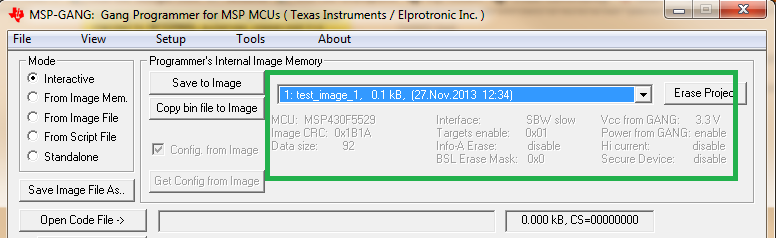
    In the dropdown in the MSP-GANG GUI section labeled "Programmer's Internal Image Memory", select the memory slot that has the image you want to save:

    Then select the button on the left side marked Save Image File As...

    Follow the prompts to enter a name for the image and choose where to save it, set protection options, etc (there's more info in the MSP-GANG user's guide on what the protection options are).

    Repeat this for the other images from your GANG image memory that you want to save, by selecting the next image in the dropdown and repeat the process.

    Now when you have saved the files, you'll noticed that it created two files - a ".mspgangimage" file and a ".mspgangbin" file. You can send your partner the ".mspgangbin" file, and they can follow the steps below to load it into the MSP-GANG internal image memory:

    Loading images

    In the MSP-GANG GUI, select the image slot that you want to load this particular image to using the dropdown.

    Then select File > Open Image File and choose the .mspgangbin file for the image you want to load into this slot. Click Open. The MSP-GANG internal memory will now be loaded with this image, and its name will show up in the dropdown. You'll see that configuration information like what MSP430 is used, the CRC, and other information shows up too.

    Now select the dropdown to go to the next image slot and repeat to load the next image file, and keep doing this until you've loaded all the images that your program uses. After you've loaded all the images that you need, close the MSP-GANG GUI and you should be able to use the Labview software that you prepared that uses these images.

    In your use case with multiple images, it will be important that your partner puts the right image in the right slot, so it will probably be good to include the memory slot # in the file name and in the image display name, to help them. You may also want to put some version number in these names as well so that when you send new images they can tell if they've loaded the new ones or not.

    Regards,

    Katie

  • Thank you very much for the very good explanation !

    BR

    Luigi


**Attention** This is a public forum