This thread has been locked.

If you have a related question, please click the "Ask a related question" button in the top right corner. The newly created question will be automatically linked to this question.

MSP 430 PC GUI INTERFACE

hi, 

I have installed the IAR workbench and open the source code given by the texas instruments.Now I need to calibrate the parameters.For that as you told in the application reports I downloaded the folder from http://www.ti.com/lit/zip/slaa517.,which contains the PC GUI interface,As they told I extract the folder and tried to execute the calibrate.exe file ,but it doesn't work.There is no change in the desktop window.Can you please suggest a solution for this.????

  • Hi

    I am facing the exact same problm. Did you find anything further?

    regards
    Soham
  • Hi Soham,

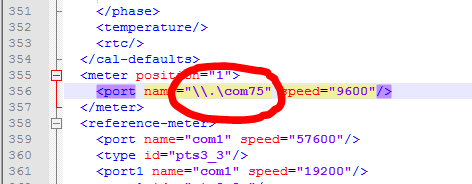
    You'll need to change the COM port in the 'calibration-config.xml' file to match the port connected to your RS232-to-USB adapter, which gets connected to the DB9 connector on the EVM. Use Windows' Device Manager to figure out which COM port is being used by the adapter. This should allow the GUI to open.

    When the EVM is powered-up and the RS232-to-USB adapter is connected to your PC and the DB9 connector on the EVM, the Comms indicator in the GUI should go from Red to Green, indicating that the board is powered and communication has been established. You can then calibrate the board using the instructions in the User's Guide.

    Regards,

    James

    MSP Customer Applications

  • Hi

      I have checked the COM port and changed it accordingly. Its working now. Thanks for the help. I really appreciate it.

**Attention** This is a public forum