This thread has been locked.

If you have a related question, please click the "Ask a related question" button in the top right corner. The newly created question will be automatically linked to this question.

Talking to LCD via RS232 and Hyperterminal

Other Parts Discussed in Thread: MSP430F47197

I would like to talk to the display via RS232. In other words Hyperterminal software let me type something on the its screen at the PC and sends the characters through the RS232 protocol to the MSP430f47197 and the micro show them on the display. (and of course the opposite way from the micro to the Hyperterminal as well)


Serial port is TX and RX are connected to the P1.6 and P1.7 of the MSP430f47197 as follows.

Therefore, I need to have the following code.

P1SEL |= 0x20+0x40; // enable the TX and RX      

According to the link that I have found through the net as follows, I guess I need to use USART0 TXD/RXD controller. But I am not sure if I am on the right track or not for the serial communication.

http://www.referencedesigner.com/tutorials/msp430/msp430_30.php

Then I should have something like the following just to send from Hyper-terminal to the LCD.

void main(void)
{
  
  WDTCTL = WDTPW + WDTHOLD; 
  
  UBR00 = 0x03;                 // 32k/9600 - 3.41
  UBR10 = 0x00;    
  P1SEL |= 0x70;

  ME1 |= UTXE0 + URXE0;     // Enable USART0 TXD/RXD
  
  UMCTL0 = 0x4A;                      // Modulation
  UCTL0 &= ~SWRST;     // Initialize USART state machine

UCA0CTL1 &= ~UCSWRST; //**Initialize USCI state machine**
  IE2 |= UCA0RXIE;         // Enable USCI_A0 RX interrupt

_BIS_SR(LPM3_bits + GIE); //Enter LPM3,interrupts enabled


#pragma vector=USCIAB0RX_VECTOR
__interrupt void USCIA0RX_ISR (void)
{
  while(!(IFG2&UCA0TXIFG));
  UCA0TXBUF = UCA0RXBUF;       // TX -> RXed character

   //**** here enable the display to show the Receieved data


}

But I am not sure how it works!

What do you think guys? Is this even possible?

  • CaEngineer said:
    Is this even possible?

    Almost anything is possible.

    CaEngineer said:
    But I am not sure how it works

    This about one of the simplest examples there is. What aren't you sure about? The example you show sets up the USART and pin configurations and then goes into LPM3 low power mode.

    After that, the ISR is called whenever a character is received. It then waits for the TX to be ready and stuffs the character back towards to the host. The while() loop in the ISR really isn't the best for real-world use, but as a test example it should be fine.

  • Brian Boorman said:
    Almost anything is possible.

    You are so funny! :))  BTW, whenever I see your avatar, it reminds me of Jens-Michael!

    Brian Boorman said:
    This about one of the simplest examples there is. What aren't you sure about?

    Yes, then as you explained this code does not give me what I need. What I need is to load a code that says to the MCU to receive what I have sent from Hyper Terminal to the display. How I can do this?

  • CaEngineer said:
    whenever I see your avatar, it reminds me of Jens-Michael!

    It should be the other way around. I made mine first, though he certainly did a better job with his.

    CaEngineer said:
    How I can do this?

    Honestly, that is for you to figure out. It feels like you want a lot of hand holding and "crowd-sourcing" of code for your projects here.

    To give you a hint, you need to put the received character you get in the ISR into some buffer. Then in your main() function, wait for the character, then when you get it do whatever translation or set of instructions are necessary to get it on whatever LCD you are using.

    All LCDs are different, some parallel interface, some SPI, some I2C, different on-glass controllers with different command sets. So certainly you have to wade through that.

  • Brian Boorman said:
    It should be the other way around. I made mine first, though he certainly did a better job with his.

    Ok, then I restate that whenever I look at his I remind yours! ;)

    Brian Boorman said:
    It feels like you want a lot of hand holding and "crowd-sourcing" of code for your projects here.

    It looks like this but I have not much experience with serial ports. So, I need to find out what is going on!

    Brian Boorman said:
    you need to put the received character you get in the ISR into some buffer

    "received" you mean from Hyper terminal through the RS232 to the MCU right?

    Brian Boorman said:
    in your main() function, wait for the character

    Well, the thing that I don't understand is why I need to use interrupt? I would like to get the character and show it on the display. Why the received character should be delivered to the interrupt section?

    Brian Boorman said:
    All LCDs are different, some parallel interface

    Yes I know how my LCD works. I can send data to it and I guess it is enough to start with!

  • CaEngineer said:
    "received" you mean from Hyper terminal through the RS232 to the MCU right?

    Yes.

    CaEngineer said:
    Well, the thing that I don't understand is why I need to use interrupt?

    You don't *have* to. You could poll the UART directly in a loop in your main()

    You could do something like this in main after everything is set up (note psuedocode, actual implementation left as an exercise):

    void main(void)
    {
      char my_variable;
      ...
    
      while(1)
      {
        if (interrupt_flag_register & rx_buffer_full_flag)
        {
          my_variable = rx_buffer_register;
          my_func_for_writing_to_lcd(my_variable);
          interrupt_flag_register &= ~ rx_buffer_full_flag;
        }
      }
    }
    

    Hope that helps nudge you in the right direction. I'm not trying to be an ass, I just believe the best way to learn is to do/try.

  • Brian Boorman said:
    Yes.

    Ok! Cool!

    Brian Boorman said:
    You don't *have* to. You could poll the UART directly in a loop in your main()

    Ok. Now I understood better. Thanks!

    Brian Boorman said:
    I'm not trying to be an ass, I just believe the best way to learn is to do/try.

    Yes, it is said that "do not give a fish, let him learn fishing instead!". Then I will try and keep you updated after. I appreciate your time Brian! 

  • Brian Boorman said:

    "received" you mean from Hyper terminal through the RS232 to the MCU right?

    Yes.

    CaEngineer said:
    Well, the thing that I don't understand is why I need to use interrupt?

    You don't *have* to. You could poll the UART directly in a loop in your main()

    You could do something like this in main after everything is set up (note psuedocode, actual implementation left as an exercise):

    1
    2
    3
    4
    5
    6
    7
    8
    9
    10
    11
    12
    13
    14
    15
    void main(void)
    {
      char my_variable;
      ...
      while(1)
      {
        if (interrupt_flag_register & rx_buffer_full_flag)
        {
          my_variable = rx_buffer_register;
          my_func_for_writing_to_lcd(my_variable);
          interrupt_flag_register &= ~ rx_buffer_full_flag;
        }
      }
    }

    Hope that helps nudge you in the right direction. I'm not trying to be an ass, I just believe the best way to learn is to do/try.

    [/quote]

    I followed your instruction and ended up with the following. Can you please take a look at that.

    #include <msp430f47197.h>
    
    void DelayMs(int Ms);
    void LCD_cmd(unsigned char cmd);
    void LCD_dat(unsigned char byte);
    void LCD_init(void);
    
    int main(void)
    {
      volatile unsigned int i;
    
      WDTCTL = WDTPW+WDTHOLD;                   // Stop WDT
      
      //*** LCD Setups
          P7DIR = 0x00; // Redundant
          P8OUT = 0;    // Before set DIR
          P8DIR = 0x07; //P8.2=>EN, P8.1=>RW, P8.0=>RS
          
          DelayMs(100);  // OR USING  __delay_cycles()
          LCD_init();
          DelayMs(50);


           FLL_CTL0 |= XCAP11PF;                     // Configure load caps


      P1SEL |=0xc0;                       // P2.4,5 = USCI_A0 RXD/TXD
      UCA1CTL1 |= UCSSEL_2;                       // SMCLK
      UCA1BR0 = 0x09;                           // 1MHz 115200
      UCA1BR1 = 0x00;                           // 1MHz 115200
      UCA1MCTL = 0x02;                          // Modulation
      UCA1CTL1 &= ~UCSWRST;                     // **Initialize USCI state machine**
      IE2 |= UCA1RXIE;                          // Enable USCI_A0 RX interrupt
    
      //_BIS_SR(LPM0_bits + GIE);                 // Enter LPM0, interrupts enabled
    
    
    //  Echo back RXed character, confirm TX buffer is ready first
    //#pragma vector=USCIAB0RX_VECTOR
    //__interrupt void USCIA1RX_ISR (void)
    //{
       while(IFG2&UCA1RXIFG)
      {
      char Mes = UCA1RXBUF;                    // TX -> RXed character
      LCD_cmd(0x80);
      LCD_dat(Mes);
      
      __delay_cycles(8388608);
      DelayMs(100);  // OR USING  __delay_cycles()
      LCD_init();
      DelayMs(50);
        __delay_cycles(8388608);
     IFG2 &= ~UCA1TXIFG;
      
      }
    }


    void LCD_cmd(unsigned char cmd)
    {
      P8OUT &= 0xF8; // EN=0,RW=0,RS=0
      P7OUT = cmd;
      
      P8OUT |= 0x04; // En = 1;
      P7DIR = 0xFF;  // out P7
      
      __delay_cycles(2); //Insurance
      
      P8OUT &= 0xFB; // En = 0;
      P7DIR = 0;     // float P7
      
      
      DelayMs(3);
    }
    
    
    void LCD_dat(unsigned char byte)
    {
      P8OUT &= 0xF8; // EN=0,RW=0,RS=0
      P8OUT |= 0x01; // change to RS=1
      P7DIR = 0xFF;  // P7 out
      
      P7OUT = byte;
      
      P8OUT |= 0x04; // EN=1
      
      
      __delay_cycles(2); // Insurance
      
      P8OUT &= 0xFB;  // EN=0
      P7DIR = 0;     //  P7 float
      
      
      DelayMs(3);
    }
    
    
    void LCD_init(void)
    {
      LCD_cmd(0x38);    // 8-bit mode 5*8 dots ==> Page 17 of the LCD datasheet: Function Set 
      LCD_cmd(0x0C);    // Blinking display   ==> Page 16 of the LCD datasheet: Display ON/OFF Control
      LCD_cmd(0x06);    // Blinking cursor   ==> Page 15 of NMTC-S0802XRGHS: Entry Mode Set 
      LCD_cmd(0x01);    // Clear Display ==> Page 15 of the LCD 
    }
    
    
    void DelayMs(int Ms)
    {
      volatile int i; // To counteract "optimization"
      while(Ms>0)
      {
        for(i=0;i<100;i++);
        Ms--;
      }
    }

  • Brian Boorman said:
    whenever I see your avatar, it reminds me of Jens-Michael!

    It should be the other way around. I made mine first, though he certainly did a better job with his.[/quote]

    Actually, my Avatar was a gift from the E2E team, done when I won the community award (I think, it was in early 2011, the first time I got the award). It was created based on a picture they found on my web page (they didn't know that the picture was about 15 years old then - and now a few more). :)
    But I was too lazy to upload and activate it. And then I won the 2011 award and got an 'avatar' image with the award logo. So my current avatar remained unused for some more time. But it was actually created mid-2011.

  • Jens-Michael Gross said:
    Actually, my Avatar was a present of the E2E team, done when I won the community award (I think, it was in early 2011, the first time I got the award). It was created based on a picture they found on my web page (they didn't know that the picture was about 15 years old then - and now a few more). :)
    But I was too lazy to upload and activate it. And then I won the 2011 award and got an 'avatar' image with the award logo. So my current avatar remained unused for some more time. But it was actually created mid-2011.

    Good to know dear Jens -MIchael! :)

  • Hi CaEngineer,

    You shouldn't put LCD display in ISR function. I would suggest you only collect RX buffer in ISR and send to LCD display after you collect enough RX buffer.

  • YiKai Chen said:

    Hi CaEngineer,

    You shouldn't put LCD display in ISR function. I would suggest you only collect RX buffer in ISR and send to LCD display after you collect enough RX buffer.

    I didn't quite get this method. May I ask you to guide me by codes please?

  • CaEngineer said:
    I didn't quite get this method

    Fill circular buffer in the ISR and empty it in the main() loop.

  • Ilmars said:

    I didn't quite get this method

    Fill circular buffer in the ISR and empty it in the main() loop.

    [/quote]

    What if I don't use interrupt and would like to send a message by Hyper-Terminal and show it on the display by having while and if as follows?

    #include <msp430f47197.h>
    
    void DelayMs(int Ms);
    void LCD_cmd(unsigned char cmd);
    void LCD_dat(unsigned char byte);
    void LCD_init(void);
    
    int main(void)
    {
      volatile unsigned int i;
    
      WDTCTL = WDTPW+WDTHOLD;           // Stop WDT
      
      //*** LCD Setups
    P7DIR = 0x00; P8OUT = 0; // Before set DIR P8DIR = 0x07; //P8.2=>EN, P8.1=>RW, P8.0=>RS DelayMs(100); LCD_init(); DelayMs(50); P1SEL |=0xc0; // P2.4,5 = USCI_A0 RXD/TXD UCA1CTL1 |= UCSSEL_2; // SMCLK UCA1BR0 = 0x09; // 1MHz 115200 UCA1BR1 = 0x00; // 1MHz 115200 UCA1MCTL = 0x02; // Modulation UCA1CTL1 &= ~UCSWRST; // while(1) { if(IFG2&UCA1RXIFG) { char Mes = UCA1RXBUF; // TX -> RXed character LCD_cmd(0x80); LCD_dat(Mes); __delay_cycles(8388608); DelayMs(100); // OR USING __delay_cycles() LCD_init(); DelayMs(50); __delay_cycles(8388608); IFG2 &= ~UCA1TXIFG; } } } void LCD_cmd(unsigned char cmd) { P8OUT &= 0xF8; // EN=0,RW=0,RS=0 P7OUT = cmd; P8OUT |= 0x04; // En = 1; P7DIR = 0xFF; // out P7 __delay_cycles(2); //Insurance P8OUT &= 0xFB; // En = 0; P7DIR = 0; // float P7 DelayMs(3); } void LCD_dat(unsigned char byte) { P8OUT &= 0xF8; // EN=0,RW=0,RS=0 P8OUT |= 0x01; // change to RS=1 P7DIR = 0xFF; // P7 out P7OUT = byte; P8OUT |= 0x04; // EN=1 __delay_cycles(2); // Insurance P8OUT &= 0xFB; // EN=0 P7DIR = 0; // P7 float DelayMs(3); } void LCD_init(void) { LCD_cmd(0x38); // 8-bit mode 5*8 dots ==> Page 17 of the LCD datasheet: Function Set LCD_cmd(0x0C); // Blinking display ==> Page 16 of the LCD datasheet: Display ON/OFF Control LCD_cmd(0x06); // Blinking cursor ==> Page 15 of NMTC-S0802XRGHS: Entry Mode Set LCD_cmd(0x01); // Clear Display ==> Page 15 of the LCD } void DelayMs(int Ms) { volatile int i; // To counteract "optimization" while(Ms>0) { for(i=0;i<100;i++); Ms--; } }

  • CaEngineer said:
    What if I don't use interrupt and would like to send a message by Hyper-Terminal and show it on the display

    You can't have all :) If you want to do long delays and don't lose received chars then chose one.

  • Jens-Michael Gross said:

    whenever I see your avatar, it reminds me of Jens-Michael!

    [/quote]

    It should be the other way around. I made mine first, though he certainly did a better job with his.[/quote]

    Actually, my Avatar was a gift from the E2E team, done when I won the community award (I think, it was in early 2011, the first time I got the award). It was created based on a picture they found on my web page (they didn't know that the picture was about 15 years old then - and now a few more). :)
    But I was too lazy to upload and activate it. And then I won the 2011 award and got an 'avatar' image with the award logo. So my current avatar remained unused for some more time. But it was actually created mid-2011.

    [/quote]

    Sounds like we need to get you an updated Avatar :)

  • Blake Ethridge said:
    Sounds like we need to get you an updated Avatar :)

    Yes, indeed! He needs the best avatar for his contribution! :)

  • CaEngineer said:
    What if I don't use interrupt and would like to send a message by Hyper-Terminal and show it on the display by having while and if as follows?

    Not using interrupts makes things more difficult but not impossible. Your main code then needs to implement sort of a state machine. It runs in a loop and only does s mall chunk of work at a time, noting in a variable which part was done and what has to be done next. Then in returns to the main loop, checks for incoming data, stores it, checks whether an incoming command is complete and then does the next chunk of work.

    You must ensure that the time between two main loop executions is smaller than the time required for receiving a data byte (so it is only suitable for lower baudrates).

    Interrupts are much easier: You receive a byte and write it down in a buffer and set a flag that new data is here. The main code can then check for this flag every now and then and see whether incoming data is complete and action must be taken - If not, it can continue normally

    Blake Ethridge said:
    Sounds like we need to get you an updated Avatar :)

    Not at all. I like it. It's an avatar, not a photograph.

  • Ilmars said:
    You can't have all :) If you want to do long delays and don't lose received chars then chose one.

    Do all what?! I just used Brian's suggestion! Can you please point what part of the code doe snot make sense?

  • CaEngineer said:
    Can you please point what part of the code doe snot make sense?

    JMG already said what you shall do in case you don't want to use ISR's

  • Ilmars said:
    JMG already said what you shall do in case you don't want to use ISR's

    OK! Thanks for your hint!

  • Again tested the following code, but the Hyper Terminal does not let me transfer anything through the RS232. How is this possible to send from Hyper to the Display like the following video? I need more help please!

    https://www.youtube.com/watch?v=As6VdtigvH4

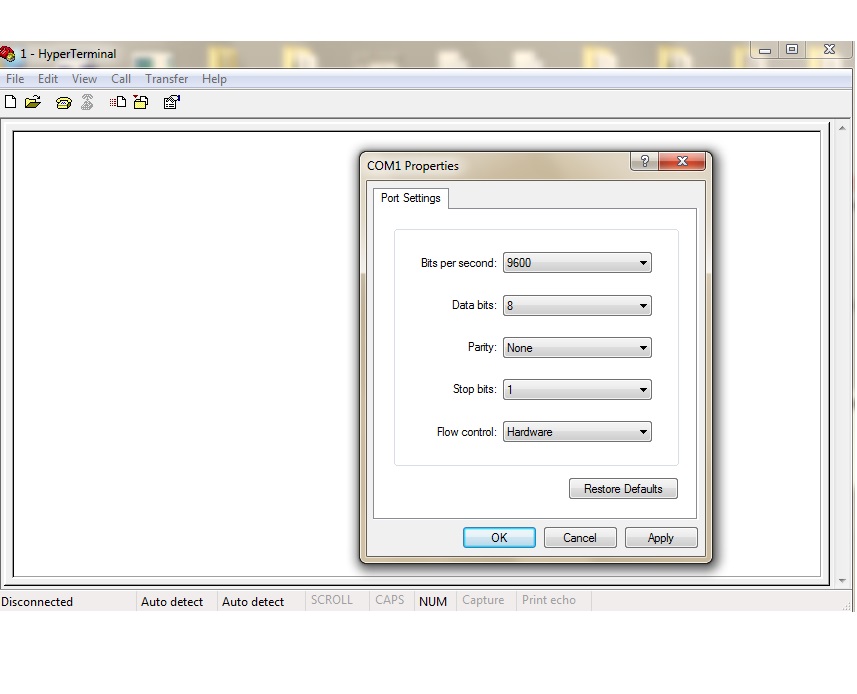
    The Hyper is set as follows.

    The code as you guys recommended me is as follows.

    #include <msp430f47197.h> 
    
    
    void DelayMs(int Ms); 
    void LCD_cmd(unsigned char cmd); 
    void LCD_dat(unsigned char byte); 
    void LCD_init(void); 
    
    
    int main(void) 
    { 
      volatile unsigned int i; 
       WDTCTL = WDTPW+WDTHOLD;           // Stop WDT 
       
      //*** LCD Setups 
          P7DIR = 0x00; 
          P8OUT = 0;    // Before set DIR 
          P8DIR = 0x07; //P8.2=>EN, P8.1=>RW, P8.0=>RS 
           
          DelayMs(100);  
          LCD_init(); 
          DelayMs(50); 
           
           
        // **** Serial communication SETTING
      
      P1SEL |=0x3F;                       // P1.6,7 = USCI_A0 RXD/TXD 
       P1DIR  |= 0x3F  ; // Set as Input 
      UCA1CTL1 |= UCSSEL_2;                   // SMCLK 
      UCA1BR0 = 0x03;                   // 1MHz 115200  --09 and 03 for 9600 // Setting Baud rate  
      UCA1BR1 = 0x00;                 // 1MHz 115200 
      UCA1MCTL = 0x02;                      // Modulation 
      UCA1CTL1 &= ~UCSWRST;                     // 
    
    
       while(1)  // infinite loop looking for a received message from the PC
    { 
    if(IFG2&UCA1RXIFG)   // If we receive a message from PC!
      { 
      char MES = UCA1RXBUF;                 // Put it into the buffer
      LCD_cmd(0x80); 
      LCD_dat(MES);                  // Show it on the display
       
      __delay_cycles(8388608);                          // wait for a while 
      DelayMs(100);  // OR USING  __delay_cycles() 
      LCD_init();                                  // Clear th edisplay
      DelayMs(50); 
      __delay_cycles(8388608); 
      IFG2 &= ~UCA1TXIFG;         // Change the flag
       
      } 
    }
     
    }


    void LCD_cmd(unsigned char cmd) 
    { 
      P8OUT &= 0xF8; // EN=0,RW=0,RS=0 
      P7OUT = cmd; 
       
      P8OUT |= 0x04; // En = 1; 
      P7DIR = 0xFF;  // out P7 
       
      __delay_cycles(2); //Insurance 
       
      P8OUT &= 0xFB; // En = 0; 
      P7DIR = 0;     // float P7 
       
       
      DelayMs(3); 
    } 
    void LCD_dat(unsigned char byte) 
    { 
      P8OUT &= 0xF8; // EN=0,RW=0,RS=0 
      P8OUT |= 0x01; // change to RS=1 
      P7DIR = 0xFF;  // P7 out 
       
      P7OUT = byte; 
       
      P8OUT |= 0x04; // EN=1 
       
       
      __delay_cycles(2); // Insurance 
       
      P8OUT &= 0xFB;  // EN=0 
      P7DIR = 0;     //  P7 float 
       
       
      DelayMs(3); 
    } 
    void LCD_init(void) 
    { 
      LCD_cmd(0x38);    // 8-bit mode 5*8 dots ==> Page 17 of the LCD datasheet: Function Set 
      LCD_cmd(0x0C);    // Blinking display   ==> Page 16 of the LCD datasheet: Display ON/OFF Control 
      LCD_cmd(0x06);    // Blinking cursor   ==> Page 15 of NMTC-S0802XRGHS: Entry Mode Set 
      LCD_cmd(0x01);    // Clear Display ==> Page 15 of the LCD 
    } 
    void DelayMs(int Ms) 
    { 
      volatile int i; // To counteract "optimization" 
      while(Ms>0) 
      { 
        for(i=0;i<100;i++); 
        Ms--; 
      } 
    }


  • CaEngineer said:
    Hyper Terminal does not let me transfer anything through the RS232

    It's not the Hyper Terminal for sure. It's your code. First thing you shall learn: echo characters on HyperTerminal without any LCD. When your UART code works - only then add LCD.

    CaEngineer said:
      char MES = UCA1RXBUF;                 // Put it into the buffer
      LCD_cmd(0x80);
      LCD_dat(MES);                  // Show it on the display
       
      __delay_cycles(8388608);                          // wait for a while
      DelayMs(100);  // OR USING  __delay_cycles()
      LCD_init();                                  // Clear th edisplay
      DelayMs(50);
      __delay_cycles(8388608);
      IFG2 &= ~UCA1TXIFG;         // Change the flag

    This is very funny code you are running in the ISR. It seems that you don't listen at all what others are teaching you. Do you have any programming courses around you can attend?

  • Ilmars said:
    This is very funny code you are running in the ISR. It seems that you don't listen at all what others are teaching you. Do you have any programming courses around you can attend?

    You better learn how to behave people here. Rather than make fun of them! Learn how people like Gens-Michael teach and treat people ...humble and helpful. Not like you rude and disrespectful!

    If you need more point to get contribution prize in TI Forum go talk to them to grant you with ... don't reply to my posts. I do not need your misleads and your DADY advise! I had enough course. You better learn how to treat people and respect them! You need a course to teach you how to behave people!

    I have had enough of your sarcasms!

  • CaEngineer said:
    I have had enough of your sarcasms!

    You once more confirm what I said by NOT paying attention to part of my reply where I actually teach you:

    Ilmars said:
    First thing you shall learn: echo characters on HyperTerminal without any LCD. When your UART code works - only then add LCD.

    About funny code: rather than (again) going into pointless discussion about my behavior you would rather ask question about why I said what I said. I would comment your questions.

    As a teacher I am highly disappointed seeing ISR code where you put delay of 8 million CPU cycles disregarding advice all around this forum- run ISR code as fast as you can.

    You don't only put long delays in your ISR, you write character on LCD and after that - clear it! This is not good if I can say so.

    Not to mention that following code clearly shows that you don't pay attention to what you actually write in your code or simply don't care:

    Ilmars said:
      DelayMs(50);
      __delay_cycles(8388608);

    Other people are donating their time to help you, in return you shall show some respect - show that you are trying. Show that you care and you are working hard by posting clean code, showing that you debugged it, tested. - Then you will get much better responses. Of course, often problems are not msp430-related, but if you repeatedly come with questions which are out of forum scope in form of "this code does not work - take look and fix it", then readers of your posts could become... how to say... disappointed.

    That's why I said what I said :)

  • I got the echo from MSP to my Terminal on PC but the opposite does not work!

    I used while as follows.

    Any idea?

    #include  <msp430f47197.h>
    
    char MES[];
    //const char numbers[]={0x30,0x31,0x32,0x33,0x34,0x35,0x36,0x37,0x38,0x39};
    
    void LCD_cmd(unsigned char cmd);
    void LCD_dat(unsigned char byte);
    void LCD_init(void);
    void DelayMs(int Ms);
    
    
    void delay(unsigned int ms)
    {
    unsigned int i, j;
    
    
        //*** LCD Setups
          P7DIR = 0x00; // Redundant
          P8OUT = 0;    // Before set DIR
          P8DIR = 0x07; //P8.2=>EN, P8.1=>RW, P8.0=>RS
          
          DelayMs(100);  // OR USING  __delay_cycles()
          LCD_init();
          DelayMs(50);


    for (i = 0; i <= ms; i++)
    {
    for (j = 0; j<=255; j++);
    }
    }
    
    void main(void)
    {
    
      WDTCTL = WDTPW + WDTHOLD;                 // Stop WDT
     
      P1SEL |= 0xC0;                            // P1.6,7 = USART0 TXD/RXD
      
      UCA1CTL1 |= UCSSEL_1;                     // CLK = ACLK
      UCA1BR0 = 0x03;                           // 32k/9600 - 3.41
      UCA1BR1 = 0x00;                           //
      UCA1MCTL = 0x06;                          // Modulation
      UCA1CTL1 &= ~UCSWRST;                     // **Initialize USCI state machine**
    
      
      while (1)
      {
        
         for (int i =0 ; i <=7; i++)
         {
          LCD_cmd(0xc0);
          LCD_dat(MES[i]);
      }
          while(!(IFG2&UCA1RXIFG));
           delay(100);
         char MES = UCA1RXBUF ;
          delay(100);


    }
    //  _BIS_SR(LPM3_bits + GIE);                 // Enter LPM3 w/ interrupt - does not reach here
    }


    void LCD_cmd(unsigned char cmd)
    {
      P8OUT &= 0xF8; // EN=0,RW=0,RS=0
      P7OUT = cmd;
      
      P8OUT |= 0x04; // En = 1;
      P7DIR = 0xFF;  // out P7
      
      __delay_cycles(2); //Insurance
      
      P8OUT &= 0xFB; // En = 0;
      P7DIR = 0;     // float P7
      
      
      DelayMs(3);
    }
    
    
    void LCD_dat(unsigned char byte)
    {
      P8OUT &= 0xF8; // EN=0,RW=0,RS=0
      P8OUT |= 0x01; // change to RS=1
      P7DIR = 0xFF;  // P7 out
      
      P7OUT = byte;
      
      P8OUT |= 0x04; // EN=1
      
      
      __delay_cycles(2); // Insurance
      
      P8OUT &= 0xFB;  // EN=0
      P7DIR = 0;     //  P7 float
      
      
      DelayMs(3);
    }


    void LCD_init(void)
    {
      LCD_cmd(0x38);    // 8-bit mode 5*8 dots ==> Page 17 of the LCD datasheet: Function Set 
      LCD_cmd(0x0C);    // Blinking display   ==> Page 16 of the LCD datasheet: Display ON/OFF Control
      LCD_cmd(0x06);    // Blinking cursor   ==> Page 15 of NMTC-S0802XRGHS: Entry Mode Set 
      LCD_cmd(0x01);    // Clear Display ==> Page 15 of the LCD 
    }
    
    
    void DelayMs(int Ms)
    {
      volatile int i; // To counteract "optimization"
      while(Ms>0)
      {
        for(i=0;i<100;i++);
        Ms--;
      }
    }
    

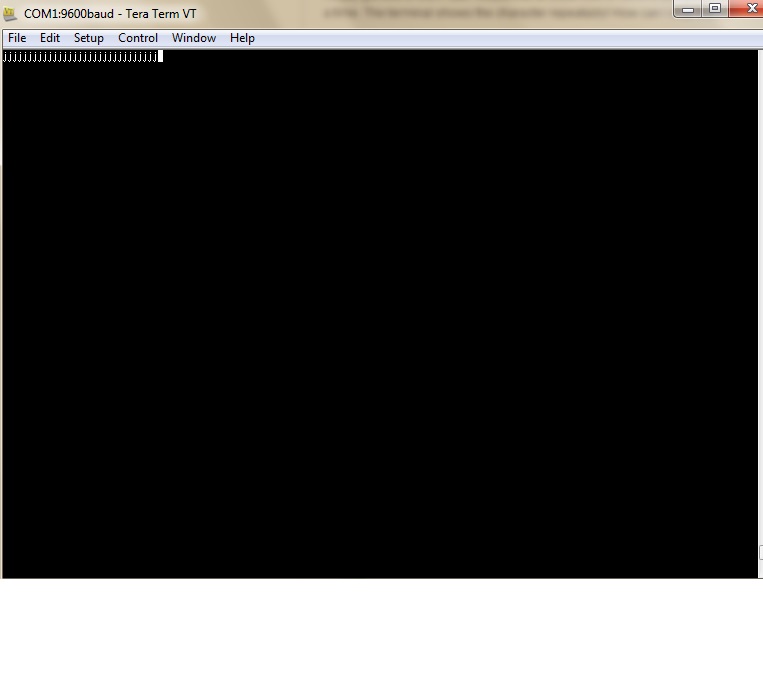
  • Finally got this to work. But I would like to know how to send a string and show it on the display instead of one character at a time. The terminal shows the character repeatably! How can I stop them?

    #include  <msp430f47197.h>
    
    
    void LCD_cmd(unsigned char cmd);
    void LCD_dat(unsigned char byte);
    void LCD_init(void);
    void DelayMs(int Ms);


    void main(void)
    {
    
      
      WDTCTL = WDTPW + WDTHOLD;                 // Stop WDT
     
          //*** LCD Setups
          P7DIR = 0x00; // Redundant
          P8OUT = 0;    // Before set DIR
          P8DIR = 0x07; //P8.2=>EN, P8.1=>RW, P8.0=>RS
          
          DelayMs(100);  // OR USING  __delay_cycles()
          LCD_init();
          DelayMs(50);
    
          
      P1SEL |= 0xC0;                            // P1.6,7 = USART0 TXD/RXD
    
      
      UCA1CTL1 |= UCSSEL_1;                  // CLK = ACLK
      UCA1BR0 = 0x03;                           // 32k/9600 - 3.41
      UCA1BR1 = 0x00;                           //
      UCA1MCTL = 0x06;                          // Modulation
      UCA1CTL1 &= ~UCSWRST;                     // **Initialize USCI state machine**
      
      while(1)
      {
    
         if(!(IFG2&UCA1RXIFG)  )
          {
         
        UCA1TXBUF = UCA1RXBUF ;
          DelayMs(100);


          LCD_cmd(0x80);
          LCD_dat(UCA1RXBUF);


       }
      
      }
    
    }


    void LCD_cmd(unsigned char cmd)
    {
      P8OUT &= 0xF8; // EN=0,RW=0,RS=0
      P7OUT = cmd;
      
      P8OUT |= 0x04; // En = 1;
      P7DIR = 0xFF;  // out P7
      
      __delay_cycles(2); //Insurance
      
      P8OUT &= 0xFB; // En = 0;
      P7DIR = 0;     // float P7
      
      
      DelayMs(3);
    }
    
    
    void LCD_dat(unsigned char byte)
    {
      P8OUT &= 0xF8; // EN=0,RW=0,RS=0
      P8OUT |= 0x01; // change to RS=1
      P7DIR = 0xFF;  // P7 out
      
      P7OUT = byte;
      
      P8OUT |= 0x04; // EN=1
      
      
      __delay_cycles(2); // Insurance
      
      P8OUT &= 0xFB;  // EN=0
      P7DIR = 0;     //  P7 float
      
      
      DelayMs(3);
    }


    void LCD_init(void)
    {
      LCD_cmd(0x38);    // 8-bit mode 5*8 dots ==> Page 17 of the LCD datasheet: Function Set 
      LCD_cmd(0x0C);    // Blinking display   ==> Page 16 of the LCD datasheet: Display ON/OFF Control
      LCD_cmd(0x06);    // Blinking cursor   ==> Page 15 of NMTC-S0802XRGHS: Entry Mode Set 
      LCD_cmd(0x01);    // Clear Display ==> Page 15 of the LCD 
    }
    
    
    void DelayMs(int Ms)
    {
      volatile int i; // To counteract "optimization"
      while(Ms>0)
      {
        for(i=0;i<100;i++);
        Ms--;
      }
    }
    

  • Successfully done!

  • CaEngineer said:
    If you need more point to get contribution prize in TI Forum

    Soon you could get TI prize as forum user who earned most points by contributing just questions.

    CaEngineer said:
    don't reply to my posts.

    Thank you - I know. Apologies for this one ;)

**Attention** This is a public forum