This thread has been locked.

If you have a related question, please click the "Ask a related question" button in the top right corner. The newly created question will be automatically linked to this question.

Enable and Disable Interrupt with Switches

Other Parts Discussed in Thread: MSP430G2553

Hello guys, I am new to this MSP430 world and need some help on the interrupt. I was able to program MSP430G2553 and use P1.3 as the interrupt, and the next step is to enable and disable this interrupt depending on the input logic level of P1.7. Here is a part of the code I wrote down:

   while(1) {
      if((P1IN & BIT7) == 0x80){                   //P1.7 high?
         P1IE |= BIT3;                                       // enable P1.3 interrupt
         _BIS_SR(CPUOFF + GIE);               
      } else {
         P1IE &= ~BIT3;                                   //disable P1.3 interrupt
      }
   }

I figured out that once P1.7 goes high, it cannot break from _BIS_SR so P1.7 stays high and never goes back low.  I also tried putting '_BIS_SR(CPUOFF + GIE);' before the while loop, but the program never gets to the while loop because of _BIS_SR. It seems I need to do something with _BIS_SR  somehow but I don't know how as I just copied the codes from the the tutorials on the internet (frankly, I don't really know what that line means at all...). Please help me out on enabling/disabling the interrupt!!

By the way, does anyone know why P1.1 and P1.2 stays high even if I wrote down P1OUT=0x00? 

  • Is this home work or just for testing?, as normally if you want a signal  to override another pins IRQ
    you would use external and-gate etc.

    Step1: Set REN for p1.3 and p1.7, set output =1 but DIR =0  for the same pins to enable pull-up as switches only goes to gnd.

    Step2: Set up two IRQs, one for p1.3 and one for p1.7

    Inside the p1.7 IRQ you toggle it's own edge for the IRQ so you can detect if it was pushed down
    and if was let go and you also toggle P1IE bit3 to enable/disable p1.3 here.

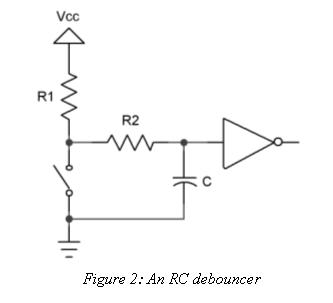
    Switch-bounce could be a problem, clean up the signal with 1 res + 1cap ,
    you already have R1 from the pull-up in software (~ 50k)  http://www.ganssle.com/images/debouncerrc.jpg.

    >why P1.1 and P1.2 stays high even if I wrote down P1OUT=0x00?
    You also have to set DIR or REN, (your choice) as input pins most of the time trickle up high if left floating

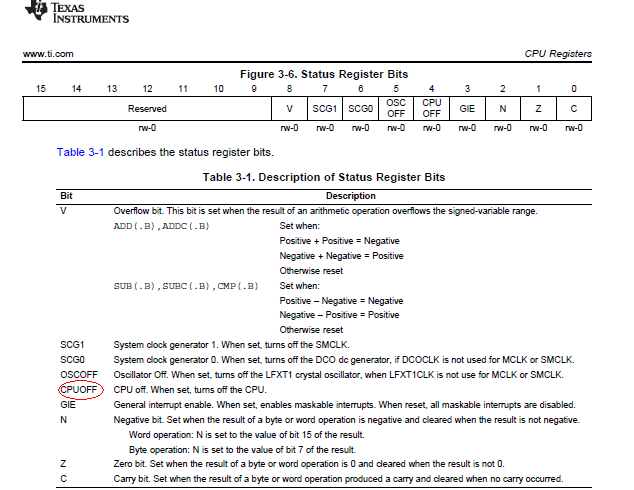
  • _BIS_SR(CPUOFF + GIE) turns the CPU off so just do _BIS_SR(GIE) and your code should continue to run.

    From p49 MSP430 User Guide slau144i

  • Thanks for your answer. This is actually a part of school project.

    I have more question about the P1.1 and P1.2. I actually wrote down these lines for the pin configuration:
        P1OUT &= 0x00;
        P1DIR |= 0x00;
        P1REN |= BIT3;
        P1OUT |= BIT3;
        P1IES |= BIT3;
        P1IFG &= ~BIT3;
    The first line shuts down everything, and the second sets all the P1 pins as input. The rest lines are to configure P1.3 as high-to-low interrupt.

    To test the code, I used FET debugger mode on the launchpad, and of course, I didn't connect anything to P1.1 and P1.2. But, I always start with P1IN= 0b00000110 and then P1IN= 0b00001110 after the pin configuration. When I tried with simulator mode, the bit 1 and 2 of P1IN had 0s. So, my guess is is has to do with the launchpad not the code. Is that correct? If it is the problem with the launchpad, is there any solution to solve this problem?

  • Thanks. I did simple test and it is working.

  • Albert Kim said:
    P1DIR |= 0x00

    This won’t do anything. If P1DIR has any port pins set to output, they will remain outputs.

    Albert Kim said:
    P1OUT &= 0x00;

    You should simply use P1OUT = 0. The result is the same, but it is faster, as it doesn’t have to read P1OUT first before setting it to 0 anyway.

    Albert Kim said:
    I didn't connect anything to P1.1 and P1.2. But, I always start with P1IN= 0b00000110 and then P1IN= 0b00001110 after the pin configuration

    A digital input is either 0 or 1. There is no ‘not connected’. If you do not connect anything, it is undefined which state it may have. It is high-impedance and even radio waves may define its value and may let it oscillate. So P1.1 and P1.2 may be high now but this may change. Or not. Depending on whatever influence is there. Crosstalk, creeping currents (dirty PCB). That’s what high-impedance means.
    P1.3 changes from 0 to 1 because you enabled a pull-up on it, making it a sure '1' unless pulled down from outside.

**Attention** This is a public forum